ZUS VACATION: Everything Entrepreneurs in Poland Need to Know
Starting from November 1, 2024, sole proprietors in Poland (JDG) can take advantage of the so-called "ZUS vacation" ("Wakacje od ZUS"), meaning they can get an exemption from paying social contributions ("składki społeczne") for one month per year.
First and foremost, this new benefit should interest entrepreneurs who pay Duży ZUS. If your Ulga na Start hasn't ended yet, you can skip the details for now and come back to this topic later.
Eligibility for ZUS Vacation
To receive the exemption, you must meet the following requirements:
- During the month preceding the application month, the entrepreneur must have been insured in ZUS for at least 1 day.
- For the month preceding the application month, the entrepreneur must have paid the contributions they want to be exempted from. (i.e. you can't game the system and have the state pay your voluntary składka chorobowa during the vacation if you weren't paying it yourself before that)
- Have no more than 9 employees.
- Annual turnover below 2 million euros.
- The entrepreneur did not provide services to a former employer for whom, in the year of business registration and the year prior, they worked under an employment contract (w ramach stosunku pracy) or another contract (spółdzielczego stosunku pracy), in the same field as their current business activity.
- Has not already used ZUS vacation this year.
Which Contributions Are Exempt
ZUS vacation exempts you from paying social contributions:
- mandatory składki społeczne for yourself: emerytalne, rentowe i wypadkowe;
- voluntary ubezpieczenie chorobowe;
- contributions to the Fundusz Pracy and Fundusz Solidarnościowy.
In terms of numbers, the ZUS vacation savings work out the same as the "Ulga na Start" benefit. Keep in mind that the health insurance contribution ("składka zdrowotna") must be paid regardless.
How to Apply for ZUS Vacation
You can only apply online through the PUE ZUS / eZUS portal. The original version of this guide was developed by Olga Korneva.
Creating the Document
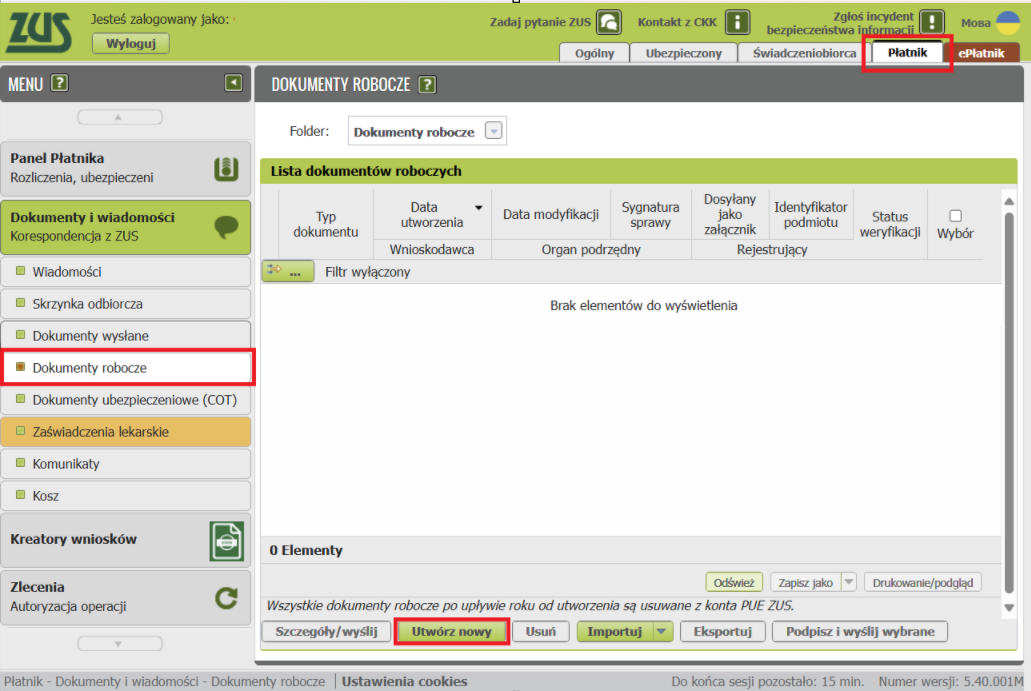
Go to the Płatnik panel (top right), then select - Dokumenty i wiadomości (left column) - Dokumenty robocze, and at the bottom click Utwórz nowy.
Selecting RWS
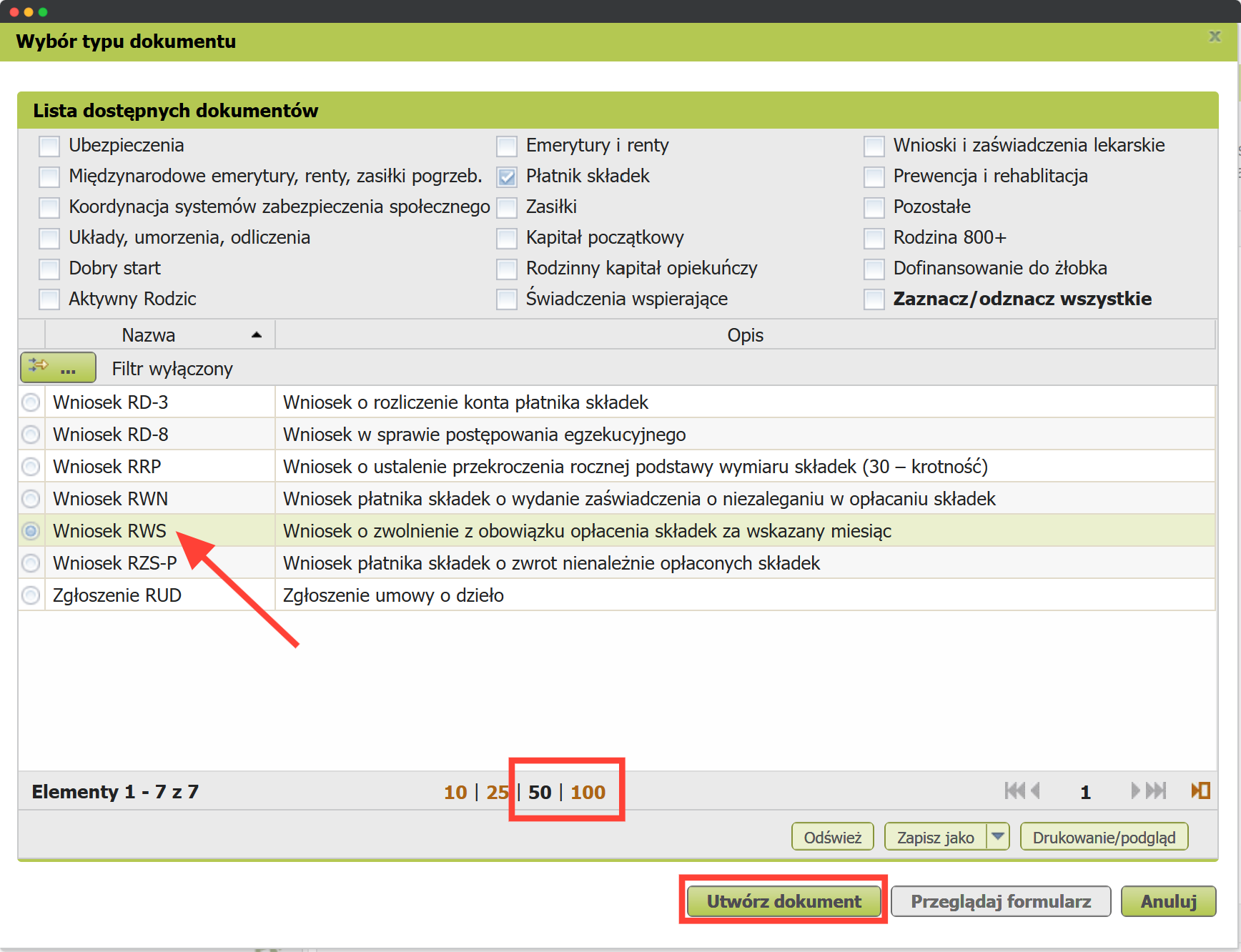
At this step, you need to find the right application form. First, increase the number of documents per page (at the bottom, select 50 or 100) and scroll to find the form, or page through and look for: Wniosek RWS - Wniosek o zwolnienie z obowiązku opłacenia składek za wskazany miesiąc. Select it and click Utwórz dokument at the bottom.
Selecting the Type
Select the document type Wniosek.
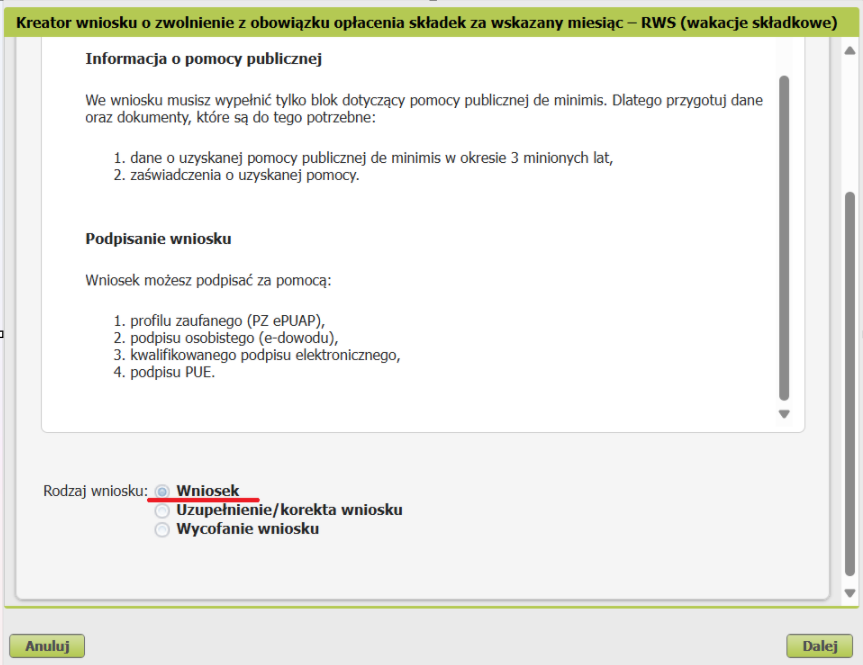
The screenshot shows the first of 3 available options:
- Application
- Amendment / correction of the application
- Withdrawal of the application
Click Dalej to proceed to the next screen.
Personal Information
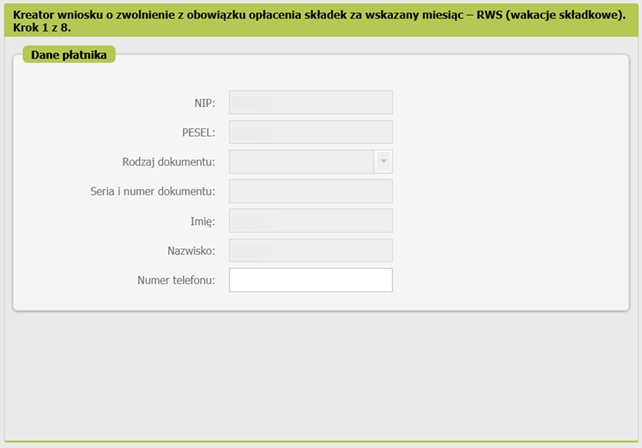
Fill in the JDG information. It will most likely be pre-filled already; you can optionally add a phone number.
Selecting the Indicated Month
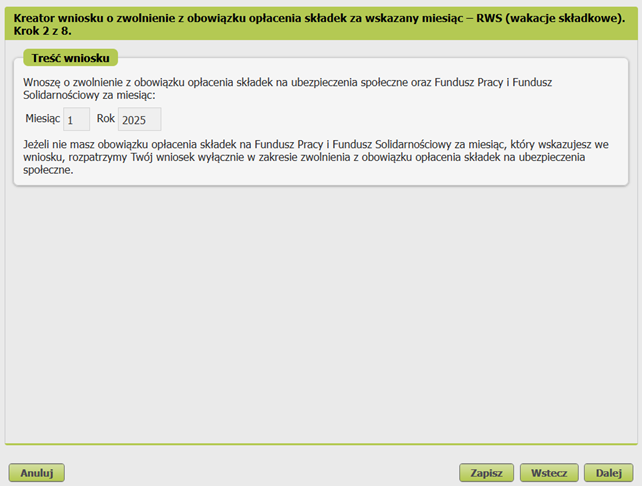
Request content
I am requesting an exemption from paying social insurance contributions and the Labour Fund and Solidarity Fund for the month:
Month 1 Year 2025
If you are not required to pay contributions to the Labour Fund and the Solidarity Fund for the month you indicated in your application, we will consider your application only with regard to the exemption from paying social insurance contributions.
Declaring the Use of De Minimis Aid
ZUS vacation is a form of de minimis aid, which means the entrepreneur must declare all government subsidies and business benefits received during the current year. The total de minimis aid limit is 300,000 euros over three years.
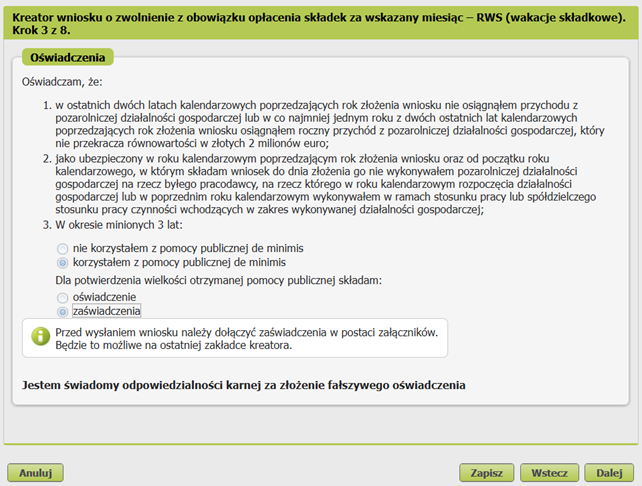
Quote
I declare that:
- for the last two calendar years preceding the year of application, I did not receive income from non-agricultural economic activity, or in at least one year of the last two calendar years preceding the year of application, I received annual income from non-agricultural economic activity that did not exceed the equivalent in zlotys of 2 million euros;
- as an insured person in the calendar year preceding the year of application and from the beginning of the calendar year in which I submit the application until the date of its submission, I did not conduct non-agricultural business activity for a former employer for whom, in the calendar year of starting business activity or in the previous calendar year, I performed, within the framework of employment or cooperative employment relationships, activities falling within the scope of the business activity;
- Over the past 3 years:
- I did not use de minimis state aid
- I used de minimis public aid To confirm the amount of state aid received, I am providing:
- a declaration
- certificates
 Before submitting the application, attach the certificates as appendices. You will be able to do this on the last page of the creator.
I am aware of criminal liability for making a false declaration.
In the example, the option with using state aid is checked — specifically, using ZUS vacation in the previous calendar year. Select the option that applies to you.
FAQ
A common question from people who aren't sure: "what if I received de minimis aid and just don't know?"
You will know if you received such aid: the entire amount must be strictly accounted for to avoid exceeding the three-year threshold, so any body providing such aid is required to issue a certificate of aid with a specific date and amount. Additionally, there is a register of entrepreneurs who received aid, where you can look yourself up. Enter your NIP, click the button to select the time range pełne 3 lata wstecz, check the field tylko de minimis, and then click Wyszukaj według wybranych kryteriów. A file will be generated listing all individually received benefits along with their total sum.
"Where do I get the de minimis aid certificate?"
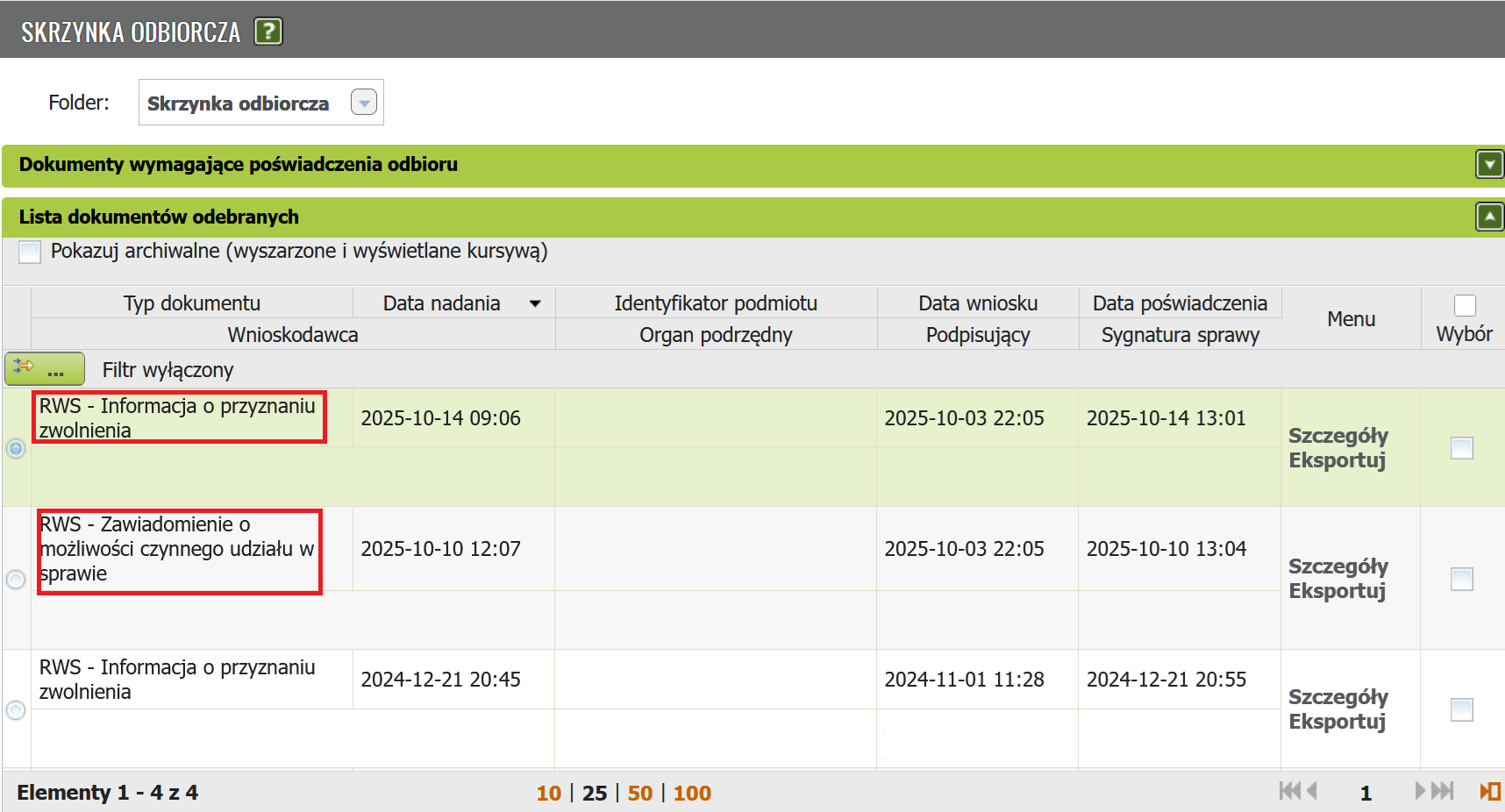
In PUE ZUS, panel Platnik - Dokumenty i wiadomości - Skrzynka odbiorcza. In the list of received documents, find all relevant documents named RWS - Informacja o przyznaniu zwolnienia. For each such document, go to Szczegóły.
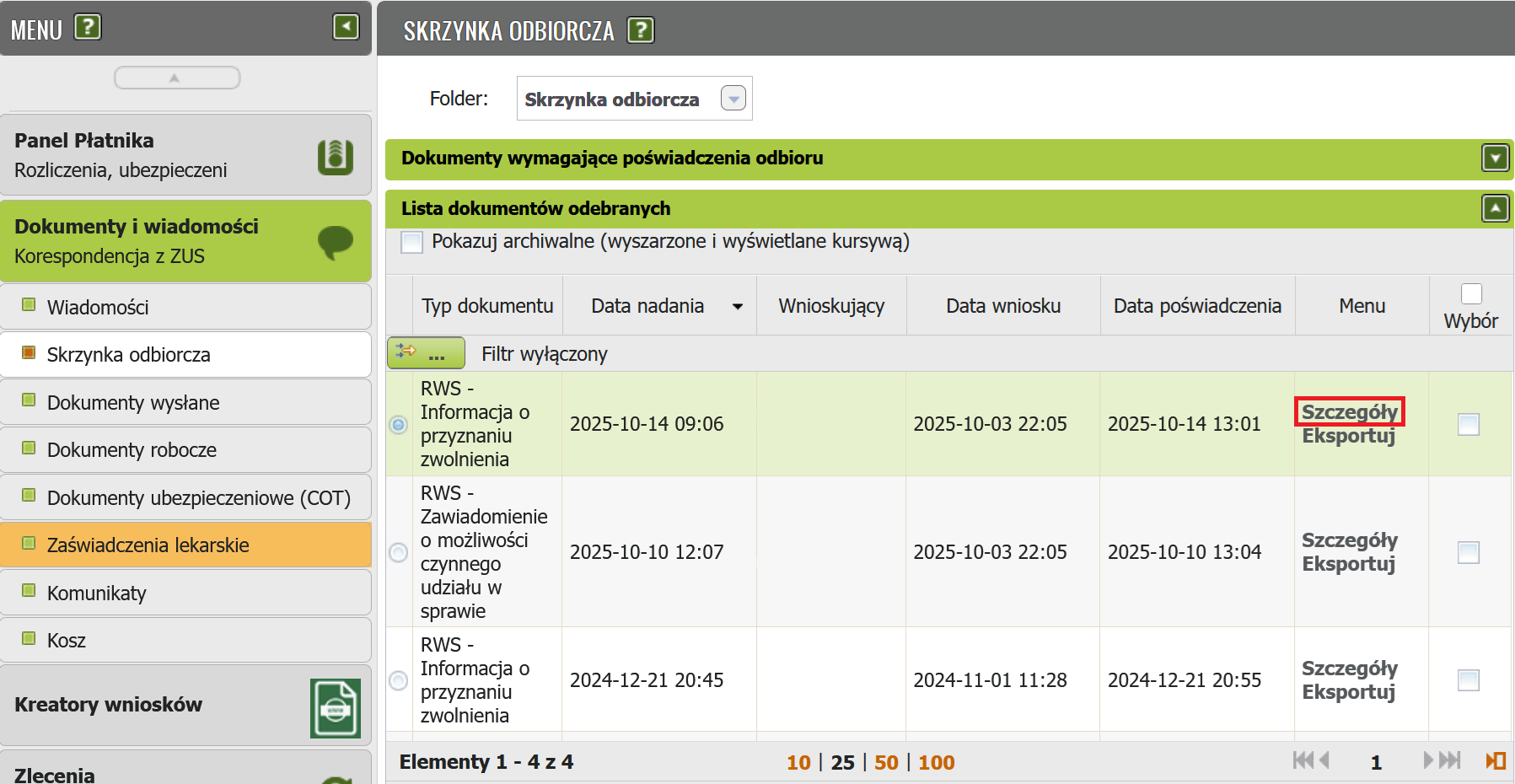
On the Szczegóły panel, in the Załączniki section, look for the document Zaświadczenie_rws-r-zasw.pdf. To download the document, click Pobierz. Adding documents is described in the last step of filling out the application.
Entrepreneur Categories
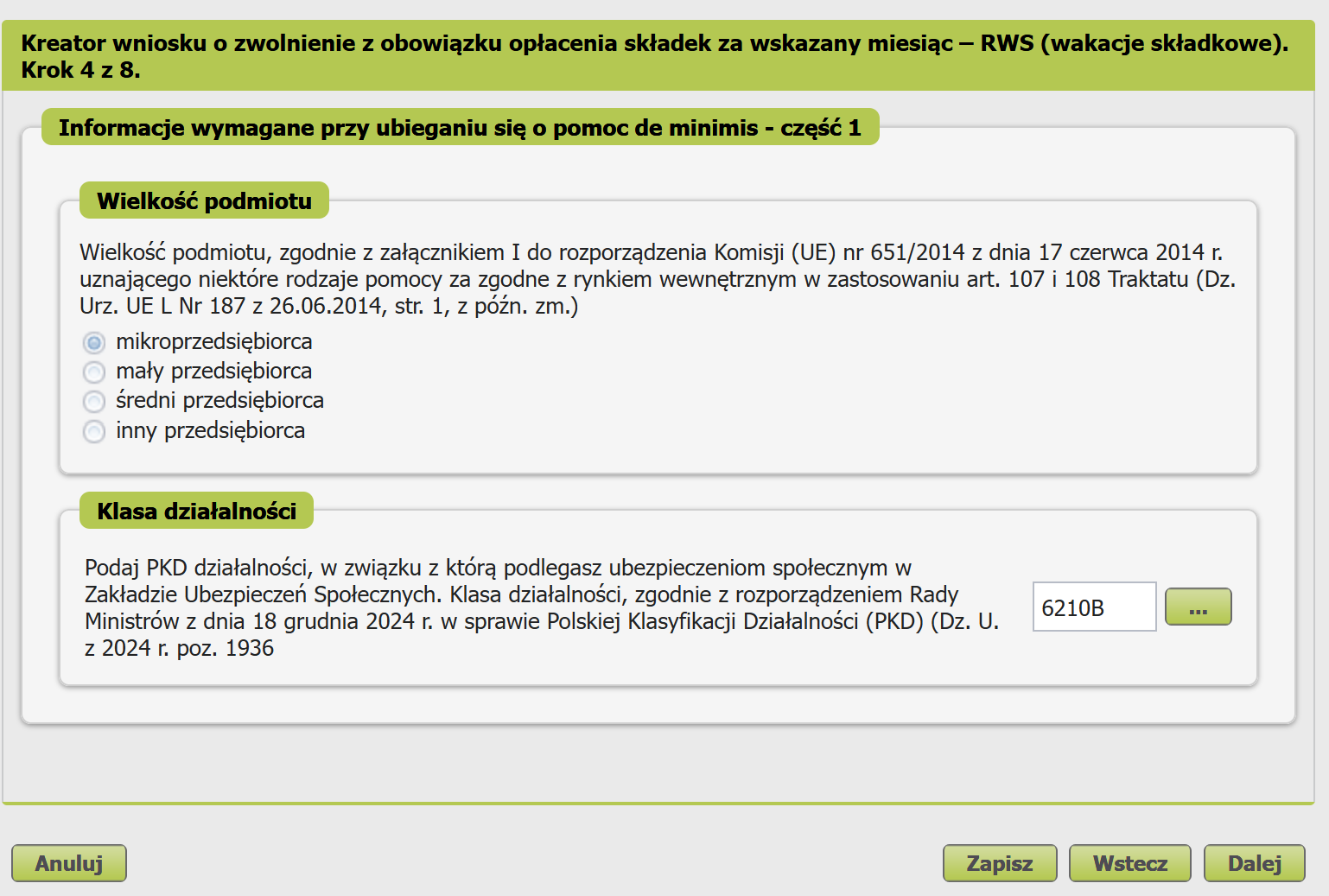
Translation of the content with category explanations
Translation
Entity size
The size of the organization in accordance with Annex I to Commission Regulation (EU) No 651/2014 of June 17, 2014, recognizing certain types of aid as compatible with the internal market in accordance with Articles 107 and 108 of the Treaty (regulation).
Micro entrepreneur — an entrepreneur who, for at least one of the last two financial years, cumulatively met the following conditions:
- had an average of fewer than 10 employees;
- achieved net annual turnover from the sale of goods, products, and services, as well as from financial operations, not exceeding the equivalent in zlotys of 2 million euros, or the total assets on their balance sheet prepared at the end of one of those years did not exceed the equivalent in zlotys of 2 million euros.
Small entrepreneur — who, for at least one of the last two financial years, cumulatively met the following conditions:
- had an average of fewer than 50 employees;
- achieved net annual turnover from the sale of goods, products, and services, as well as from financial operations, not exceeding the equivalent in zlotys of 10 million euros, or the total assets on their balance sheet prepared at the end of one of those years did not exceed the equivalent in zlotys of 10 million euros, and — is not a micro entrepreneur.
Medium entrepreneur — who, for at least one of the last two financial years, cumulatively met the following conditions:
- had an average of fewer than 250 employees;
- achieved net annual turnover from the sale of goods, products, and services, as well as from financial operations, not exceeding the equivalent in zlotys of 50 million euros, or the total assets on their balance sheet prepared at the end of one of those years did not exceed the equivalent in zlotys of 43 million euros, and — is not a micro entrepreneur or a small entrepreneur.
Other entrepreneur — who does not fall into any of the above categories.
In the example, Micro entrepreneur is selected. This is the only correct answer in the sense that if you have 10 or more employees, ZUS vacation is not for you. Select the option that applies to you.
Activity Class
Translation
Indicate the PKD of the activity for which you are subject to social insurance in the Social Insurance Fund. Activity class, in accordance with the Regulation of the Council of Ministers of December 18, 2024 on the Polish Classification of Activities (PKD = the Polish equivalent of industry classification codes) (Dz. U. z 2024 r. poz. 1936)
In the popup window, select the appropriate activity code.
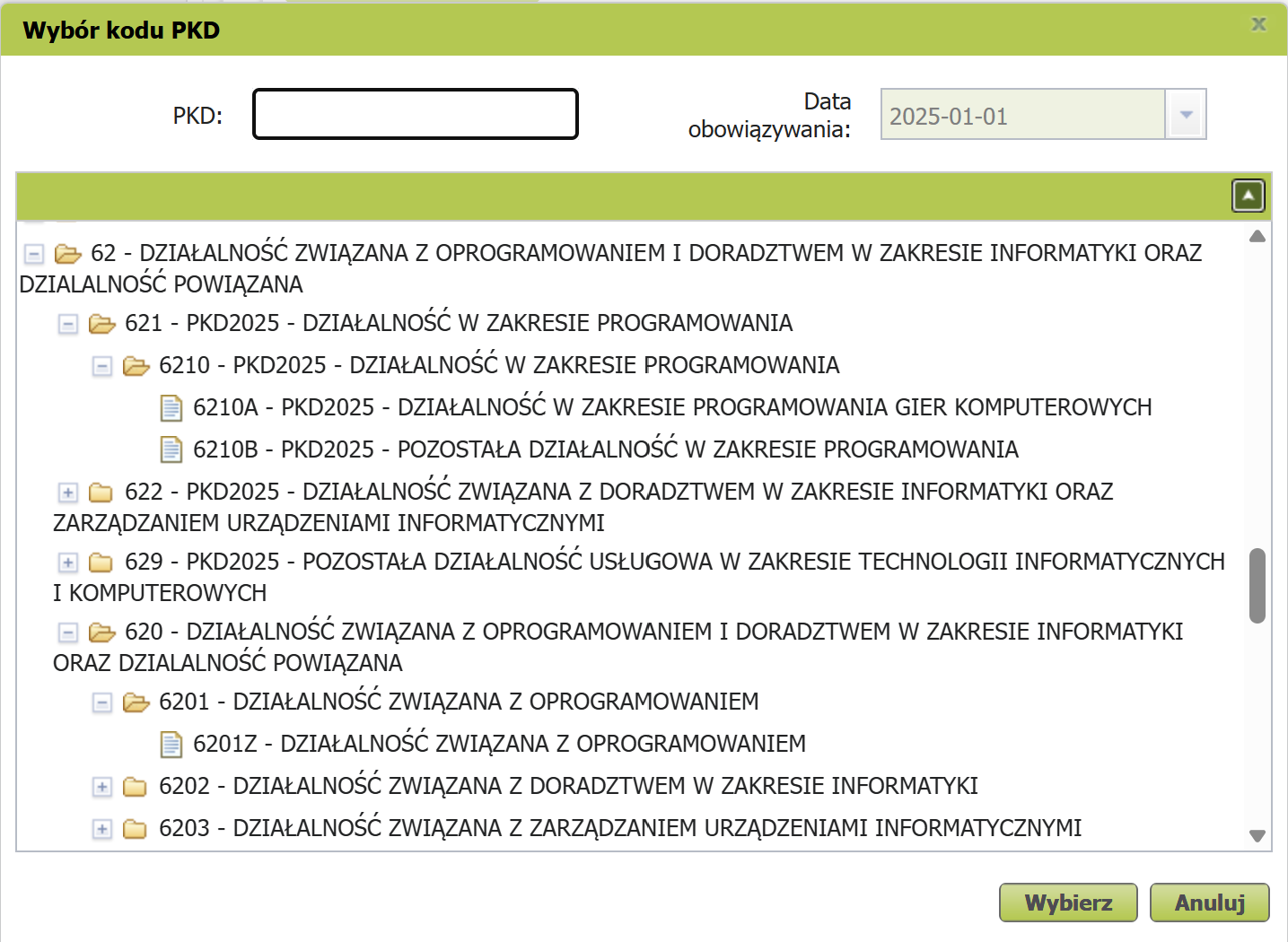
In the example, activity code 62.10.B is selected (other software development activities). Select the option that applies to you.
Relationships with Other Entrepreneurs
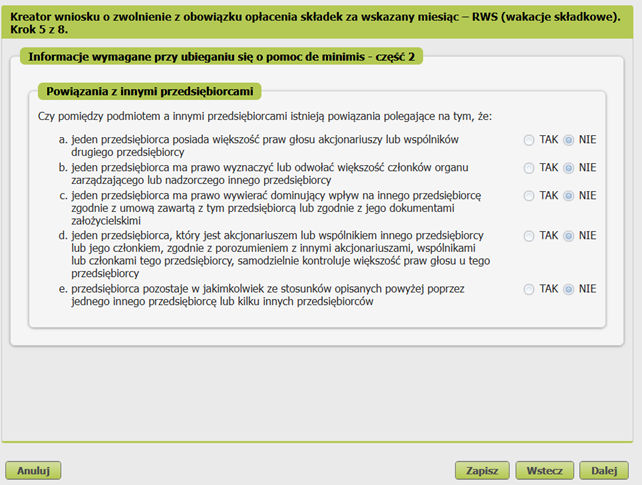
Translation
Is there a relationship between the entity and other entrepreneurs, consisting of the fact that:
- one entrepreneur holds a majority of voting rights of shareholders or partners of the other entrepreneur;
- one entrepreneur has the right to appoint or dismiss a majority of the members of the management or supervisory body of the other entrepreneur;
- one entrepreneur has the right to exercise dominant influence over the other entrepreneur under a contract concluded with that entrepreneur or under its founding documents;
- one entrepreneur, who is a shareholder, founder, or member of the other entrepreneur, independently controls most of the voting rights of that entrepreneur under an agreement with other shareholders, partners, or founders;
- the entrepreneur is in any of the relationships described above through one or more other entrepreneurs.
In the example, all categories are marked as negative. If even one answer is TAK, you will need to provide the NIP numbers of the other entrepreneurs, as well as the amount of de minimis aid. Select the options that apply to you.
Information About the Entity's Origin
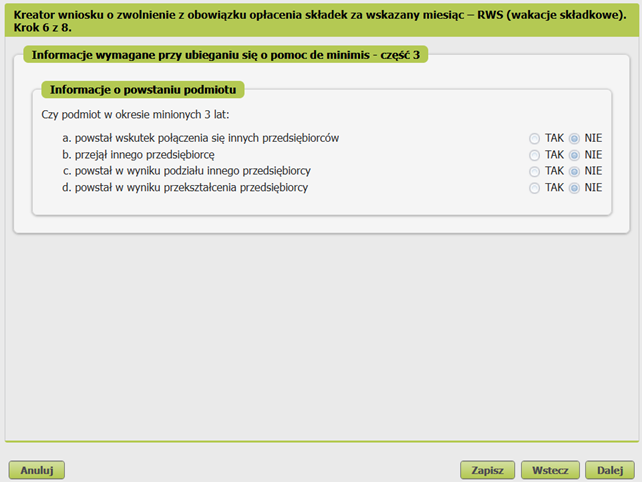
Translation
In the past 3 years, the entity:
- was created as a result of a merger of other entrepreneurs;
- accepted/took over another entrepreneur;
- was formed as a result of a split of another entrepreneur;
- was created as a result of a transformation of an entrepreneur.
In the example, all categories are marked as negative. If even one answer is TAK, you will need to provide the NIP of the other entrepreneur, as well as the amount of de minimis aid. Select the options that apply to you.
Information About Specific Activity Categories
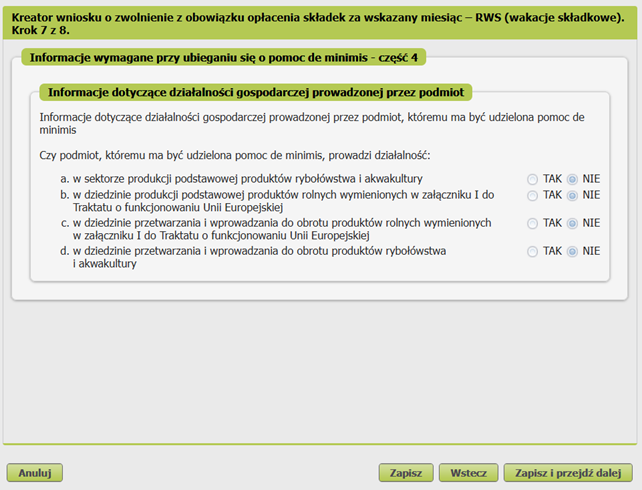
Translation
Information about business activity conducted by the entity to which de minimis aid is to be granted
Does the organization to which de minimis aid is to be granted conduct activity:
- in the primary production sector for fishery and aquaculture products;
- in the primary production of agricultural products listed in Annex I to the Treaty on the Functioning of the EU;
- in the processing and marketing of agricultural products listed in Annex I to the Treaty on the Functioning of the EU;
- in the processing and marketing of fishery and aquaculture products.
In the example, all categories are marked as negative. Select the options that apply to you.
Signing and Sending
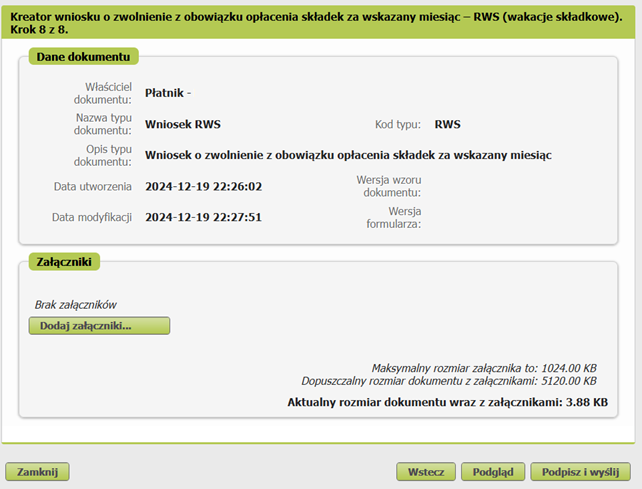
If at step 3 you selected the option "korzystałem z pomocy publicznej de minimis" + the option "zaświadczenia", then now, at the last step before submitting the application, you need to attach the certificates (zaświadczenia) using the "Dodaj załączniki..." button.
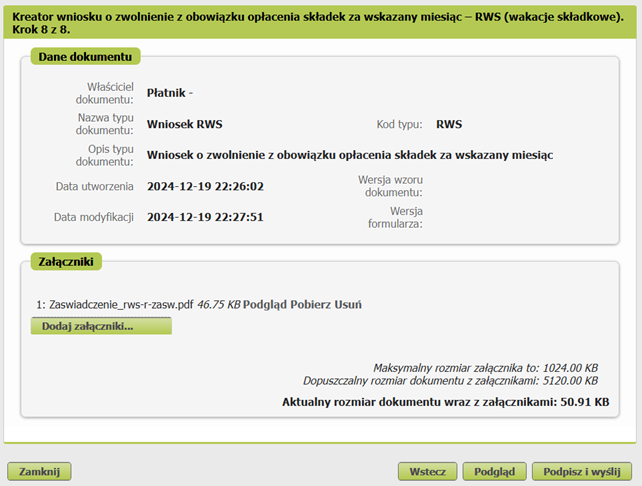
Sign and send the document using the Podpisz i wyślij button.
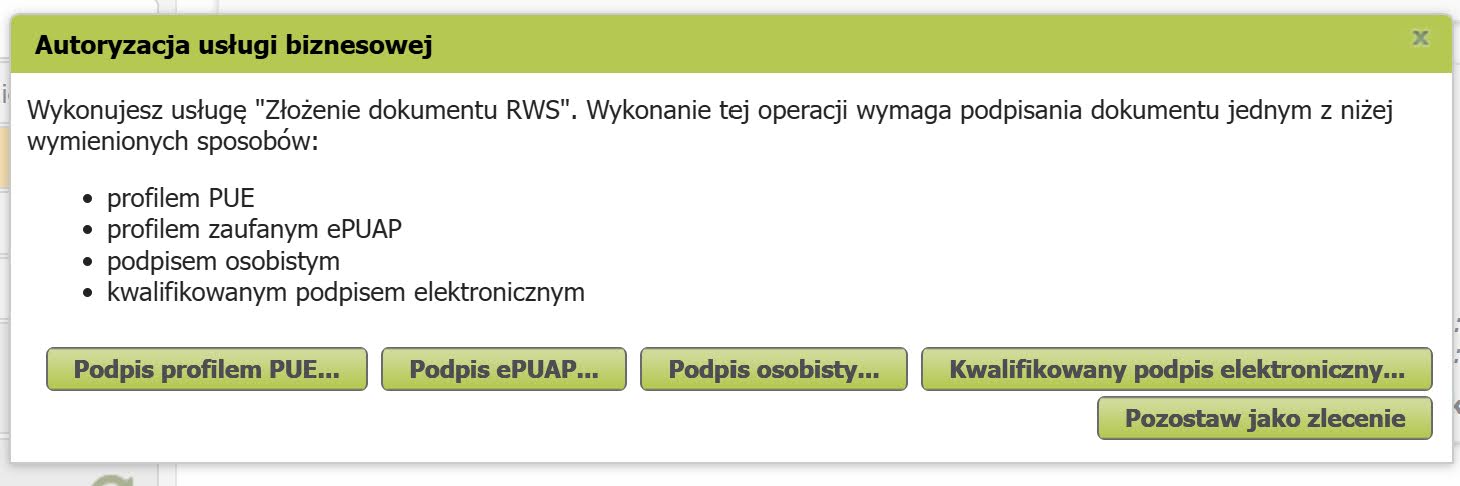
The first option "Podpis profilem PUE" is recommended as the simplest to use.
Success Criteria
You will see this message:
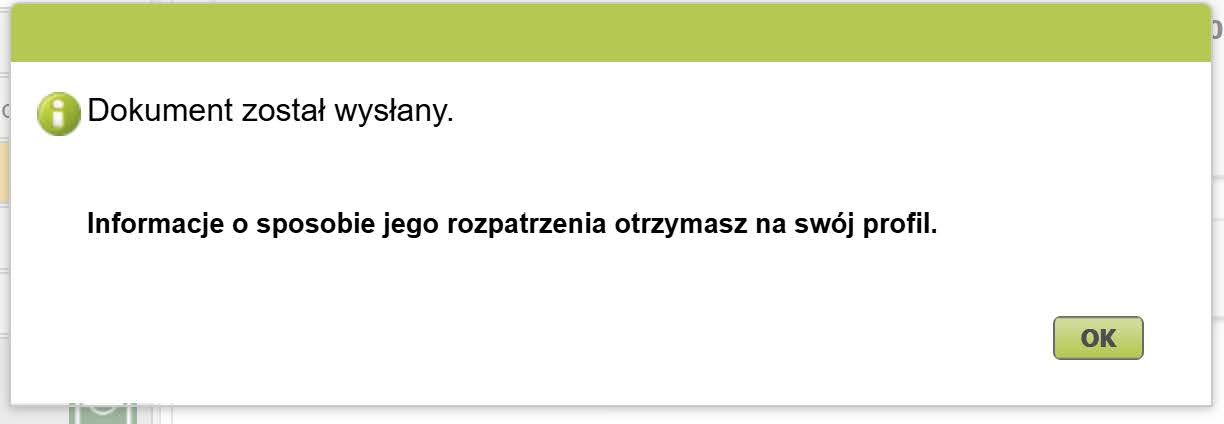
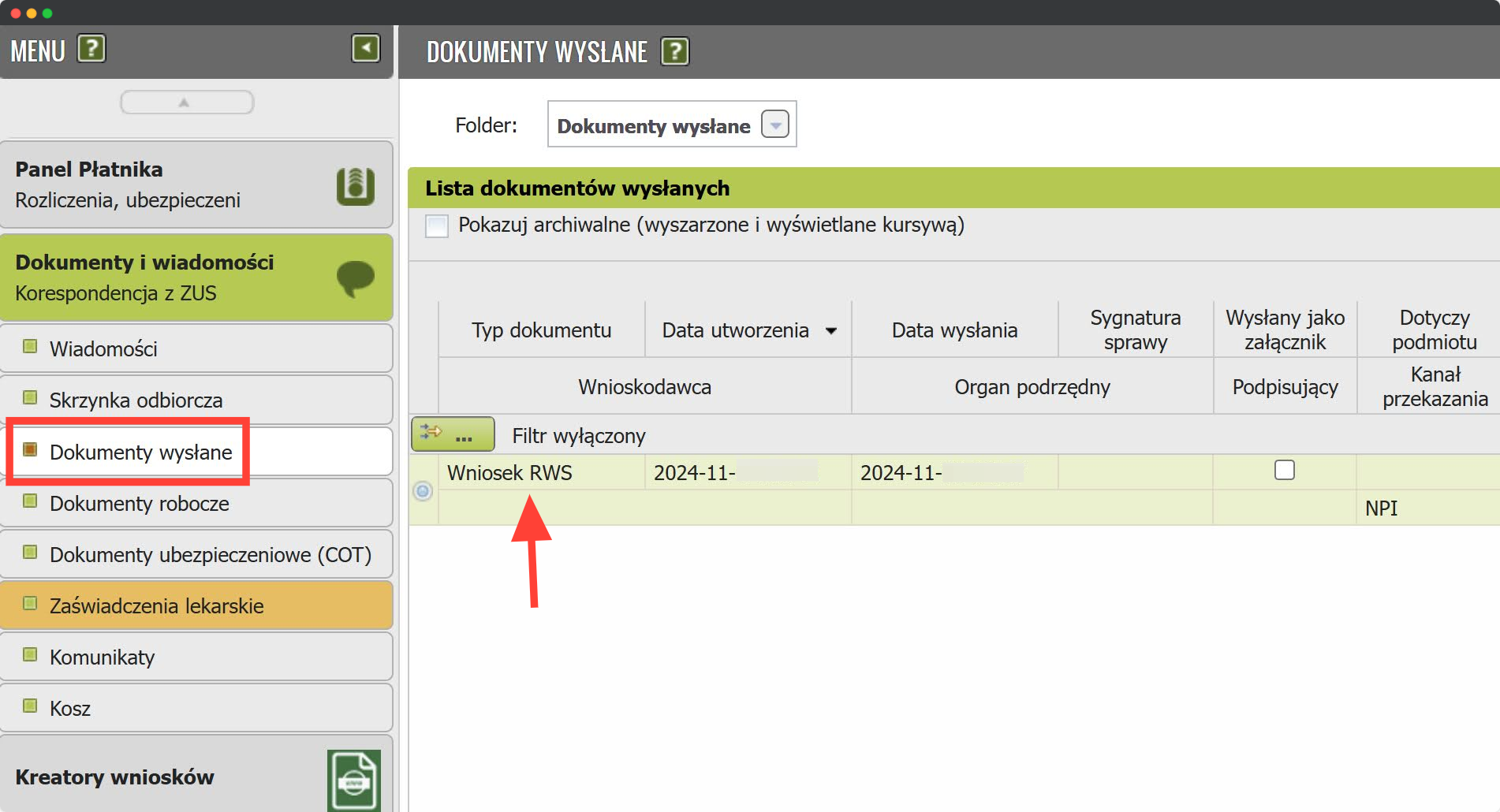
And in the sent documents (Dokumenty wysłane), the Wniosek RWS will appear:
What's Next
Wait for a response from ZUS in your PUE/eZUS account. This may take several days. You will receive a notification about new messages at the email address or phone number you provided in PUE/eZUS.
First, you will receive Zawiadomienie o możliwości czynnego udziału w sprawie — this is an informational letter from ZUS that your application has been accepted for review. After that, within a few days, you will receive either a positive or negative decision about participating in ZUS vacation. In the case of a positive decision, the document is called Informacja o przyznaniu zwolnienia. The example shows a case where the vacation application was approved.
If you don't pay the voluntary składka chorobowa (the one for sick leave) and apply for the vacation, ZUS may at some point send something like this:
Zawiadomenie
Zakończyliśmy postępowanie w sprawie ustalenia prawa do zwolnienia z obowiązku opłacenia składek za czerwiec 2025 r., wszczętego na Pana wniosek z 29 maja 2025 r.
W wyniku weryfikacji stwierdziliśmy, że nie spełnia Pan następujących przesłanek ustawowych:
• nie podlegał Pan dobrowolnemu ubezpieczeniu chorobowemu w miesiącu złożenia wniosku albo w miesiącu go poprzedzającym
Może Pan wypowiedzieć się o zgromadzonej w Zakładzie dokumentacji w terminie 7 dni od daty doręczenia tego zawiadomienia.
Don't panic — this does not mean a full rejection of the vacation, just a denial of the składka chorobowa compensation. A few days after this, you'll receive the normal documents regarding the aid.
If your application is approved, you need to notify your accountant
If you handle your own accounting, see the section Monthly reports during ZUS vacation.
Monthly Reports During ZUS Vacation
The entrepreneur must submit the following documents for themselves:
- ZUS RCA 1: a personal social insurance report (składka na ubezpieczenie społeczne) accounting for the vacation. The report must specify the appropriate Kod tytułu ubezpieczenia - 0514 for Duży ZUS, 0574 for Składki preferencyjne, 0594 for Mały ZUS Plus.
- ZUS RCA 2: a personal health insurance report (składka na ubezpieczenie zdrowotne) and, if applicable, voluntary sick leave contributions (dobrowolne ubezpieczenie chorobowe) without accounting for the vacation. The report must specify the current Kod tytułu ubezpieczenia - 0510 for Duży ZUS, 0570 for Składki preferencyjne, 0590 for Mały ZUS Plus.
- ZUS DRA: a contributions declaration accounting for the vacation. In the declaration, in the social insurance payment sections (Składki finansowane przez sections), the values should be entered in the budżet państwa fields instead of ubezpieczonych.
The ZUS vacation benefit does not apply to employees. If the entrepreneur has employees, they must submit the following documents for them:
- ZUS RCA: a personal report without accounting for the vacation.
How to Generate Reports for ZUS Vacation
If you use accounting software (Infakt, WFirma, iFirma), you can generate the reports using those tools. Otherwise, you can follow the instructions below. These instructions are written for a payer on Składki preferencyjne. The original version of this guide was developed by Olga Korneva.
Report Creator for ZUS Vacation in PUE ZUS
Panel ePłatnik – Kreatory – Obsługa rozliczenia - Dalej.
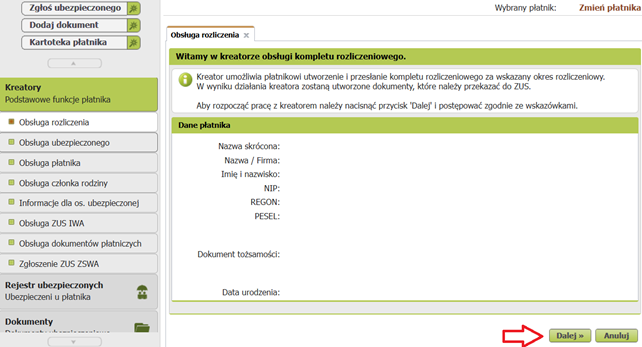
Nowy komplet rozliczeniowy - Dalej.
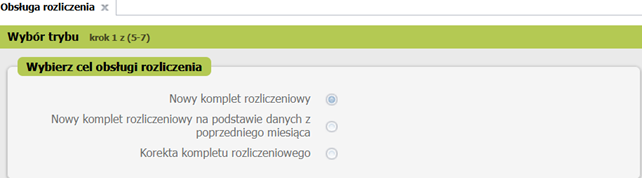
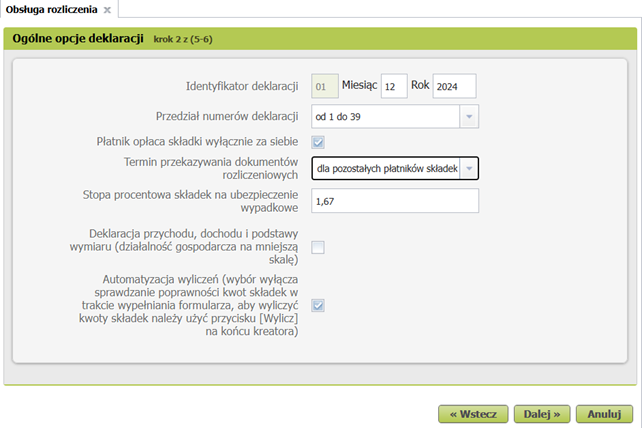
The date field will be pre-filled; verify the remaining fields and click Dalej.
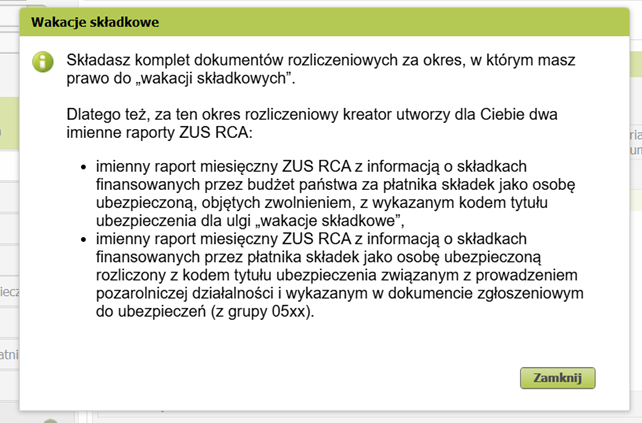
An informational message will pop up saying that ZUS RCA declarations will be generated — click Zamknij.
On the Rozliczenie ubezpieczonych panel, click Dane rozliczenia.
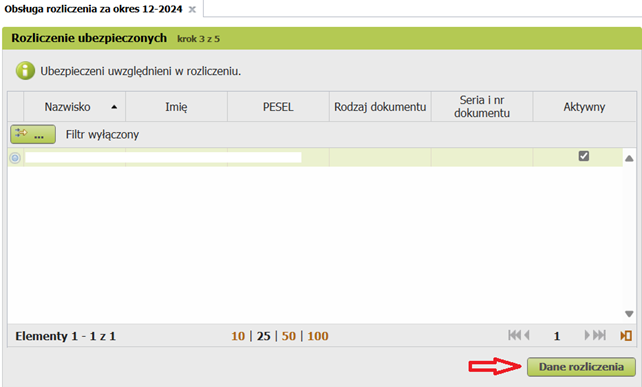
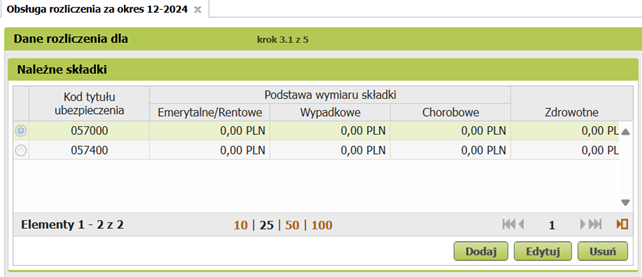
On the Dane rozliczenia panel, select element 057000 and click Edytuj.
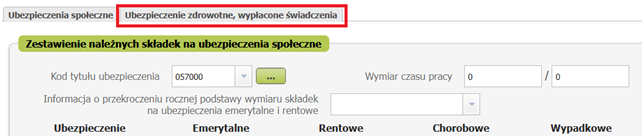
On the panel, select the second tab Ubezpieczenie zdrowotne, wypłacone świadczenia.
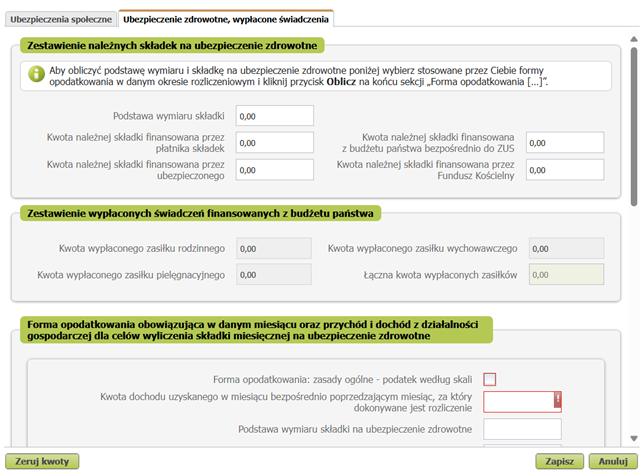
Select the appropriate tax form. To select ryczałt, you need to scroll down.
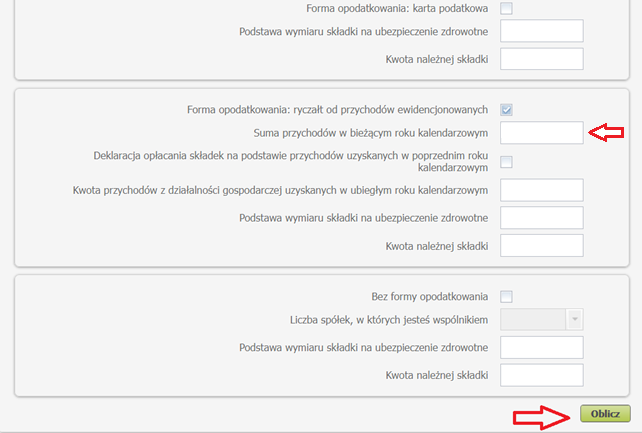
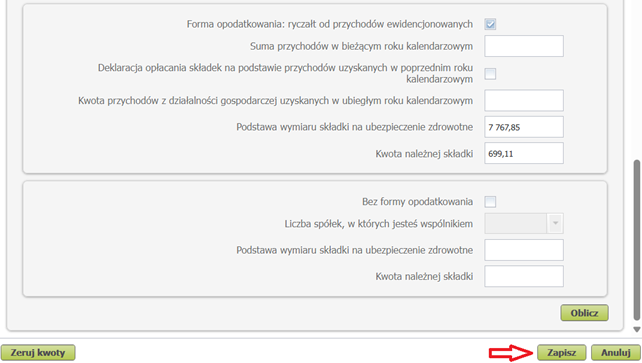
In addition to the checkbox, for ryczałt you need to enter the income amount for the current calendar year (in the example — for 2024). Click Oblicz.
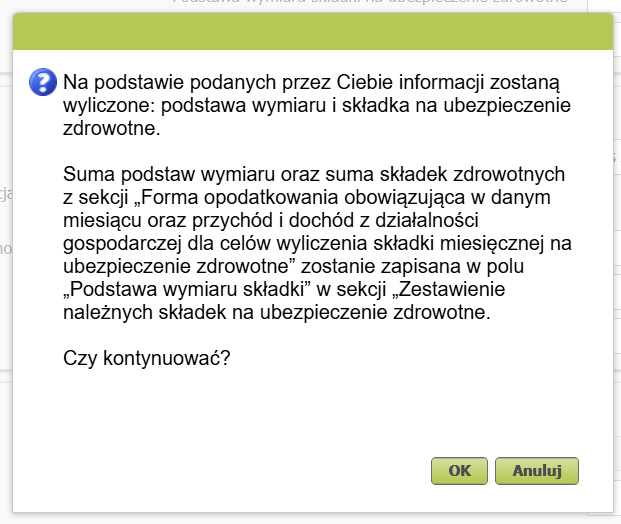
An informational message about the calculated base and health insurance contribution based on the provided data will pop up. Click Ok.
The corresponding fields are filled in automatically. Click Zapisz.
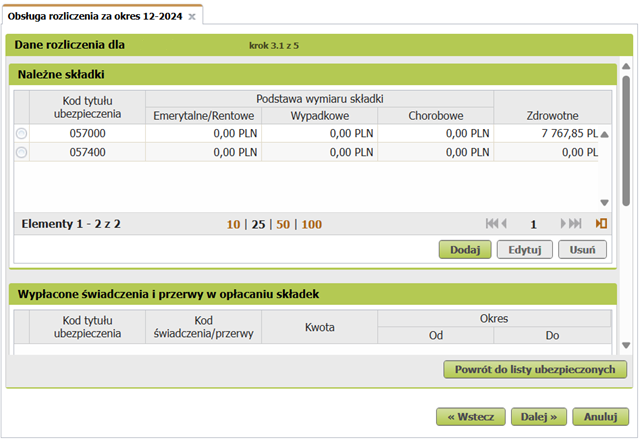
Return to the Dane rozliczenia panel and click Dalej.
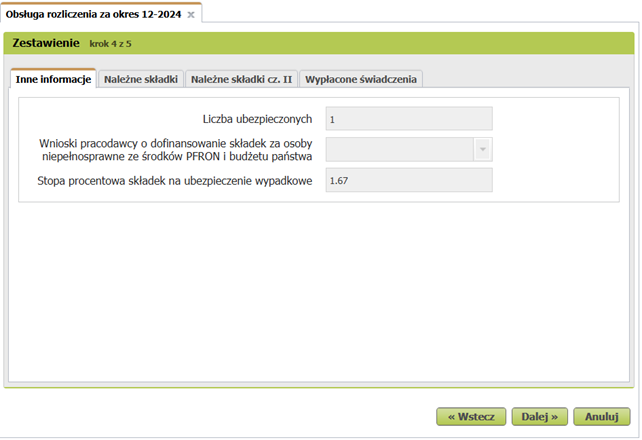
On the Zestawenie panel, click Dalej.
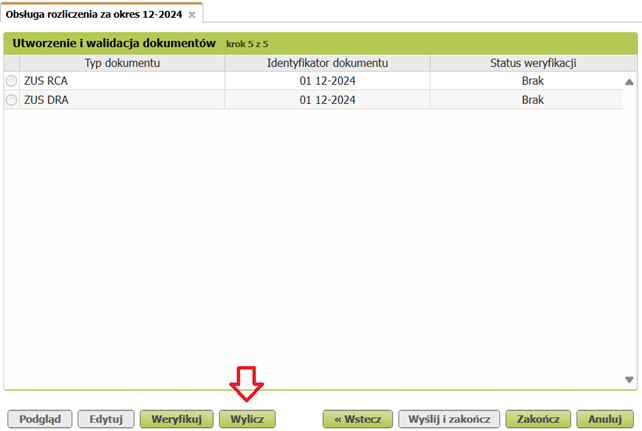
On the Utworzenie i walidacja dokumentów panel, click Wylicz.
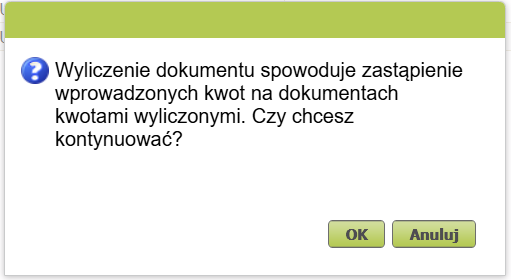
An informational message will pop up. Click Ok.
On the Utworzenie i walidacja dokumentów panel, click Weryfikuj.
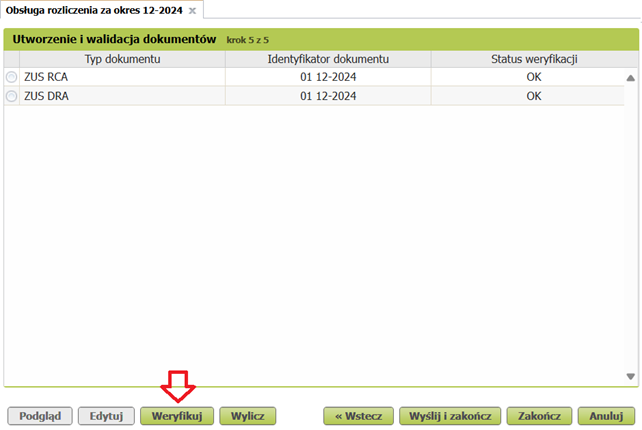
The declarations will be verified.
Reviewing the Created Declarations
To review the declarations, on the Utworzenie i walidacja dokumentów panel, select the desired element and click Podgląd.
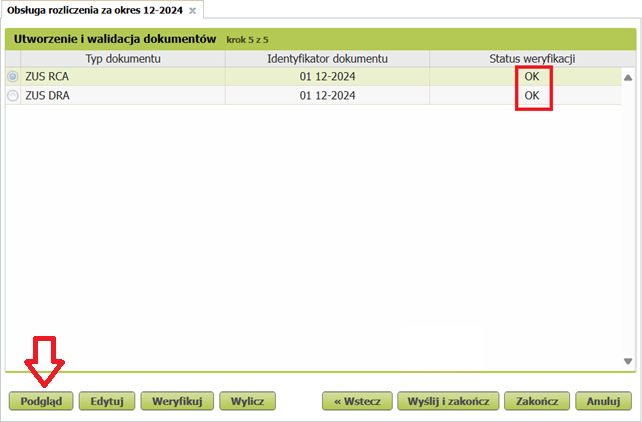
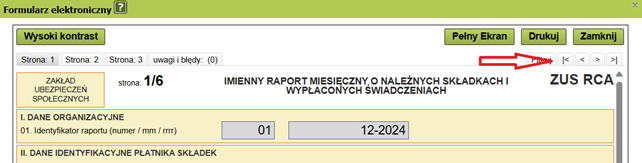
Two ZUS RCA declarations will be generated within one ZUS RCA element. To view both declarations, use the navigation buttons shown in the screenshot.
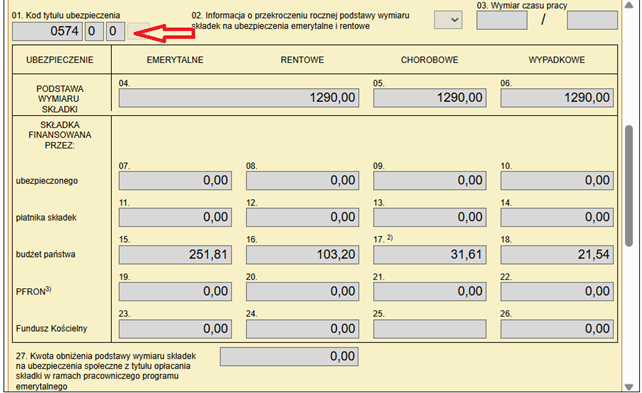
The social insurance contributions (emerytalne, rentowe, chorobowe, wypadkowe) paid by the state will appear in the declaration with code 057400. In the screenshot below, these are fields 15, 16, 17, 18.
The social insurance contributions (emerytalne, rentowe, chorobowe, wypadkowe) paid by the entrepreneur will appear in the declaration with code 057000. In the screenshot below, these are fields 07, 08, 09, 10.
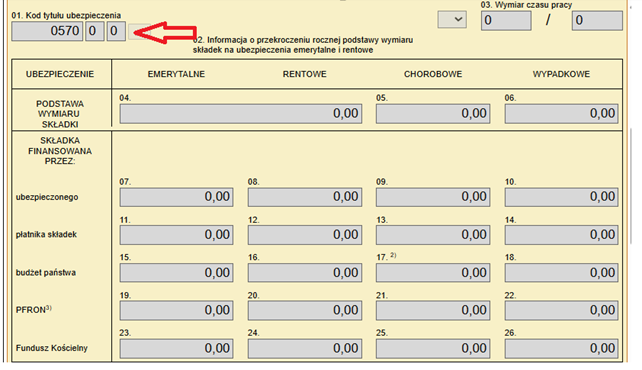
In the declaration with code 057000, the corresponding fields will contain the base and amount of the health insurance contribution (składka zdrowotna). Section III.C field 04 — this is the amount the insured entrepreneur must pay. The screenshot below shows the amount 699.11 zł, which may differ depending on your situation.

Sending the Declarations
On the Utworzenie i walidacja dokumentów panel, click Wyślij i zakończ.
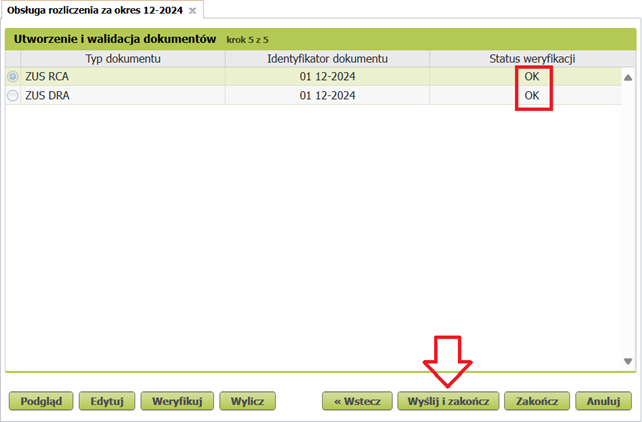
Sign the document using any of the listed methods.
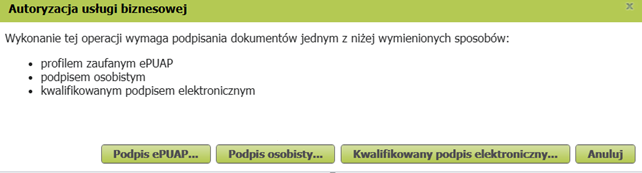
After signing, the document will be sent to ZUS.
Pitfalls
The benefit really is "free": the social insurance contributions you are exempted from are covered by the state budget. Nevertheless, there are a few nuances worth knowing about in advance:
- Ryczałt payers, watch the annual income limit for the składka zdrowotna rate. The vacation does not reduce your income, and the amounts saved on składki społeczne do not reduce your taxable base — as a result, savings of 300–1,000 zł can turn into an additional składka zdrowotna payment of 3,000–6,000 zł if you cross the threshold.
- Mały ZUS Plus. If you pay reduced income-based contributions, the benefit of the vacation is noticeably smaller — calculate whether it is worth the bureaucracy.
- Voluntary increased contributions. If you deliberately pay ZUS more than the minimum for the sake of your future pension, for the vacation month the state only compensates the minimum contribution amount.
- Accountants may charge extra for filling in the RWS application and the non-standard settlement with ZUS for the vacation month (we have seen 50 zł at iFirma and 200 zł at private accountants).
- The effect is delayed. Your ZUS payment will decrease not in the "vacation" month, but in the following month. And a month after that, the income tax due will be slightly higher — the saved składki społeczne will not reduce your taxable base.
- Switching from Preferencyjne to Duży ZUS. You will be exempted from składki społeczne in the minimum amount you were supposed to pay in the month preceding the month you submit the RWS application. In practice this means you cannot switch from Składki Preferencyjne to full ZUS (Duży ZUS) and get the exemption in the full Duży ZUS amount in the very first month. Nor in the second month.
Does the vacation affect applying for a residence card?
It has no effect at all. What matters is that the business has no break in activity or irregular income.
You Don't Lose Anything
The state will pay your contributions for that month — this has no effect on your pension savings. Unlike a "pause" (zawieszenie) or sick leave, during ZUS vacation the entrepreneur can continue conducting income-generating activity and issuing invoices.
Conclusion
ZUS vacation is a great opportunity to reduce business expenses a bit and make your life easier. Just don't forget to carefully review the eligibility criteria and submit your application on time.
More detailed information about the benefits can be found on the official ZUS website.
Support our guide with a cup of coffee ♥