Switching to "Obniżone składki"
After 6 full months of using Ulga na start, you can take advantage of reduced ZUS contributions (the "Obniżone składki" benefit, also known as Składki preferencyjne) for 24 full months. The benefit is that the minimum social contributions are calculated based on 30% of the minimum wage.
Official website
When to switch to składki preferencyjne
What you need to do (in a nutshell)
Got an accountant? Just remind them that your Ulga na Start is about to expire. No accountant? Read the instructions below ⬇️
- Deregister from ZUS using the ZUS ZWUA form.
-
Register for insurance:
a. If you're working simultaneously under Umowa o Pracę and earning above the minimum wage, use the ZUS ZZA form;
b. Otherwise use the ZUS ZUA form with the new code 0570 xx. If you're switching from ulga na start to składki preferencyjne, your old code is: 0540, and the new one is: 0570.
-
Switch the settings in inFakt/wFirma/iFirma to składki preferencyjne.
Each of these steps is described in detail below.
How to access the ZUS payer's online portal?
See available methods.
1. Deregistration (ZUS ZWUA)
Step 1
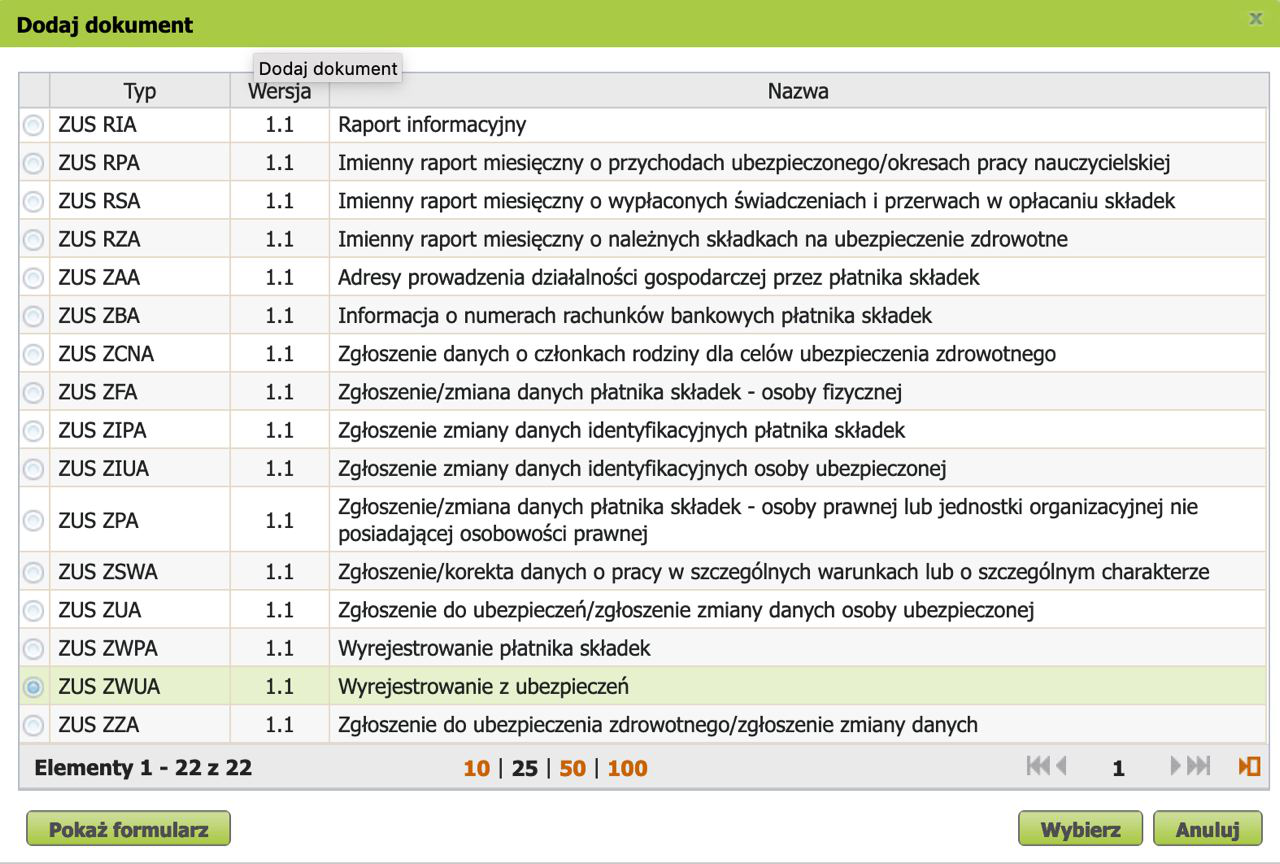
On the zus.pl page, in the e-Płatnik tab, open the Dodaj dokument window → select a new document of type ZUS ZWUA → click Wybierz → in the dialog that appears, click Przejdz do kreatora.
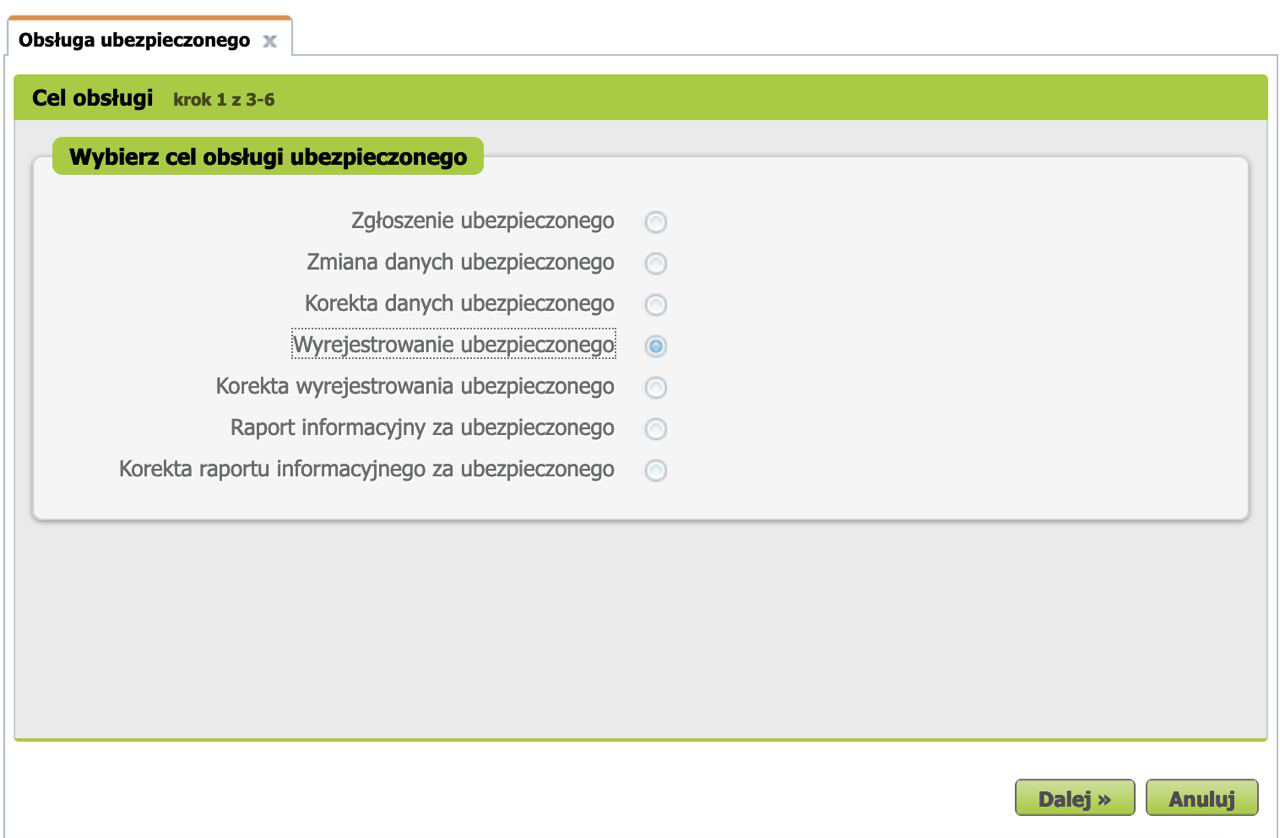
Next, in the Obsługa ubezpieczonego window, for Cel obsługi select Wyrejestrowanie ubezpieczonego (Deregistration of the insured person). Then click Dalej.
Step 2
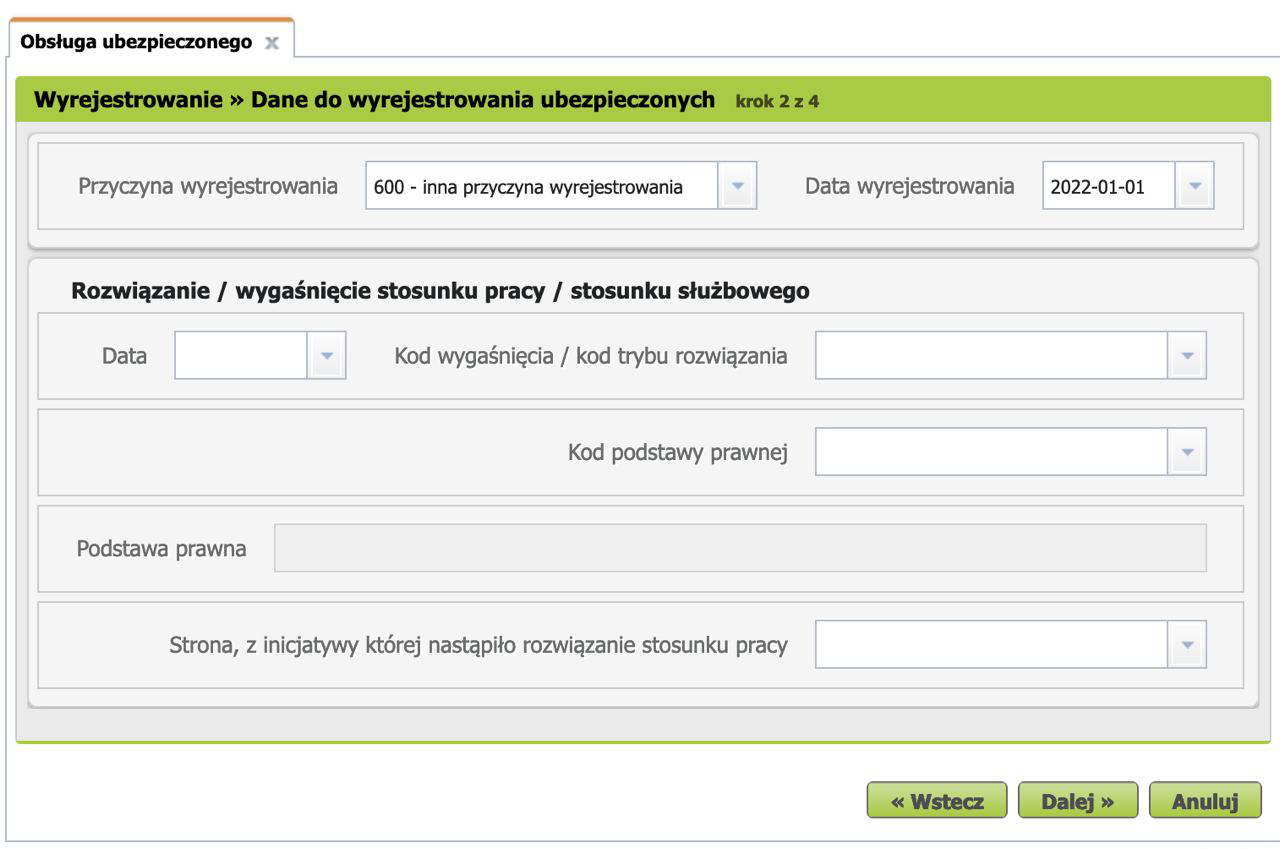
Next, on the step Wyrejestrowanie » Dane do wyrejestrowania ubezpieczonych, you need to specify the reason and date of deregistration.
In the Przyczyna wyrejestrowania field, select 600 - inna przyczyna wyrejestrowania, and in the Data wyrejestrowania field — the first day of the month in which Ulga na Start is no longer active (if you're doing everything on time, this is the current month). Leave the remaining fields empty.
Click Dalej.
Step 3
Next, select the person being deregistered with Kod tytułu ubezpieczenia 054000 and click Dalej.
Step 4
ZUS automatically generates a set of documents: not only the ZWUA is created, but also a ZCNA for removing dependents from the register.
Important!
To avoid having to re-add dependents after registration, do NOT send the ZCNA in the next step!
Step 5
Review, verify, and send the ZWUA document to ZUS.
TODO: help make this guide better! add your screenshots here.
Step 6
If you have dependents: go to Dokumenty -> Dokumenty robocze, select the ZCNA and delete them using the Usuń button.
TODO: help make this guide better! add your screenshots here.
2. Registration (ZUS ZUA) with code 05 70
Don't rush to submit the ZUA application right after the ZWUA — until the manual processing of the first application is complete, ZUS won't let you send the second one. Wait, it usually takes 1-2 days.
Step 1
On the zus.pl page, in the e-Płatnik tab, open the Dodaj dokument window → select a new document of type ZUS ZUA → click Wybierz → in the dialog that appears, click Przejdz do kreatora.
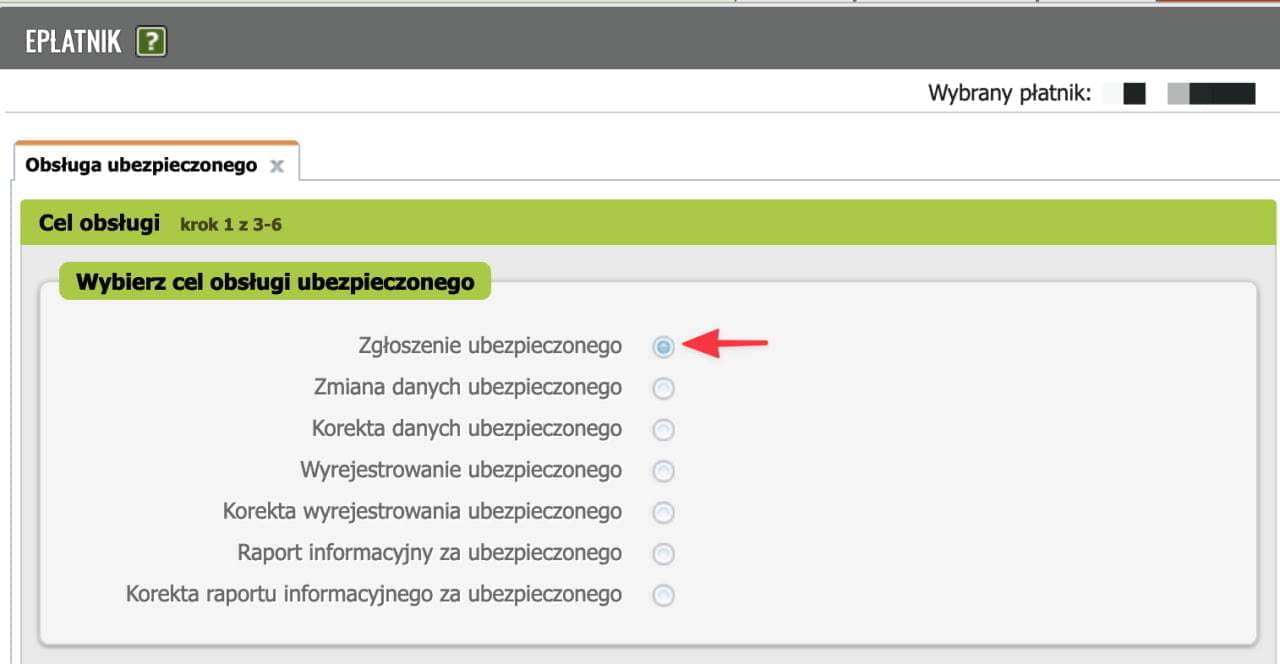
Next, in the Obsługa ubezpieczonego window, for Cel obsługi select Zgłoszenie ubezpieczonego (Registration of the insured person). Then click Dalej.
Step 2
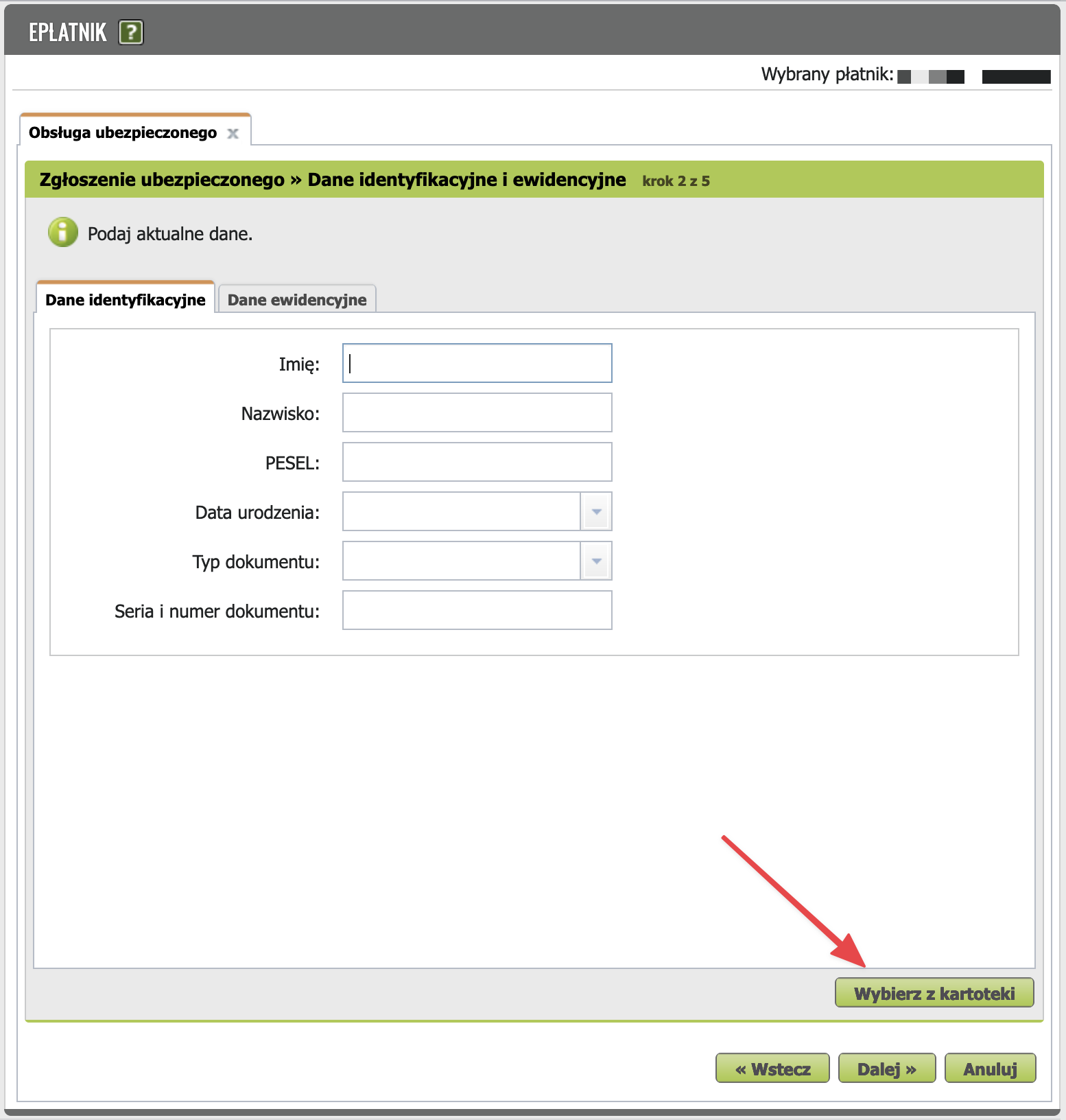
On the step "Zgłoszenie ubezpieczonego » Dane identyfikacyjne i ewidencyjne" fill in Dane identyfikacyjne and Dane ewidencyjne in both tabs. You can load the data already on file with ZUS by clicking "Wybierz z kartoteki".
Should you provide your passport?
It's recommended to leave the Typ dokumentu and Seria i numer dokumentu fields empty. It's enough to provide your PESEL.
Step 3
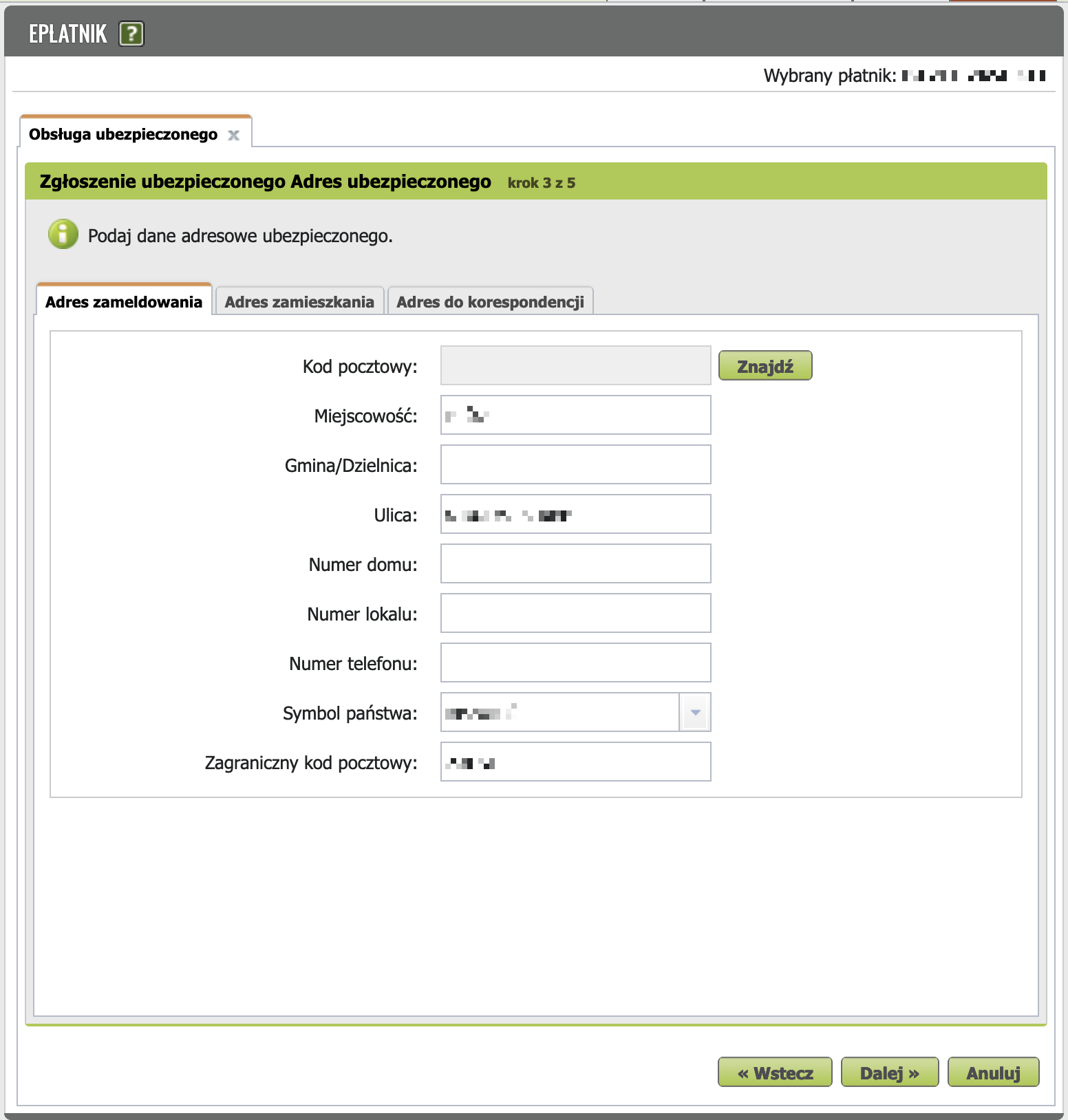
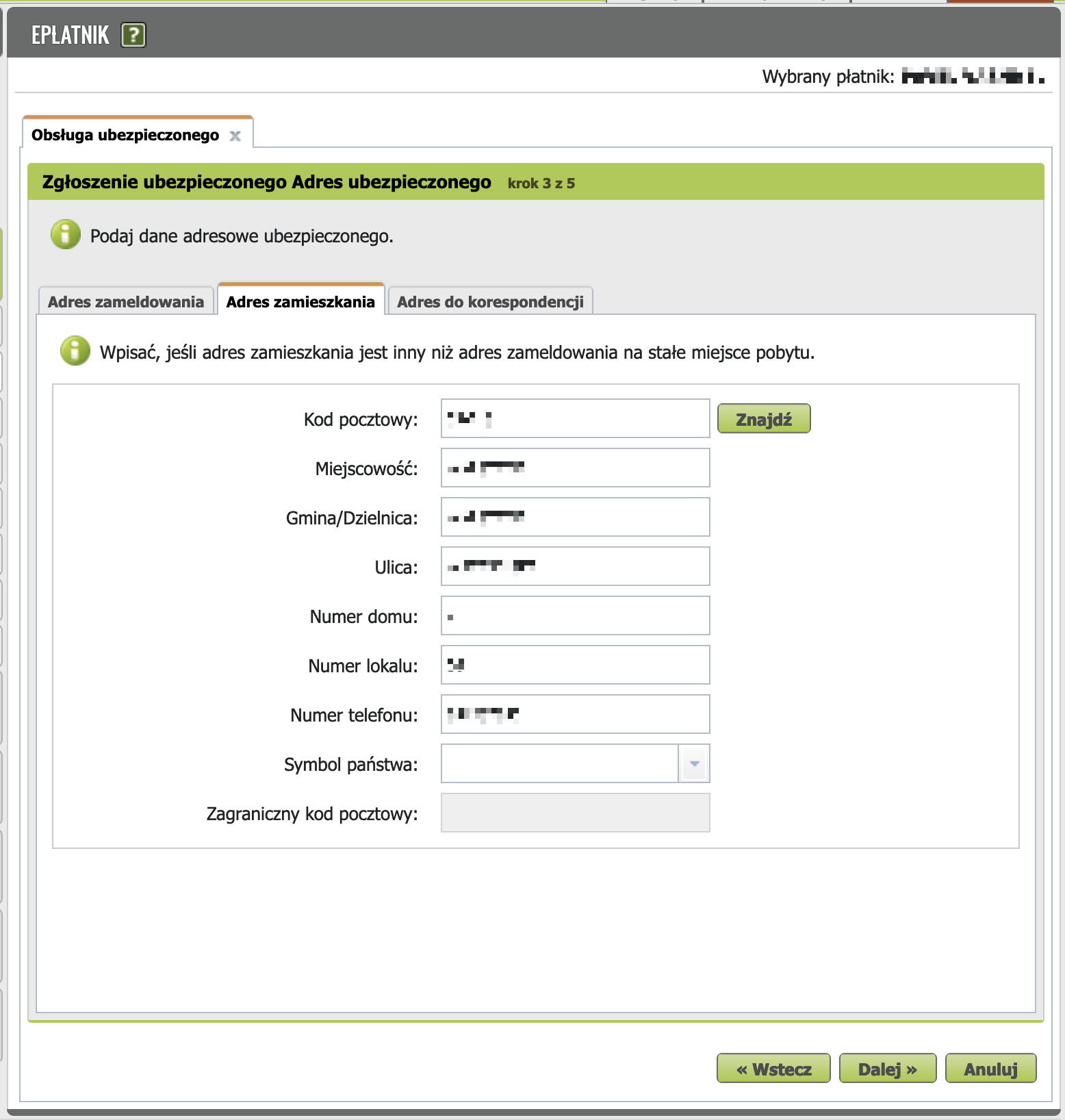
On the step "Zgłoszenie ubezpieczonego Adres ubezpieczonego" check your addresses.
- Adres zameldowania - registered address:
- Adres zamieszkania - residential address:
- Adres do korespondencji - correspondence address.
Click Dalej.
Step 4
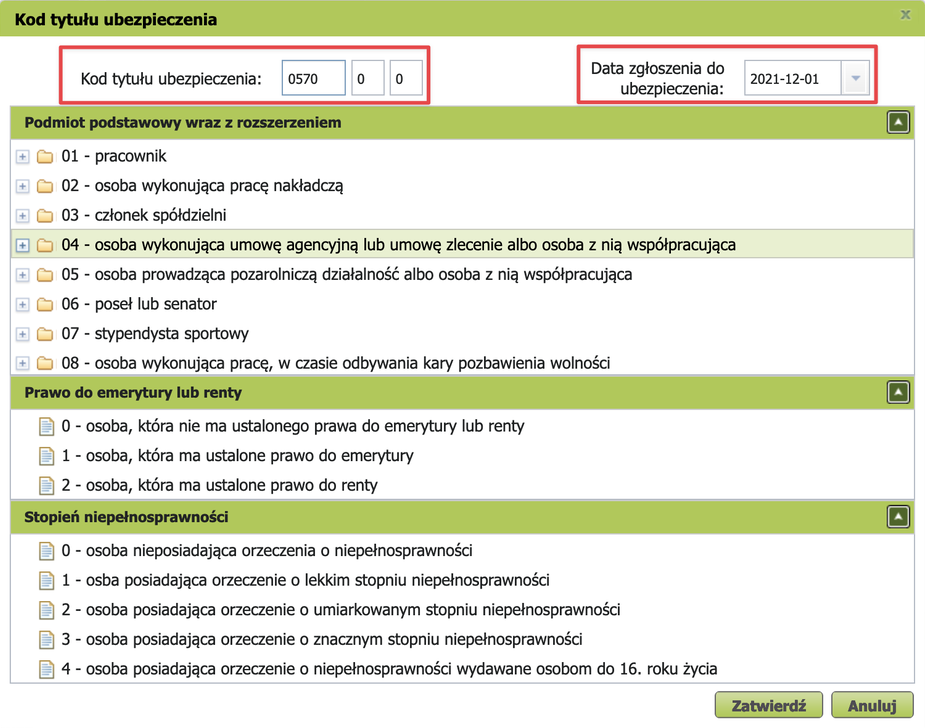
On the screen "Zgłoszenie ubezpieczonego » Tytuły ubezpieczeń" you need to click Dodaj kod tytułu ubezpieczenia.
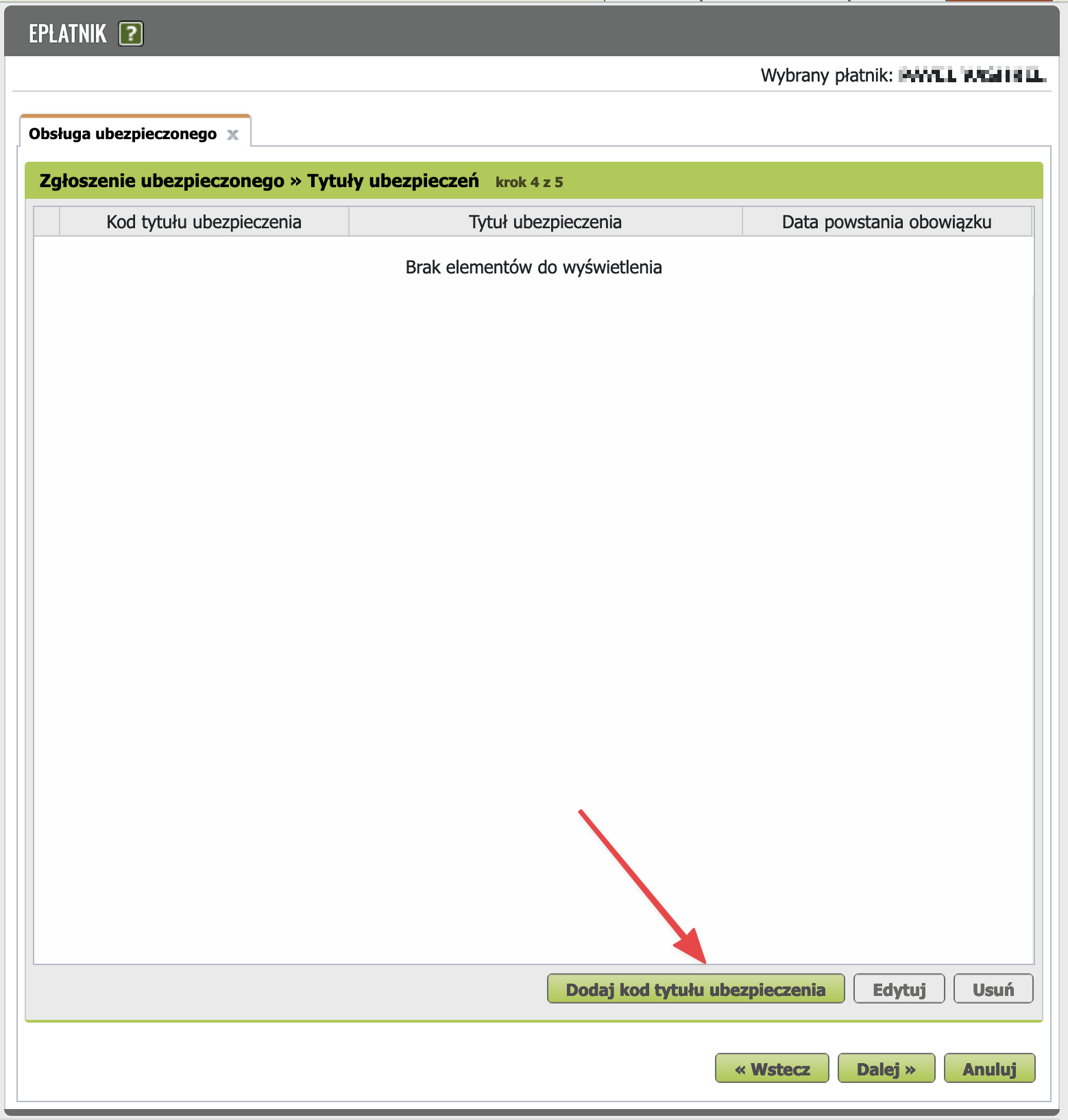

Here, select Kod tytułu ubezpieczenia. As a reminder, if you're switching to składki preferencyjne, choose code 05 70.
In the left column, fill in Data powstania obowiązku ubezpieczenia (or Data zgłoszenia do ubezpieczenia): the first day of the month in which the new benefit takes effect (if you're doing everything on time, this is the current month). It's important that this is the same day as for ZUS ZWUA. This way a foreigner has no gap in insurance coverage.
Click Zatwierdź.
In the Wybór schematu podlegania window, select the appropriate insurance affiliation scheme. If you have no other sources of social insurance besides your sole proprietorship, leave the default scheme (highlighted in the screenshot).
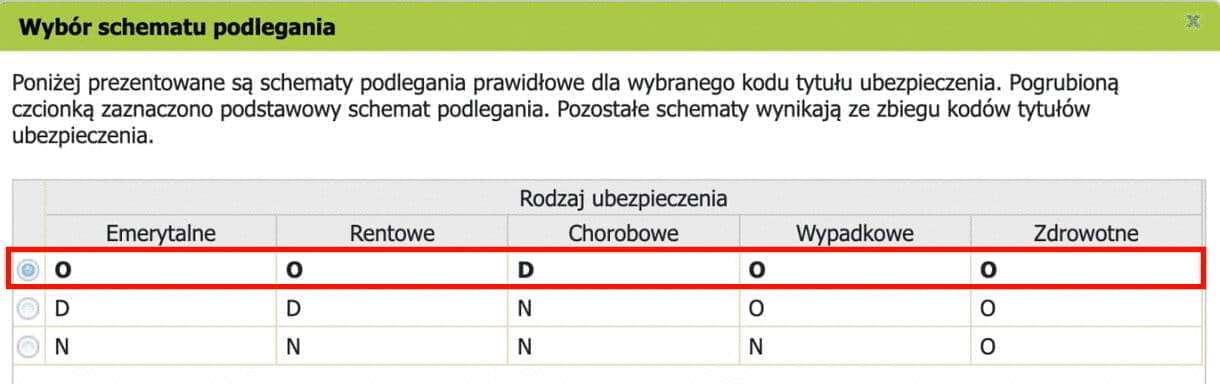
Screenshot translation
Below are the correct insurance affiliation schemes for the selected insurance title code. The default scheme is shown in bold. Other schemes are due to overlapping insurance title codes.
| Emerytalne | Rentowe | Chorobowe | Wypadkowe | Zdrowotne | |
|---|---|---|---|---|---|
| ☑ | M | M | V | M | M |
Legend:
M - mandatory contribution
V - voluntary contribution
In the Kod tytułu ubezpieczenia window, in the left column:
-
Select the required items in the Obowiązkowe ubezpieczenia społeczne (Mandatory social insurance) section. You need to check 3 out of 4 as shown in the picture (TODO: does this instruction apply to those who work under UoP in parallel?):
- Emerytalnemu
- Chorobowemu
- Rentowym
- Wypadkowemu
-
Obowiązkowe ubezpieczenie zdrowotne (Mandatory health insurance). Should be filled in.
In the same window, in the right column:
-
Dobrowolne ubezpieczenia społeczne (Voluntary social insurance).
- Chorobowym - here you can optionally check the chorobowa contribution to be able to receive sick pay in case of illness. The chorobowa contribution is optional. You can reduce your ZUS payments by 30+ PLN per month if you opt out of this contribution, but then you won't be able to get sick pay compensation in case of illness. The decision is yours. According to a poll in the chat, most entrepreneurs opt out of it. If you check this box, set the date accordingly — the first day of the current month.
-
Dobrowolne ubezpieczenie zdrowotne (Voluntary health insurance). Leave empty.
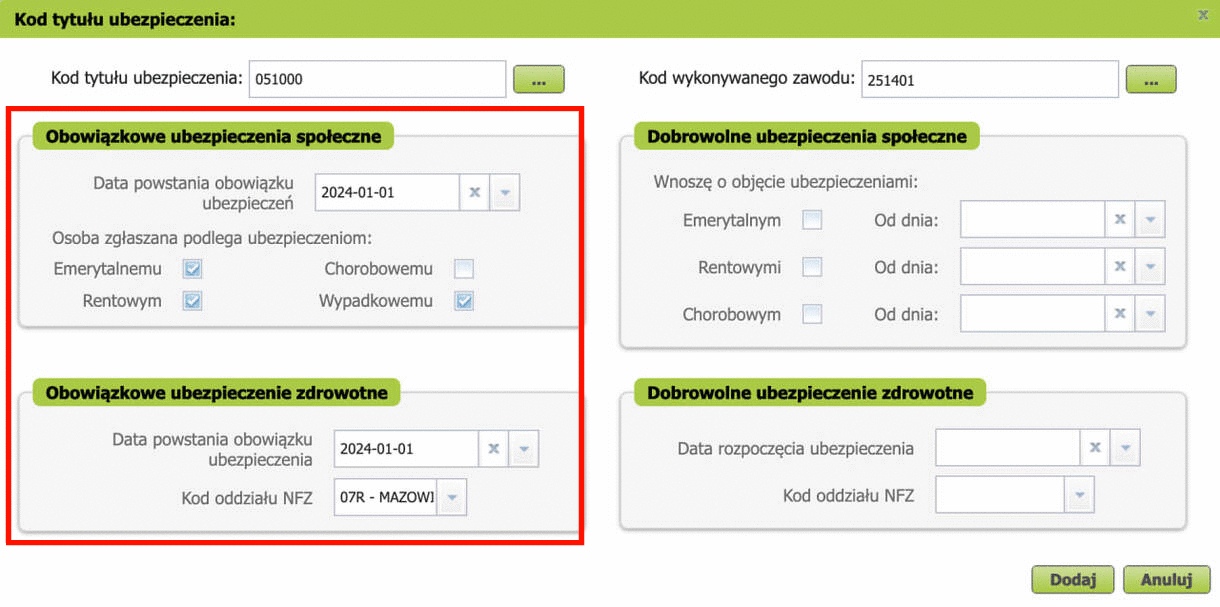
Don't forget to select Kod wykonywanego zawodu in the right section. This is needed for statistics. For more details, see the profession codes table.
Click "Dodaj".
In the dialog that appears, click "OK".
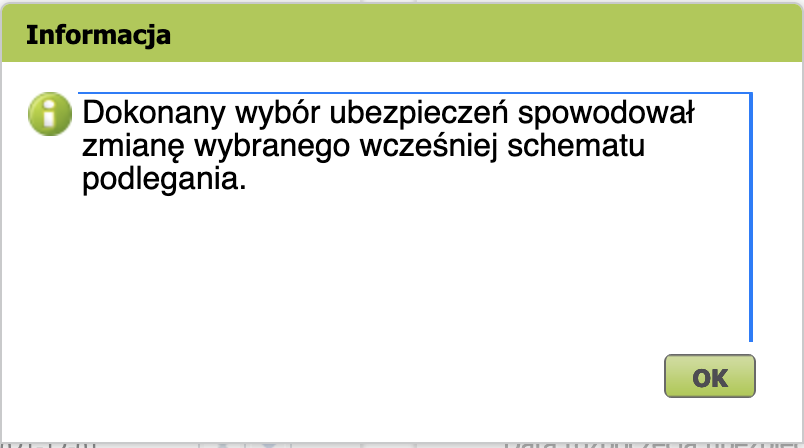
Screenshot translation
Information
The insurance type selections you made have caused a change to the previously selected affiliation scheme.
On the step "Zgłoszenie ubezpieczonego » Tytuły ubezpieczeń" select the insured person (ubezpieczonego) you just created with code 057000.
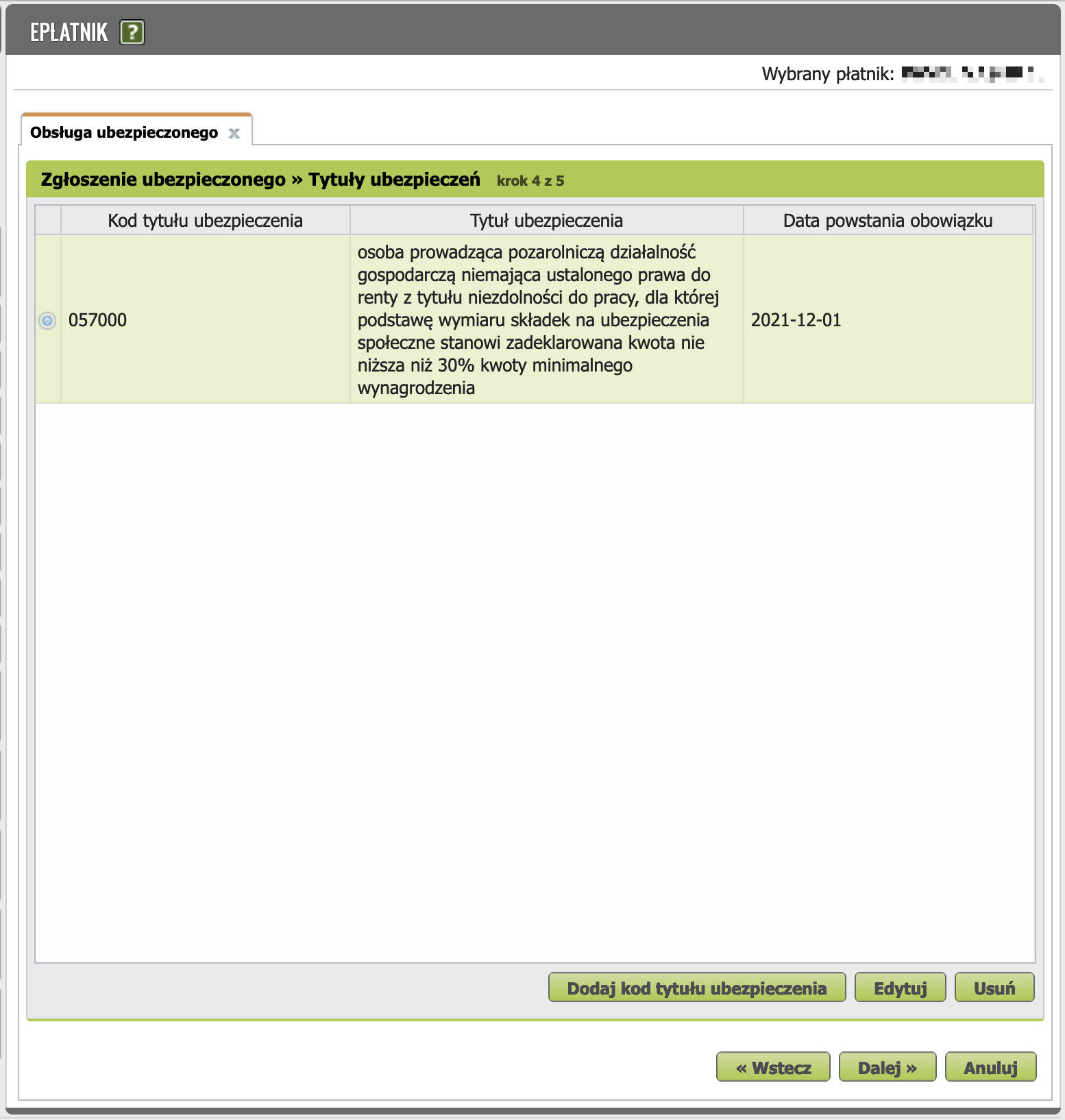
Screenshot translation
Registration of the insured » Insurance titles step 4 of 5
| Insurance title code | Insurance title | Date of obligation arising |
|---|---|---|
| ☑ 057000 | Person conducting non-agricultural business activity, without an established right to a disability pension, for whom the basis for calculating insurance contributions is a declared amount not lower than 30% of the minimum wage | 2021-12-01 |
Click Dalej.
Step 5
Review, verify, and send the document to ZUS.
TODO: help make this guide better! add your screenshots here.
Step 6
Wait for ZUS to process the application. If everything is OK, it should look like this:
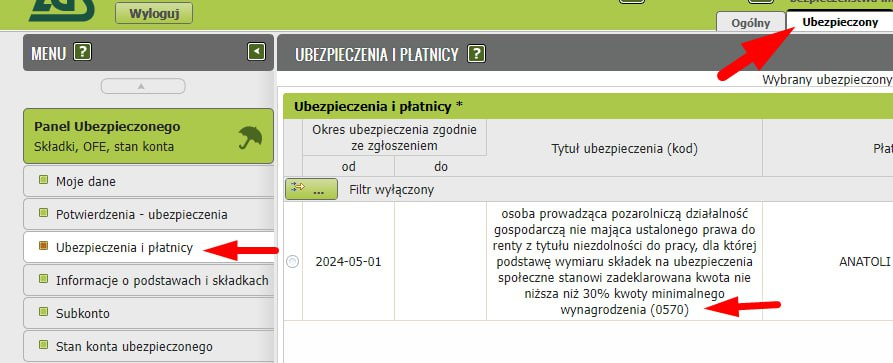
3. Switching accounting software settings
Try not to let your ZUS settings on zus.pl get out of sync with the ZUS settings in your accounting software. So after you've reported the switch to the new benefit in ZUS, go into your software settings.
This month you'll be sending several different declarations to ZUS:
DRA
Pay ZUS and send the ZUS DRA between the 1st and 20th of the month following the reporting period.
ZWUA and ZUA/ZZA
ZUS ZWUA and ZUS ZUA/ZZA must be sent to ZUS between the 1st and 7th of the month in which you started using the składki preferencyjne benefit.
Because of this, many beginning entrepreneurs have a question:
Does the order of sending declarations matter?
No. It doesn't matter in what order you do these things. Just stick to the deadlines.
It's recommended to change the settings in inFakt/iFirma/wFirma after you've sent the documents listed above.
wFirma
wFirma users should pay special attention to the order of operations.
After switching to składki preferencyjne in the settings, wFirma will generate the ZUS DRA as if the previous month also had składki preferencyjne (without ulga na start). Because of this, ZUS will refuse to accept the declaration with an incorrect code and contribution amount (error 69004101).
So it's better to do it this way:
- first, generate the ZUS DRA for the previous month (your last DRA with ulga na start);
- send the DRA to ZUS;
- pay ZUS (this step can be done earlier or later — doesn't matter);
- only after that, switch ZUS in wFirma settings to składki preferencyjne.
📚 Source: Koniec ulgi na start - przejście na preferencyjne składki ZUS
Hint
The wFirma calendar will tell you when to switch the settings. 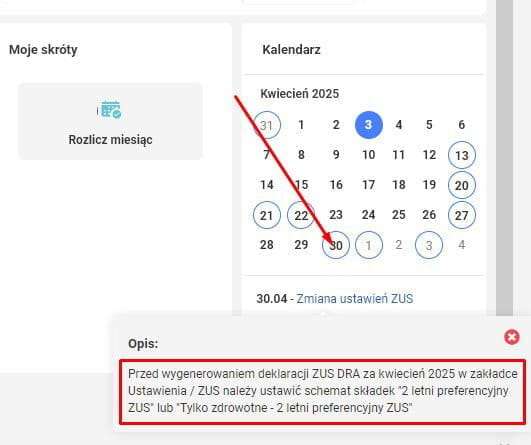
Ustawienia => Podatki => ZUS
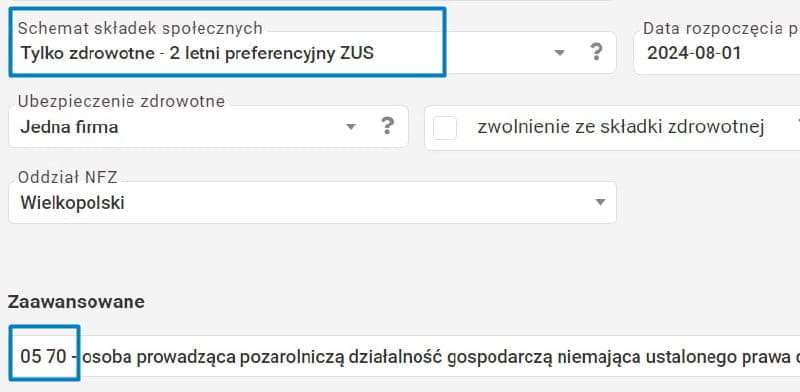
Replace "Tylko zdrowotne — 6-miesięczna ulga na start" with "2-letni preferencyjny ZUS". 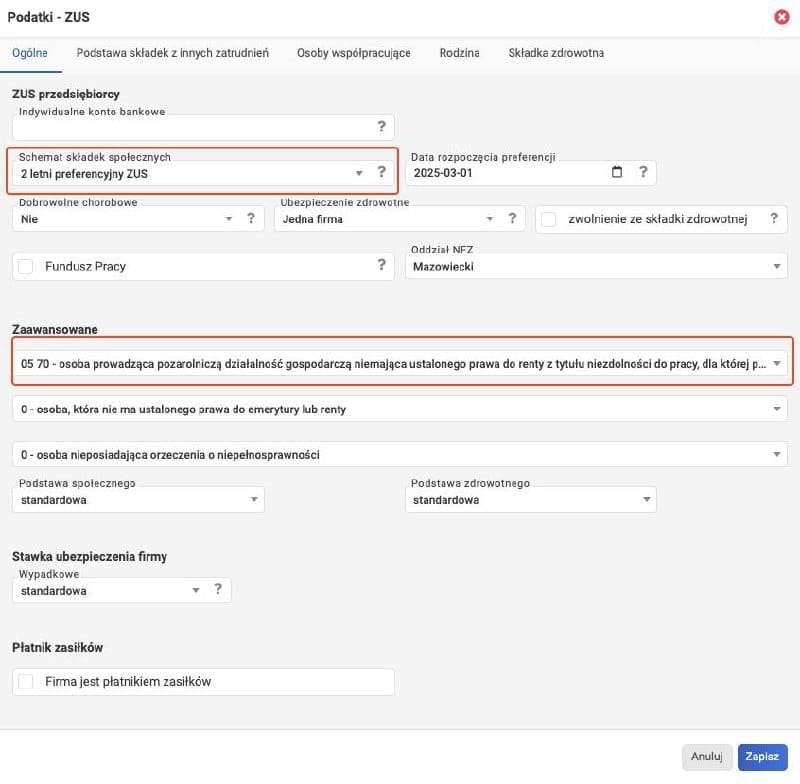
Exception: if you run your business in parallel with employment under Umowa o Pracę (UoP), and your UoP salary is at or above the minimum wage, then your employer pays the składki społeczne for you. In this case you're exempt from paying składki społeczne for yourself as JDG — choose "Tylko zdrowotne — 2-letni preferencyjny ZUS". You did submit ZUS ZZA in the previous step, right? The same applies to entrepreneurs who receive a pension.
UPP - sending confirmation
See UPP.
Common mistakes
See error collection.
Support our guide with a cup of coffee ♥