Migrating to inFakt
This document describes transferring your bookkeeping to inFakt.pl from another service (wFirma, iFirma, an accountant, etc.) in the middle of the year. After the initial setup, you need to correctly carry over the current year's history — otherwise inFakt will miscalculate your taxes, the składka zdrowotna rate, and the limits.
Who this is for
Suitable for a typical freelancer with a JDG on ryczałt issuing one or two invoices a month for services (programming). For VAT payers there are separate notes on carrying over the VAT nadwyżka.
Preparation
The initial inFakt setup is described in the "Setting up infakt.pl" guide. When migrating, pay special attention to the setup wizard steps where inFakt asks for:
- the month from which you keep records in inFakt — specify the migration month, not the month you started your business;
- the income amount since the beginning of the year — the amount from your ewidencja przychodów in the old system as of the end of the last month calculated there;
-
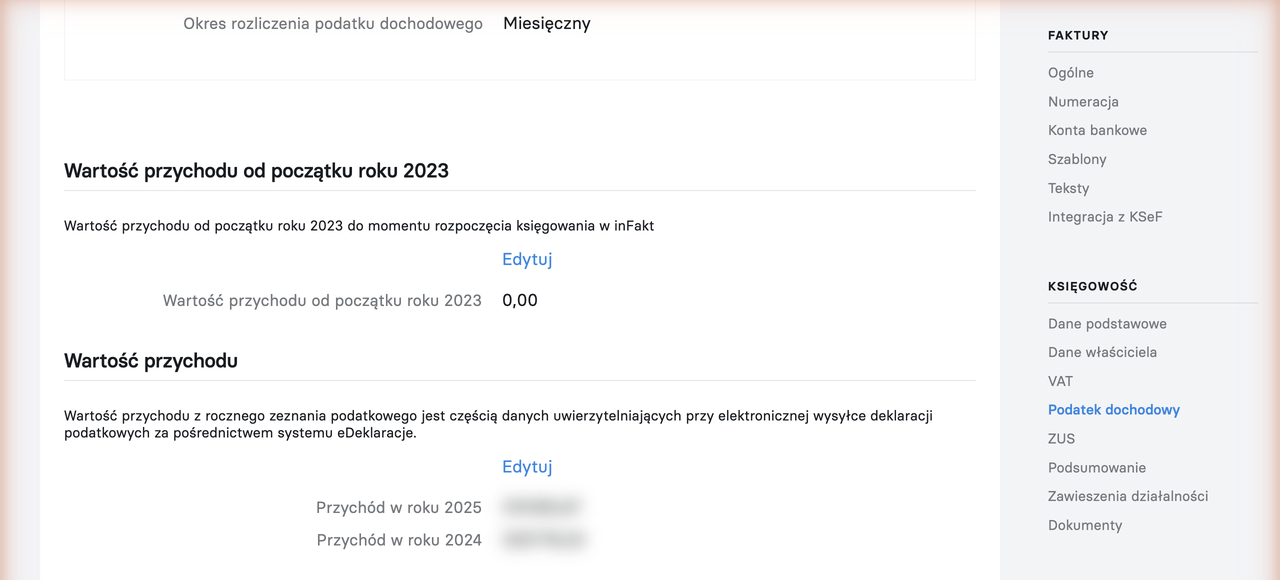
the previous year's income — needed to authorize declaration submissions (see the "Weryfikacja negatywna" error) and is entered in Ustawienia -> Księgowość -> Podatek dochodowy -> Przychód w roku N:
Theory
For the first month in inFakt to be calculated correctly, you need to carry over for it (and for the elapsed part of the year):
- INCOME from the previous year and the elapsed months of the current year — affects the składka zdrowotna rate (the 60,000 / 300,000 zł thresholds) and the VAT exemption limit (240,000 zł).
- INCOME: the reporting month's invoices — continuing the numbering from the old system.
- INCOME: exchange rate differences that arose in the reporting month on last year's invoices.
- ZUS CONTRIBUTIONS — set them up so that the amounts calculated by inFakt match what was actually paid (contributions in inFakt are calculated automatically and can't be entered by hand).
- The składka zdrowotna additional payment for the previous year (roczne rozliczenie), if it was paid in the current year.
Practice
Carrying over income from past months
Income earned before switching to inFakt is entered as a dowód wewnętrzny (internal document) — one per elapsed month, or as a single document for the total amount since the beginning of the year.
This way inFakt will correctly determine the składka zdrowotna rate and keep track of the limits, and the amounts in the ewidencja przychodów will match the old system.
Entering the current month's invoices
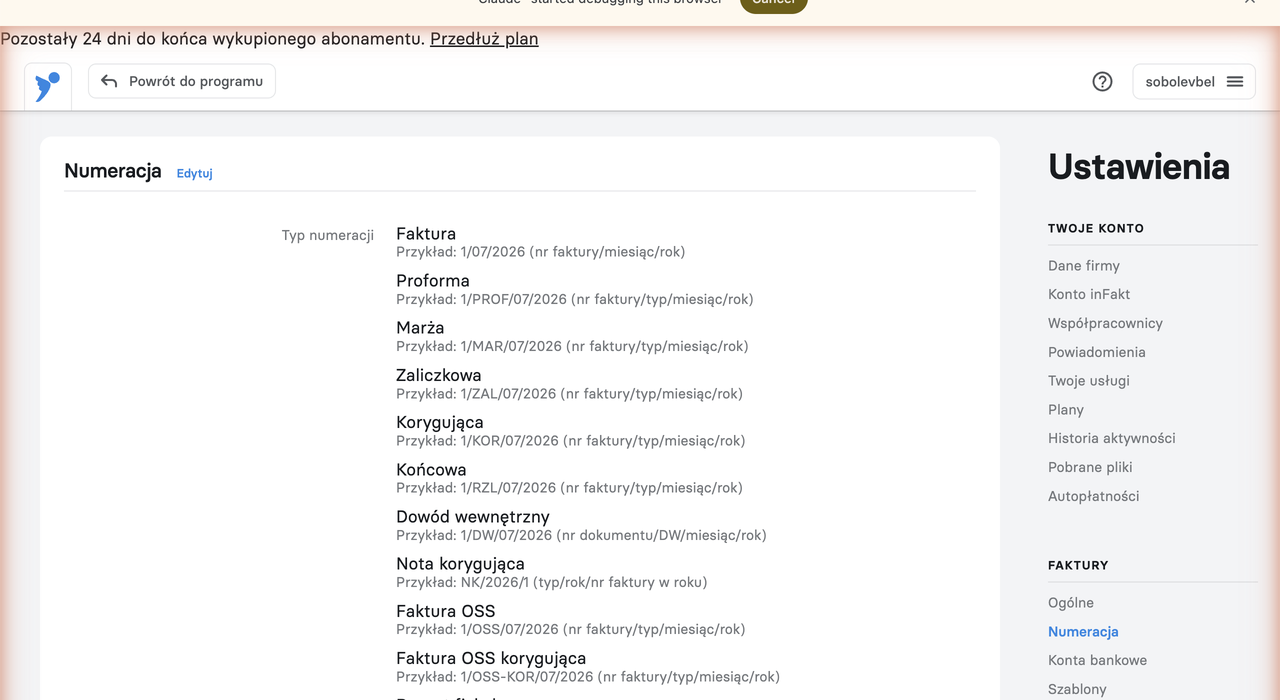
Issue invoices following the "Issuing invoices" instructions, but check the numbering: it must continue the existing series from the old system (for example, if the last invoice was 12/2026, the next one must be 13/2026). The number can be changed manually when creating an invoice, and the numbering format is configured in Ustawienia -> Faktury -> Numeracja:
If an invoice has already been paid — mark it as paid right away and enter the payment date so that inFakt correctly calculates the exchange rate differences (for payments in a foreign currency).
ZUS contributions
In inFakt, paid ZUS contributions can't simply be entered by hand — the application calculates them itself based on your income and settings (tax system, contribution scheme ulga na start / preferencyjne / duży ZUS, voluntary chorobowe, dates of transitions between schemes — see ZUS settings). The task during migration is to set the settings so that the amounts calculated by inFakt match the contributions actually paid in the old system.
Compare inFakt's calculation month by month against the actual payments (from your bank statement). Pay attention to two points where the calculations most often diverge:
- December składki społeczne paid in January. Under the cash basis they belong to January of the new year and reduce January's tax base — check that inFakt accounted for them exactly this way.
- The składka zdrowotna additional payment for the previous year (following the roczne rozliczenie, usually paid in May) — it must land in the calculations of the month it was actually paid.
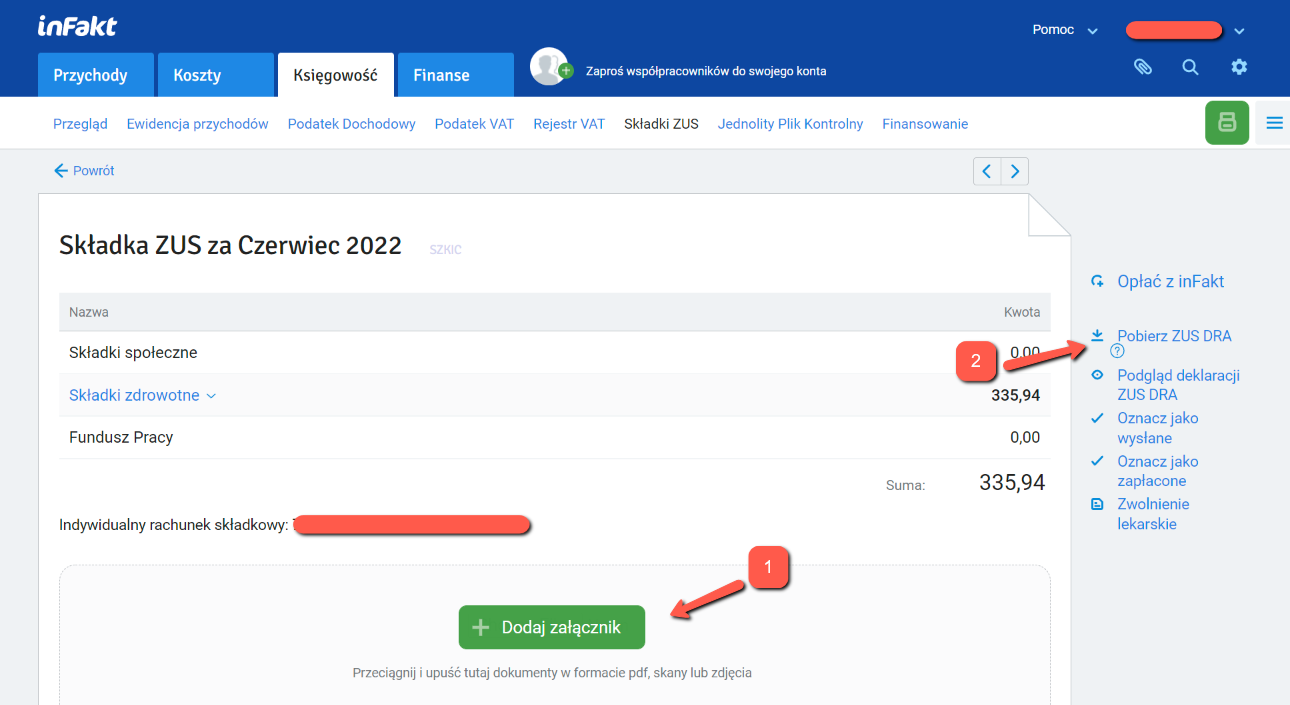
The contributions screen: Księgowość -> Składki ZUS — here you can see the periods, payment statuses, and amounts (including the "w tym z rozliczenia" line for the month with the additional payment from the roczne rozliczenie zdrowotnej).
Nadwyżka VAT (for VAT payers)
If you are a czynny VAT payer and the last JPK_V7M declaration from the old system had a kwota nadwyżki VAT do przeniesienia (VAT surplus to carry over), it needs to be entered in inFakt so that it makes it into the first declaration sent from the new system.
Reconciliation
After entering all the documents, compare against the old system's data:
- the running total in the ewidencja przychodów;
- the ryczałt/PIT calculated for the first month in inFakt;
- the składka zdrowotna rate and amount in the ZUS DRA declaration.
If everything matches — the migration was successful.
Don't resubmit declarations
ZUS DRA and JPK declarations already submitted from the old system don't need to be submitted again. In inFakt they can be marked as recorded/paid without sending.
What's next
From here on it's the usual routine: monthly operations in infakt.pl.
Support our guide with a cup of coffee ♥