PIT Declaration¶
PIT is the personal income tax on individuals (podatek dochodowy od osób fizycznych).
Every entrepreneur who ran a business in the previous year is required to submit an annual tax declaration.
Types of PIT Declarations¶
| Form | Who must file | Notes |
|---|---|---|
| PIT-28 | Entrepreneurs who used the ryczałt taxation system during the reporting year. Individuals who received rental income. | |
| PIT-36 | Entrepreneurs who used the general taxation system (skala podatkowa 12%/32%) during the reporting year. Employees with income from abroad or other sources | Option for joint filing with a spouse or child |
| PIT-36L | Entrepreneurs who used the flat-rate taxation system (podatek liniowy, 19%) during the reporting year | |
| PIT-37 | Employees who received income from employment (skala podatkowa 12%/32%) | Filled based on PIT-40A/PIT-11A or PIT-11 from the employer. Auto-generated and submitted on 30.04 at 23:59 if you don't send your own version to the tax office |
| PIT-38 | Individuals who received capital gains (crypto transactions, investments, dividends, interest on deposits in foreign banks, etc.) | Auto-generated and submitted on 30.04 at 23:59 if you don't send your own version to the tax office |
| PIT-39 | Individuals who received income from real estate sales |
Income from Multiple Sources¶
Situation: In the previous year I had income from my JDG taxed under the ryczałt system, and now I'll have income from other sources (say, a side gig) taxed under the general system (skala podatkowa). How do I calculate my income to determine the 12/32% tax rate? Can I use the tax-free allowance for employment income up to 30,000 zł if my total individual income exceeds 30,000 zł including ryczałt?
Answer: At year-end, Ryczałt is declared separately in PIT-28. Skala podatkowa 12/32% is declared separately in PIT-36 or PIT-37. Income under skala podatkowa and ryczałt is NOT combined!
Jeżeli prowadzisz działalność gospodarczą opodatkowaną ryczałtem od przychodów ewidencjonowanych i jednocześnie osiągasz przychody z innych źródeł, na przykład z umowy o pracę, umowy zlecenia, umowy o dzieło, emerytury, najmu prywatnego opodatkowanego na zasadach ogólnych, albo z tytułu sprzedaży innych rzeczy, musisz odrębnie opodatkować i rozliczyć dochody z działalności gospodarczej oraz dochody osiągnięte z pozostałych tytułów. W tym przypadku dochody z działalności gospodarczej nie łączą się z dochodami uzyskanymi w ramach innych źródeł przychodów.
📚 Source: Jak rozliczać przychody z różnych źródeł
Joint PIT¶
Who Is Eligible to File a Joint PIT¶
A joint PIT can be filed by spouses if both of them use the general taxation system (Skala podatkowa w podatku dochodowym na zasadach ogólnych), do not use ryczałt, and have not signed a separate property agreement. Another condition is that the spouses were married for the entire year, or got married during the reporting year and were still married on the last calendar day of the year.
Important!
If at least one spouse files a non-zero PIT-28 (with JDG income under ryczałt), they cannot file PIT-37 or PIT-36 jointly.
PIT-28 with rental income is an exception that does not prohibit joint filing by spouses.
A joint PIT with a child can be filed by a parent or guardian raising a child alone (Osoba samotnie wychowująca dziecko).
Example 1
Spouse-JDG on skala podatkowa + Spouse with no income = can file a joint PIT-36.
Example 2
Spouse-JDG on skala podatkowa + Spouse-employee = can file a joint declaration (PIT-36 instead of PIT-37 in this case).
Example 3
Spouse-JDG on ryczałt + Spouse with no income = CANNOT file a joint declaration. The JDG spouse declares income separately in PIT-28.
Example 4
Spouse-JDG on ryczałt who also worked as an employee that same year + Spouse-employee = CANNOT file a joint declaration (even for the portion of income taxed under the general system). The employee spouse declares income in PIT-37. The JDG spouse files two declarations: PIT-28 for ryczałt and PIT-37 for employment (or PIT-36, if needed).
Example 5
Spouse-JDG on ryczałt, business paused, zero income for the previous year + Spouse-employee = can file a joint PIT-37 (or PIT-36, if needed). The JDG spouse submits a zero PIT-28.
Useful links
📜 Law: Art. 6 - Podatek dochodowy od osób fizycznych.
📚 Wspólne rozliczenie małżonków - tax office website
📚 Wspólne rozliczenie małżonków PIT - e-pity
📚 Osoba samotnie wychowująca dziecko - tax office website
Ways to File PIT¶
- In person at the tax office
- Send a completed paper declaration by mail (list polecony or courier)
- Online via the Internet
In this guide we'll focus on online filing as the most efficient method.
Software for Filing PIT¶
Choose a service based on your preferences and where you kept your books last year (full year). Here's a list of popular services:
| Service | Advantages | Disadvantages | Instructions |
|---|---|---|---|
| Twój e-PIT | Government, official. Great for simple cases, e.g. PIT-37 with income from umowa o pracę. This guide has instructions for JDG. | Can get confused with foreign income, hard to automatically add it to the tax base. | PIT-28 via Twój e-PIT |
| e-pity | A tried-and-true service, handles non-standard cases well. This guide has instructions for JDG. | - | PIT-28 via e-pity for Android |
| fill-up | Ideal for those who kept books in inFakt — allows automatic data import. Others can fill in manually. | - | PIT in inFakt |
| pitroczny.pl | A service for those who kept books in iFirma. | Opens late: approximately after March 9 | Instructions for pitroczny.pl in Telegram |
| wFirma | Can generate and submit PIT on its own, no intermediaries needed. | Only free during the first year for new clients | Official PIT-28 instructions |
e-pity for Android¶
Here I'll explain how to submit a PIT-28 declaration using a JDG with the ryczałt taxation system as an example. For other taxation systems the process may differ slightly, but overall it will be similar.
To create and submit the declaration we'll use the free app e-pity, specifically its Android version.
0. Settings and the 1.5% Tax¶
This step is optional but still important.
You have the right to direct 1.5% of the tax you've already paid to any charitable organization. If you don't do this, that percentage simply goes to the tax office, so it makes sense to fund something you care about.
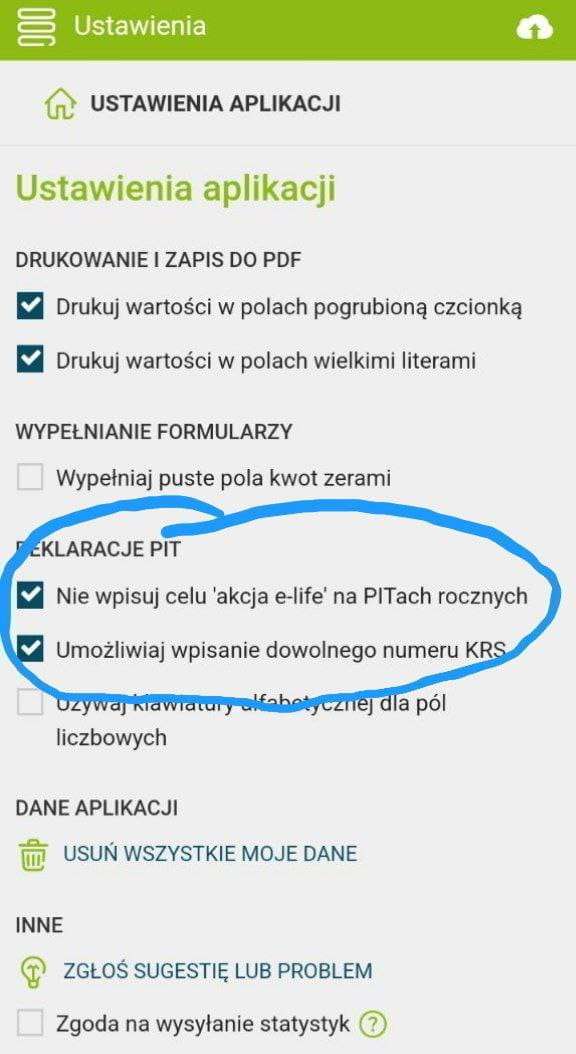
To be able to choose the organization you want, you need to check the boxes in the settings as shown in the screenshot, and later provide the KRS number of the organization you want to send your 1.5% to. If you don't check the boxes, the app will pick some default fund.
1. When to Submit¶
Officially, the annual declaration must be submitted between February 15 and April 30 inclusive. In 2028 the deadline shifts to May 2, since April 30 falls on a Sunday and is followed by the public holiday on May 1.
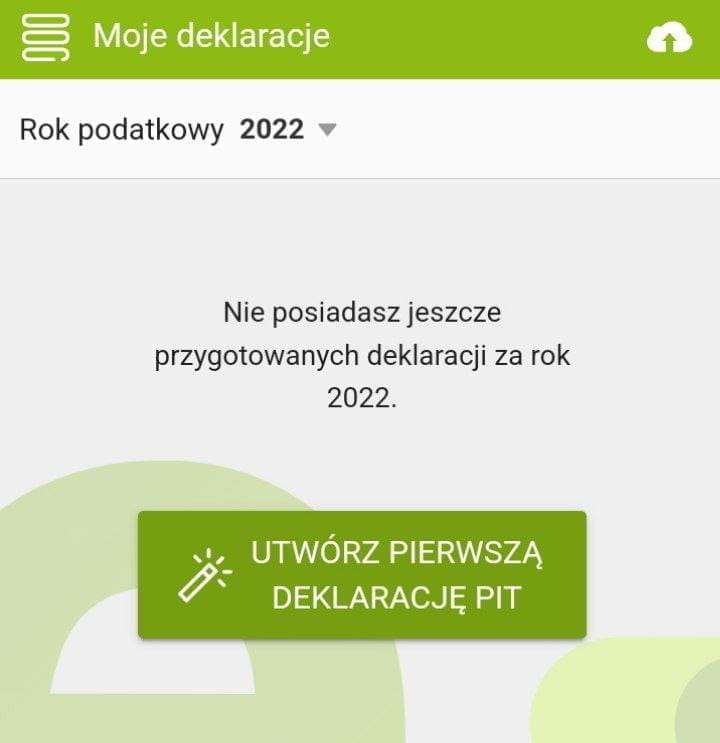
In practice, you can submit as early as January, but declarations won't start being processed until February 15. And of course, the earlier you submit, the sooner you'll get your tax refund.
Now press the big button to create your declaration.
2. Declaration Calculation Method¶
Here you can choose the calculation method. Options are:
- Individual calculation.
- Together with a spouse. Only available under the general taxation system. If your spouse doesn't work or earns little, this method lets you double your first tax bracket at the 12% rate. As a result, you should pay less tax or get a refund.
- Together with a spouse who died during the year. Same as above, with one exception.
- Single parent raising children.
Also, at this step you can choose whether to create a new declaration or correct an existing one.
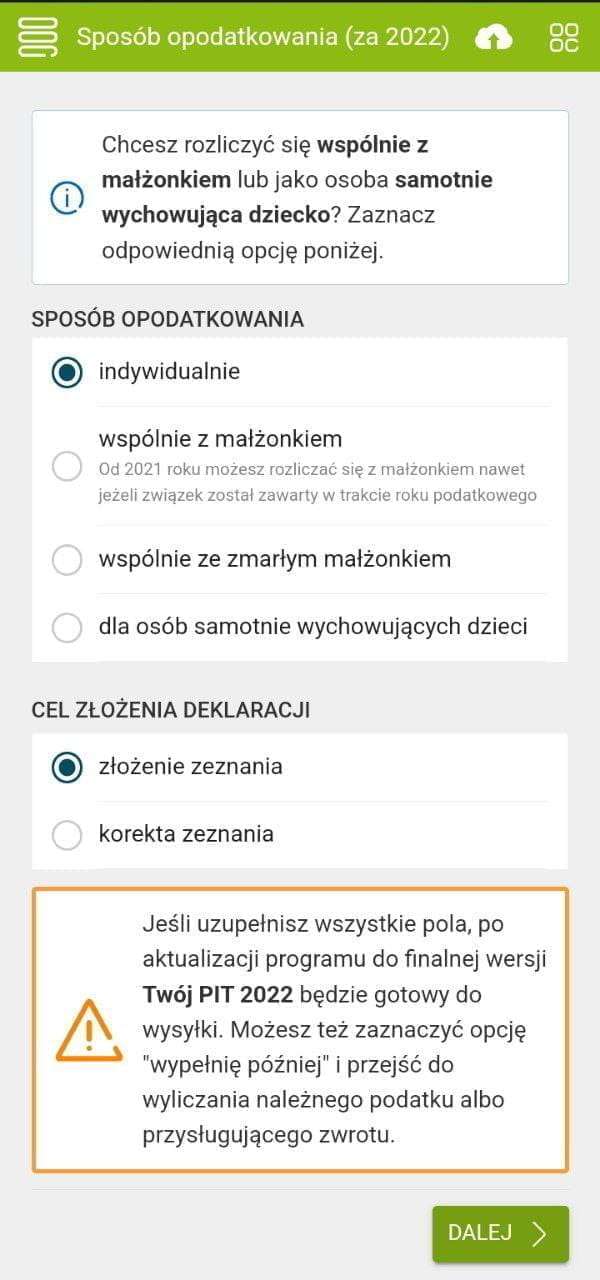
Below is an example of a declaration with individual tax calculation.
3. Personal Information¶
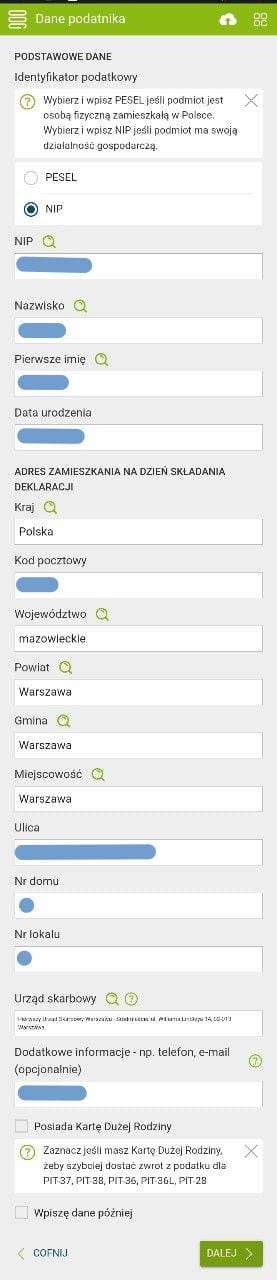
Here you need to fill in your details. Note that since you're filing as an entrepreneur, you must provide your NIP, not PESEL. You also need to enter your name, address, and select your tax office. If you have a karta dużej rodziny, enter it here — your tax refund will come faster.
4. Income Type¶
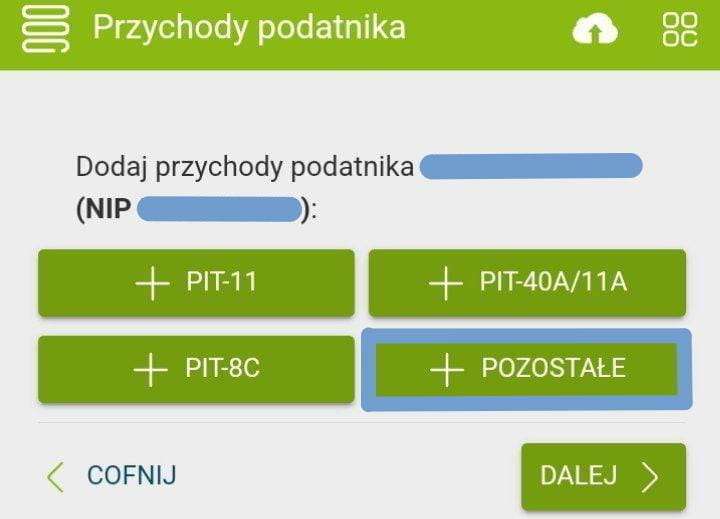
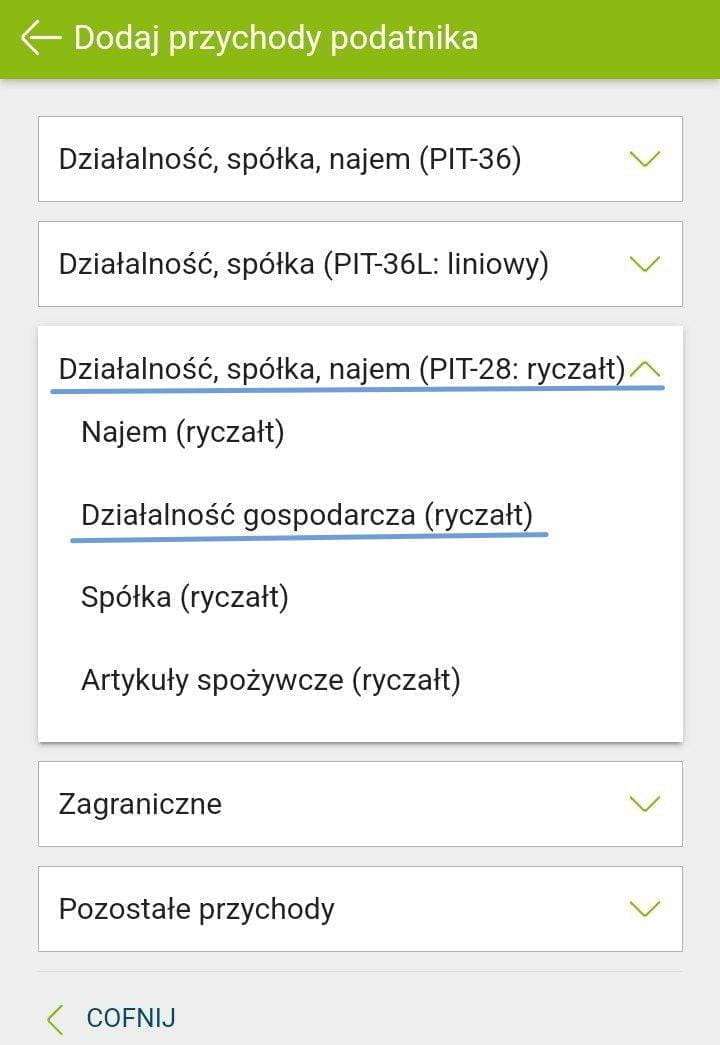
On the next screen you need to add your income. Press Pozostałe and choose your taxation system.
- General system: PIT-36
- Flat-rate system: PIT-36L
- Ryczałt: PIT-28
We'll choose ryczałt and PIT-28 as an example.
5. Gross Income Amount¶
At this step you need to enter the full name of your business (which usually matches your name), and the gross income amount excluding VAT in PLN for the entire year at the appropriate rate. If you worked at different rates, enter the corresponding amounts in the appropriate fields.
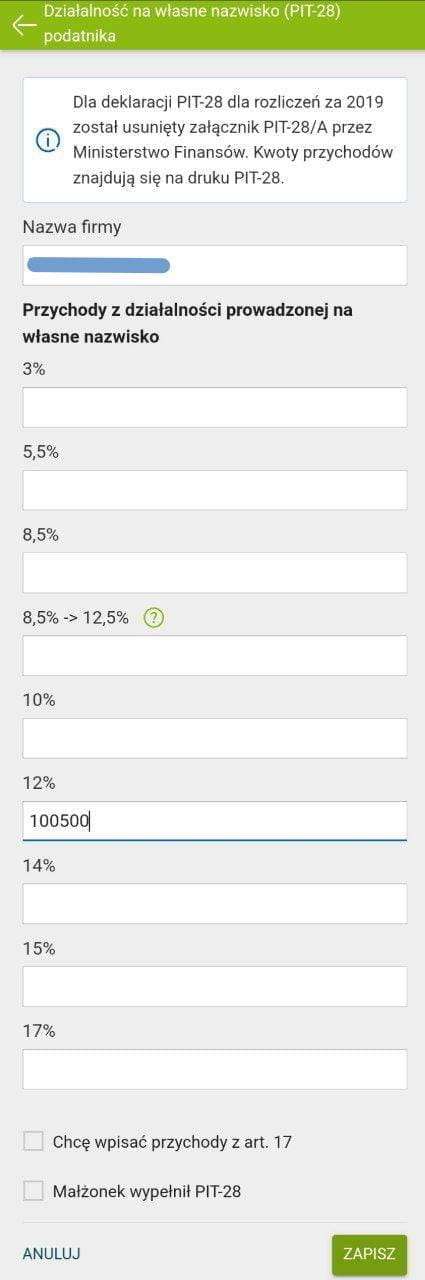
Press "Zapisz" to return to the previous screen, where your income info should now appear. Press Dalej.
6. ZUS Contributions¶
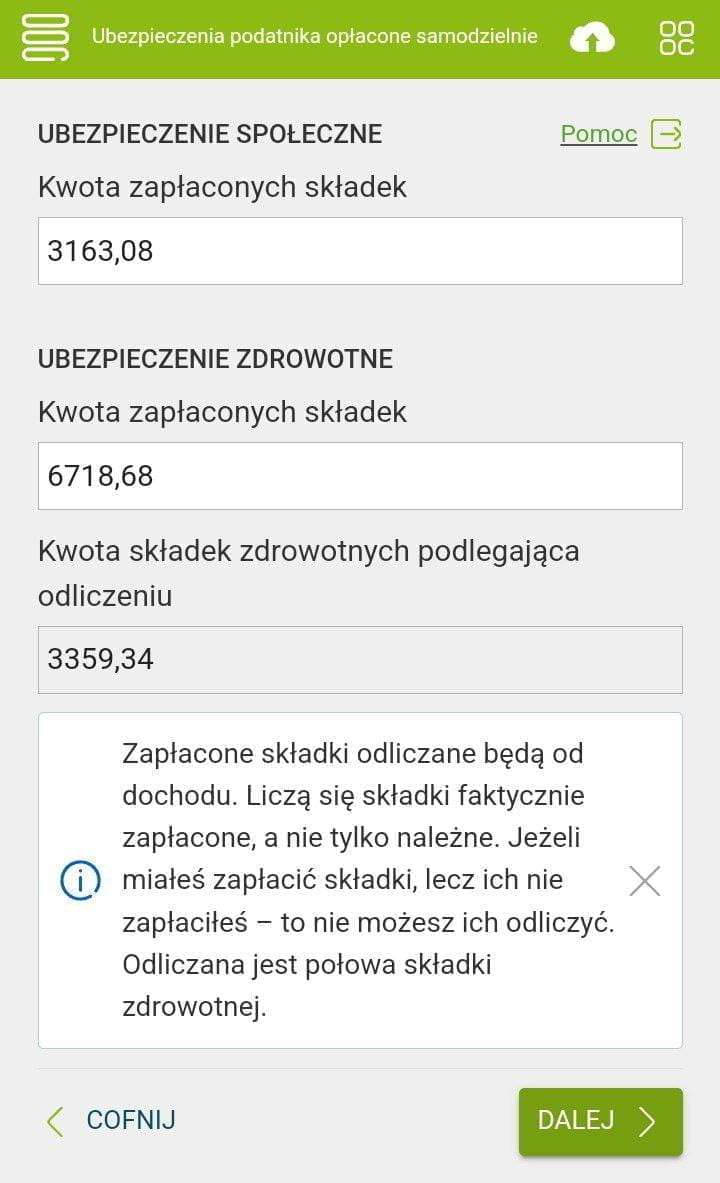
Next, fill in the ZUS contributions for 12 months in separate fields: social contributions (first field) and health insurance (second field). If you have ulga na start active, your social contribution will be 0. The app will automatically calculate the deductible amount — half the health insurance contribution.
You can find your payments in the ZUS portal (Płatnik->Podział wpłat). To get data older than a year, use the "Zamów dane archiwalne" button (within 48 hours the requested data will appear on the same tab).
Note that you need to enter contributions actually paid during the reporting year. Contributions paid in the new year (following the reporting year) should not be included, even if they're December contributions — you'll include those in next year's PIT.
7. Taxes Paid¶
On the next step, in the 12 fields "Kwoty ryczałtu należnego obliczone i wykazane w ewidencji (zaokrąglone do pełnych złotych)" you need to enter month-by-month the amounts of income tax due, calculated and recorded in the ewidencja (rounded to full złoty). If you pay taxes quarterly, check the appropriate box.
There's a difference from ZUS payments here: you must enter the calculated tax amount in the field for the reporting month, regardless of the fact that you actually paid it the following month.
Example 1
For July you owe 2,000 PLN in taxes. You actually paid it by August 20, but in the PIT you need to enter this tax in the July (lipiec) field.
Example 2
For December you have 1,500 PLN in taxes, and you paid it by January 20 of the following year. But in the PIT you need to enter it in the December (grudzień) field.
It's possible that the amounts in your ewidencja don't match the amounts of tax actually paid (monthly advances). Accidentally overpaid? Made a mistake in the payment description? Or recalculated taxes at the end of the year and found an underpayment for previous months? Things happen.
At the very bottom of the form there's a field "Kwota wpłaconego ryczałtu za cały rok". By default, the "sum" checkbox (sumowanie kwoty za cały rok) is checked and the total paid tax is calculated automatically. Uncheck it if the amounts from your ewidencja don't match the payments made. It's important to understand the difference: - in the first 12 fields, the taxpayer enters how much they should have paid, - and in the second-to-last field, how much they actually paid.
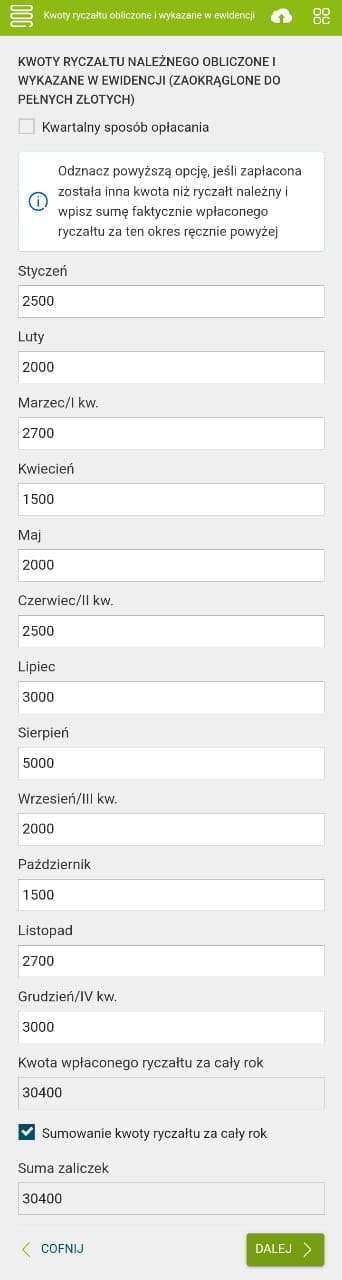
Press Dalej.
8. Tax Reliefs and Deductions¶
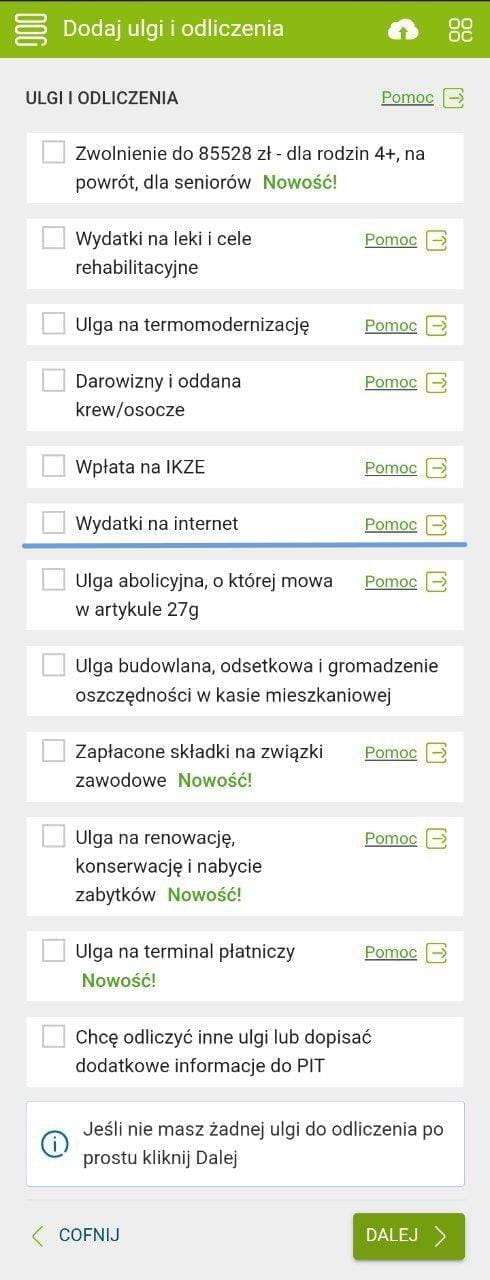
On the next step you can use tax reliefs and deductions if you're eligible. Read about each one and decide whether it applies to you.
9. Internet Deduction¶
Among the reliefs there's an interesting one available to anyone in Poland — the internet deduction. It lets you recover internet costs for the year up to 760 zł. You can use it for any two consecutive years, once in your lifetime. You can't skip a year between those two — if you used it last year, you must use it this year too. Also, you cannot deduct internet costs if you already wrote them off as business expenses (on the general or flat-rate taxation systems).
This deduction covers home and mobile internet as well as payments for any other public internet, for example, in an internet cafe. You need to keep receipts or invoices for all internet payments — they may sometimes be requested.
You can read more, for example, in the PITax article on ulga internetowa, or just google "ulga na internet".
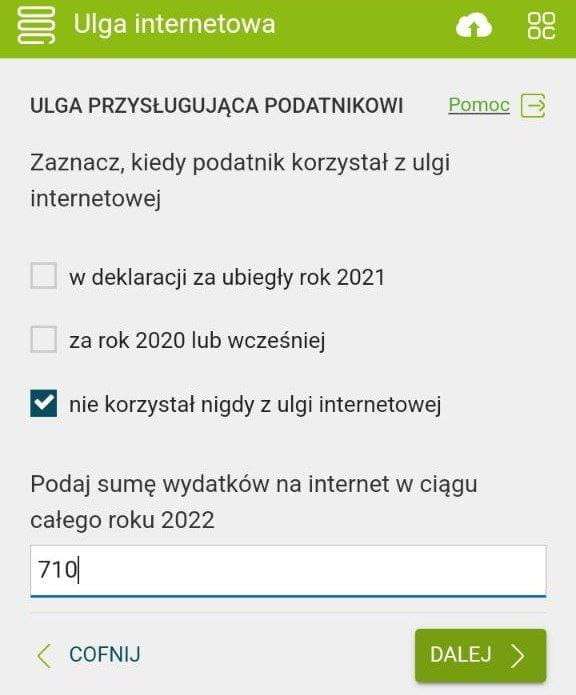
Select the third checkbox if you haven't used the deduction before, or the first one if you used it last year. In the field, enter the total of all your internet costs for the year.
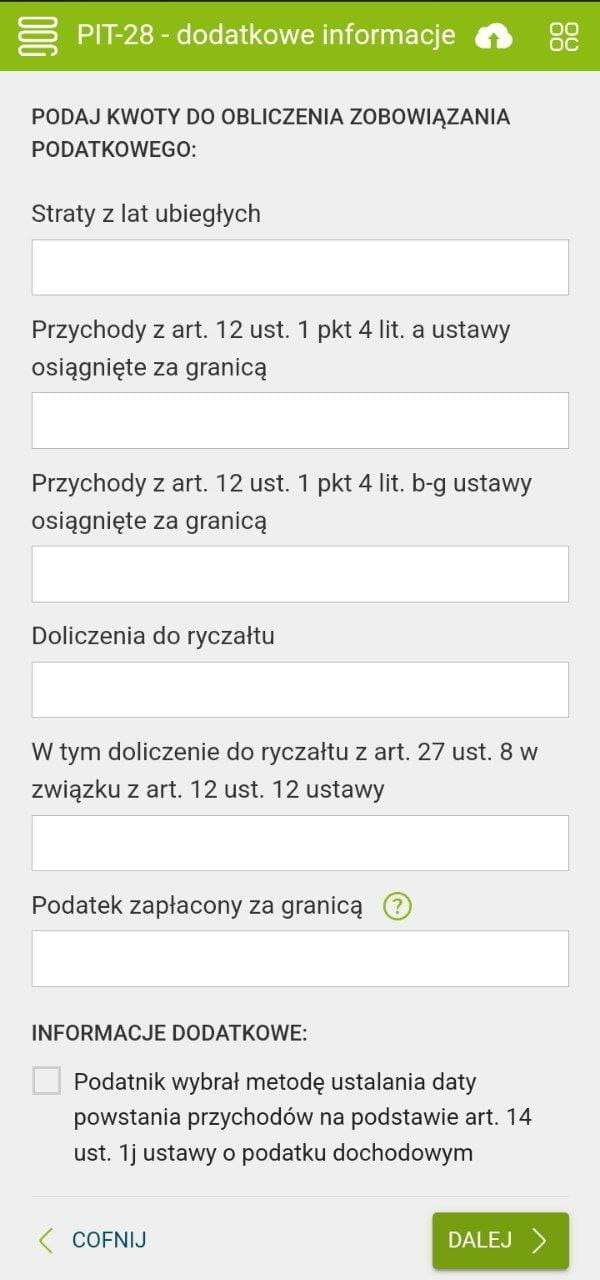
10. Additional Information¶
The next step covers specific edge cases that people might encounter. Nothing applies to me, so I just press Dalej.
11. Debtors and Creditors¶
Next you can enter information about your debtors and creditors. I don't have any, so I just move on.
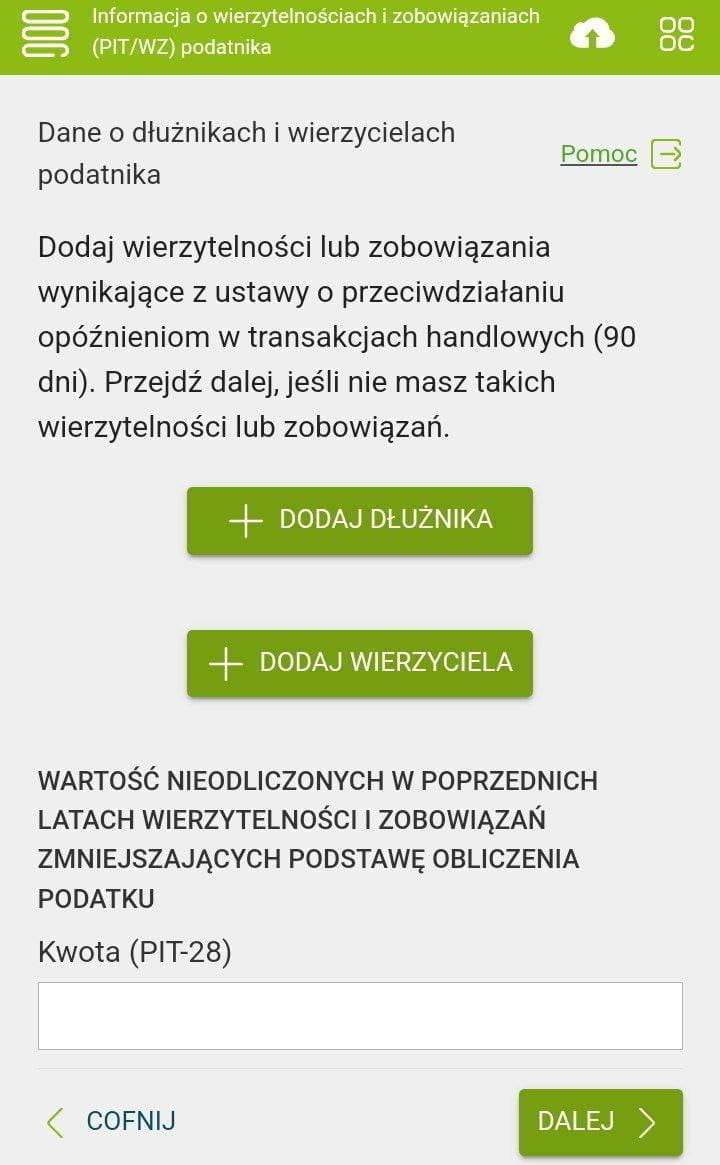
12. Enter Your Bank Account for the Refund¶
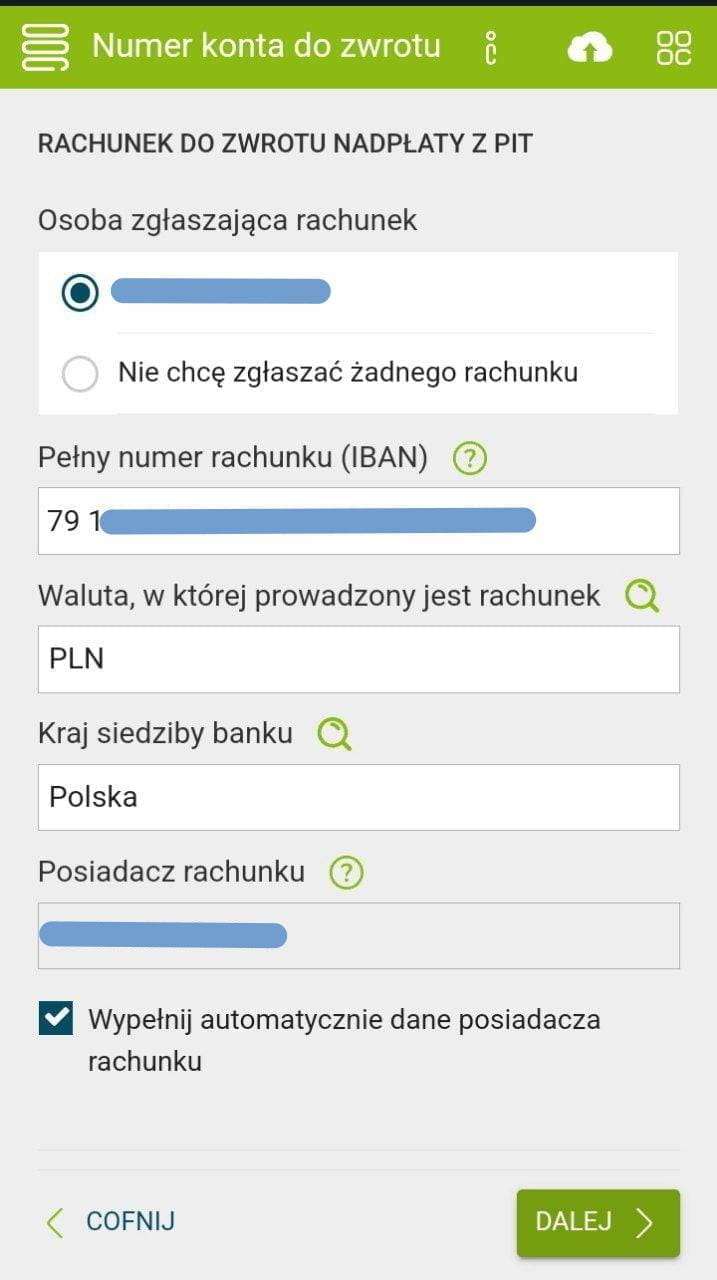
Enter your account number and name. You can use any account — it doesn't have to be your business one. If the account is shared with your spouse, you need to enter the names of all account holders.
13. Donate 1.5% of Your Paid Tax to Charity¶
On the next step you can specify a fund to receive 1.5% of the tax you've already paid. You don't need to pay anything extra. You can opt out and the 1.5% will simply go to the tax office, but it's better to help someone — it's a great opportunity.
To direct 1.5% of your tax to a fund, you need to enter its KRS number. You can find funds helping children, animals. There are funds supporting Ukraine and Belarus. Look for something that interests you.
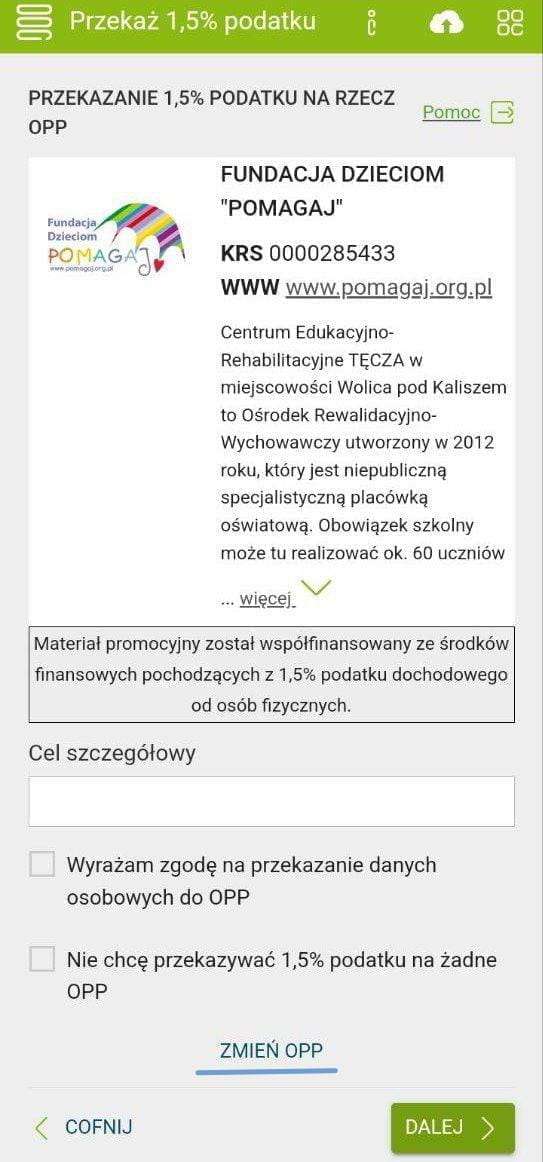
Press the ZMIEŃ OPP button and on the next step choose a fund you're interested in or manually enter the KRS number of the fund you want.
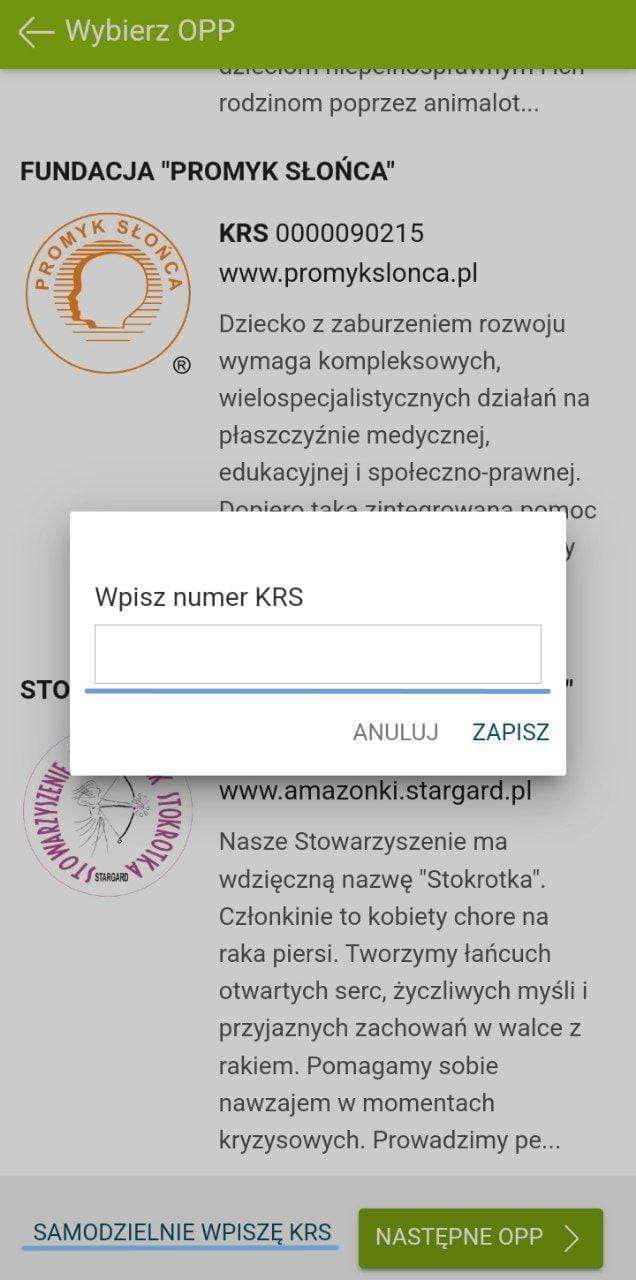
14. List of Funds¶
Below is a list of funds that might interest you.
Cel szczególowy is not always required. Enter it without quotation marks, exactly as shown.
- 0000507234 - Belarusian initiative Partyzanka (cel szczegółowy: 85537). Helping refugees from Belarus and Ukraine.
- 0000030279 - Polish fund Ocalenie, actively helping refugees from Belarus, Ukraine, and other countries.
- 0000190607 - Towarzystwo przyjaciół Ukrainy.
- 0000507234 - Fundacja Stand with Ukraine (cel szczegółowy: 83905). Helping war victims.
- 0000017257 - Animal shelter fund Fundacja św. Franciszka.
- 0000348880 - School for children with disabilities Bona Fide.
- 0000883672 - Center for Belarusian Solidarity.
- 0000270261 - Belarusian Youth Hub (cel szczegółowy: HUB Warszawa 11876).
- 0000507234 - Zerkalo (cel szczegółowy: 84784).
- 0000507234 - Dzik pic, devby.io (cel szczegółowy: 85644).
Children's medical treatment:
- 0000396361 - Paulina Danilchanka - cel szczegółowy: 0890517 Paulina
- 0000396361 - Yeudakim Zakharevich - cel szczegółowy: 0451161 Yeudakim
- 0000396361 - Anastasiya Liaszczewicz - cel szczegółowy: 0491365 Anastasiya
- 0000396361 - Margarita Datskiewicz - cel szczegółowy: 0104216 Margarita
- 0000037904 - Artur Nikanau - cel szczegółowy: 44133 NIKANAU ARTUR
- 0000396361 - Artem Padzialowski - cel szczegółowy: 0568766 Artyom
- 0000037904 - Zlatoslava Mytnik - cel szczegółowy: 40923 Mytnik Zlatoslava
- 0000396361 - Vasilisa Loban - cel szczegółowy: 0165621 Vasilisa
- 0000037904 - Dzmitry Kharutski - cel szczegółowy: 43917 Kharutski Dzmitry
- 0000037904 - Petr Vakhrameyev - cel szczegółowy: 42671 Vakhrameyev Petr
List of funds from e-pity.pl.
If you check the box to share your data with the fund, they'll send you a report next year on how they spent your money.
15. Summary¶
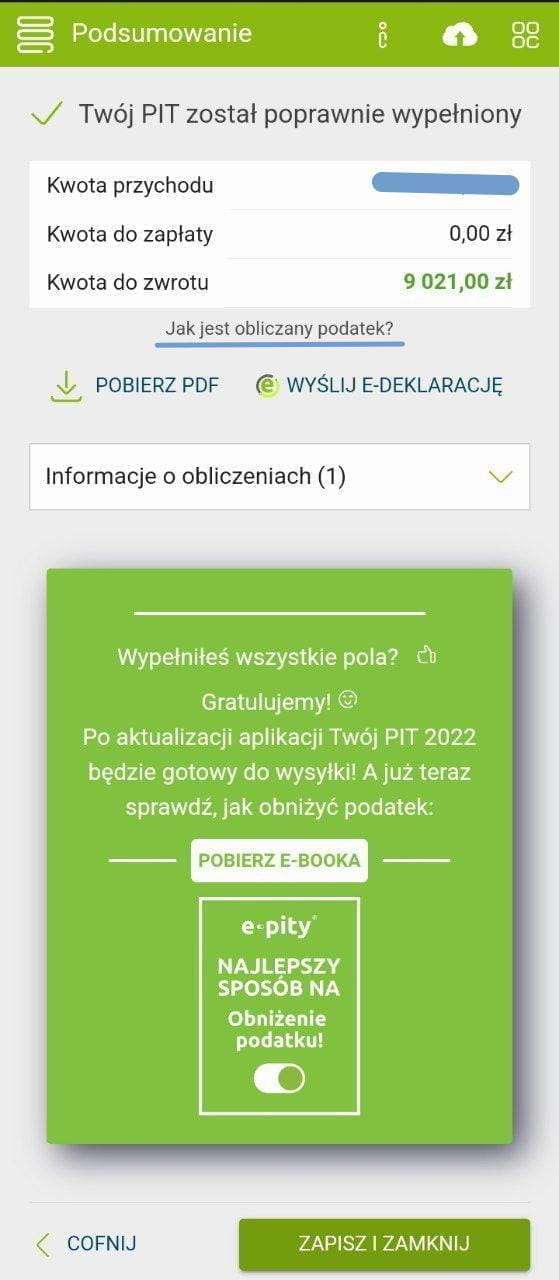
On the final screen you can see how many złoty you've been calculated for a refund or additional payment. Here you can also download a PDF of the declaration and view the refund or underpayment amounts.
To see how the refund or underpayment was calculated, press the "Jak jest obliczany podatek?" button.
16. Submitting the Declaration to the Tax Office¶
On the next step you can submit the declaration to the tax office. The submission was successful if you received a UPO with status 200 in response.
If this isn't your first declaration, the app will ask you to enter the exact income amount from the previous year for verification.
Worth mentioning: you are required to keep a copy of the PIT declaration along with its UPO for 5 years from the date of submission.
Also, people living in Warsaw can now get a Karta Warszawiaka if they filed taxes in Warsaw. To do this, go to a ZTM customer service point with your city card, a printed first page of the PIT declaration, and the UPO for it. In other cities the procedure is similar.
17. Declaration List¶
Now on the main screen you can see your declaration. You can download it and visually check that everything is in order.
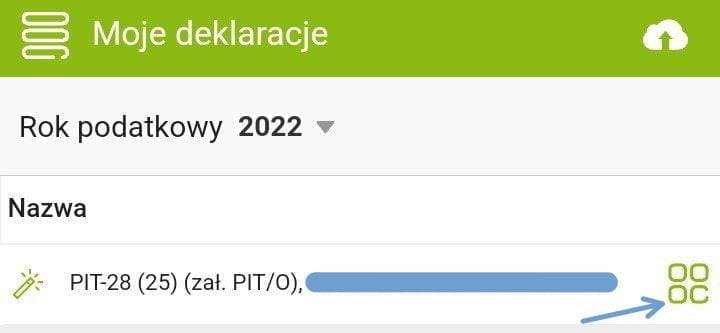
You can manage the declaration using the button on the right.
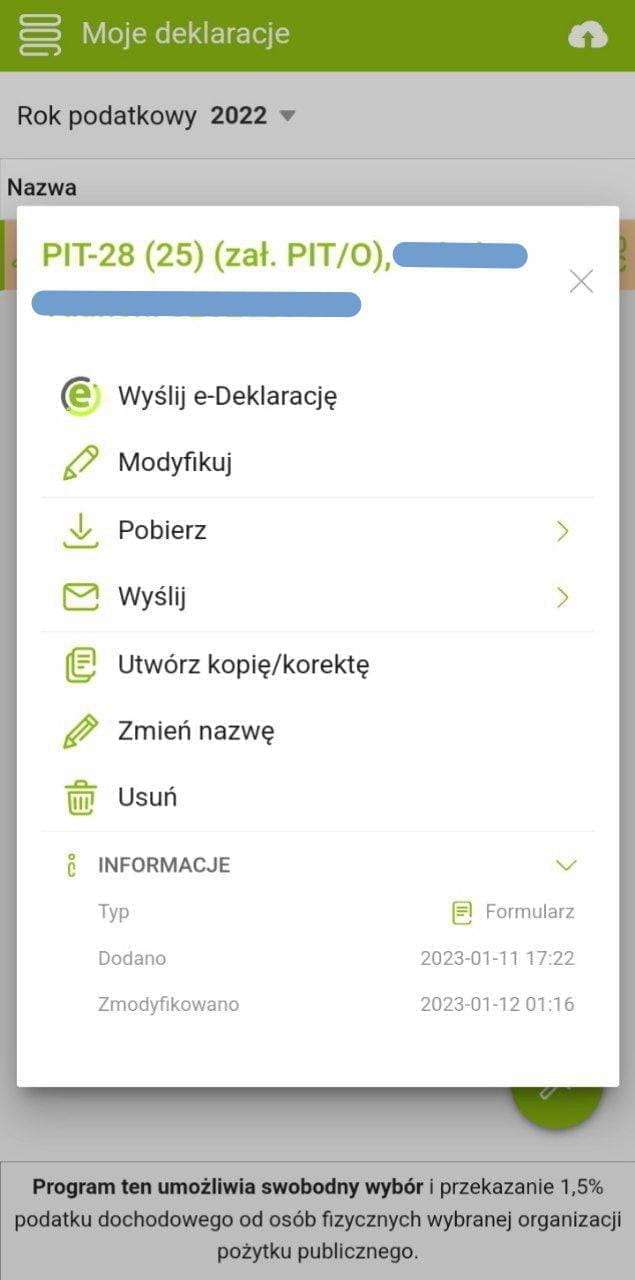
Using the corresponding buttons you can submit the declaration to the tax office, edit it, download the PDF, rename it, delete it, or submit a correction if you want to change something after it's been sent to the tax office.
For applying for a residence permit, download the declaration together with the UPO.
PIT-28 via Twój e-PIT¶
This is an alternative way to file a PIT declaration — the official government service Twój e-PIT (in e-Urząd Skarbowy). It's not very different from the e-pity service, but some people might find it more convenient. The government Twój e-PIT is great, especially if you have a simple ryczałt for one person. Here's a picture guide.
1. Login¶
Go to https://urzadskarbowy.gov.pl/services: log in via your bank, profil zaufany, or using last year's data, and select Twój e-PIT.
2. Choosing a Declaration¶
A page will open where you choose which PIT to submit. PIT-28 will be at the very bottom.
3. Choose the Type of Activity¶
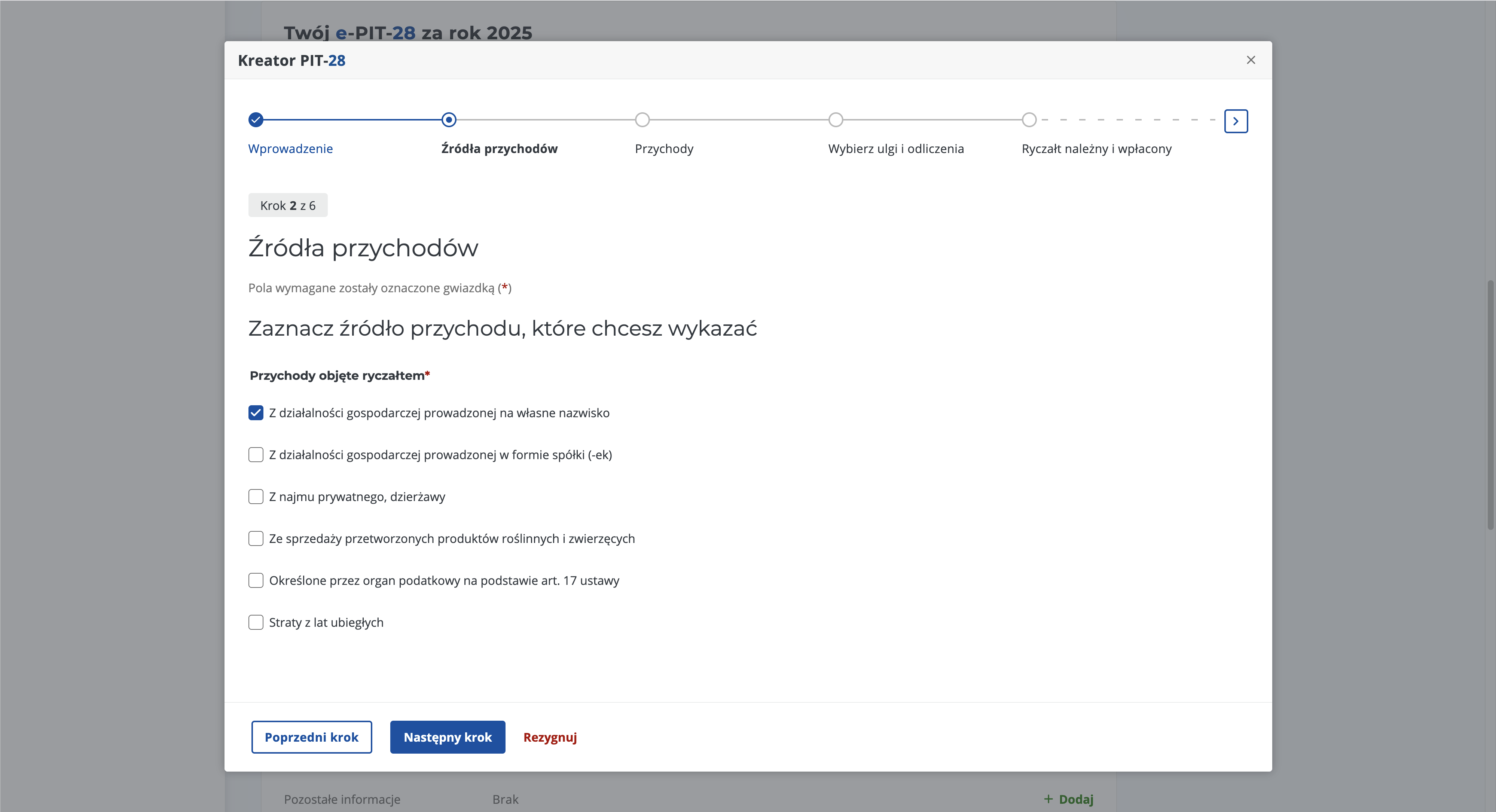
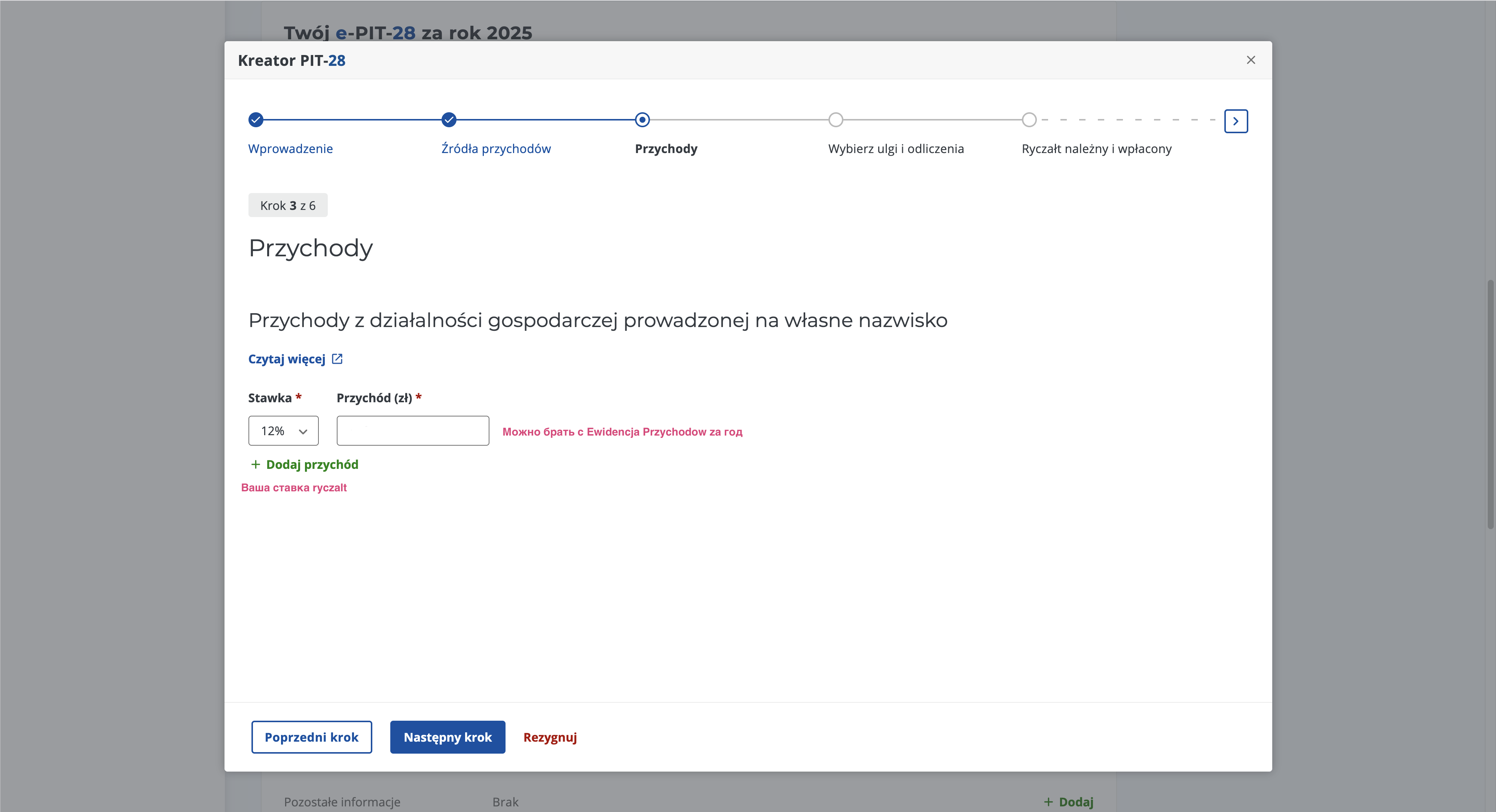
4. Enter Your Income¶
I take it from ewidencja przychodów for the last month of the reporting year — it has the annual total.
5. Next Is the Reliefs Step¶
Since I only use the ZUS contribution deduction, I'll write about that — it applies to everyone. For other reliefs, read below in the guide: Reliefs.
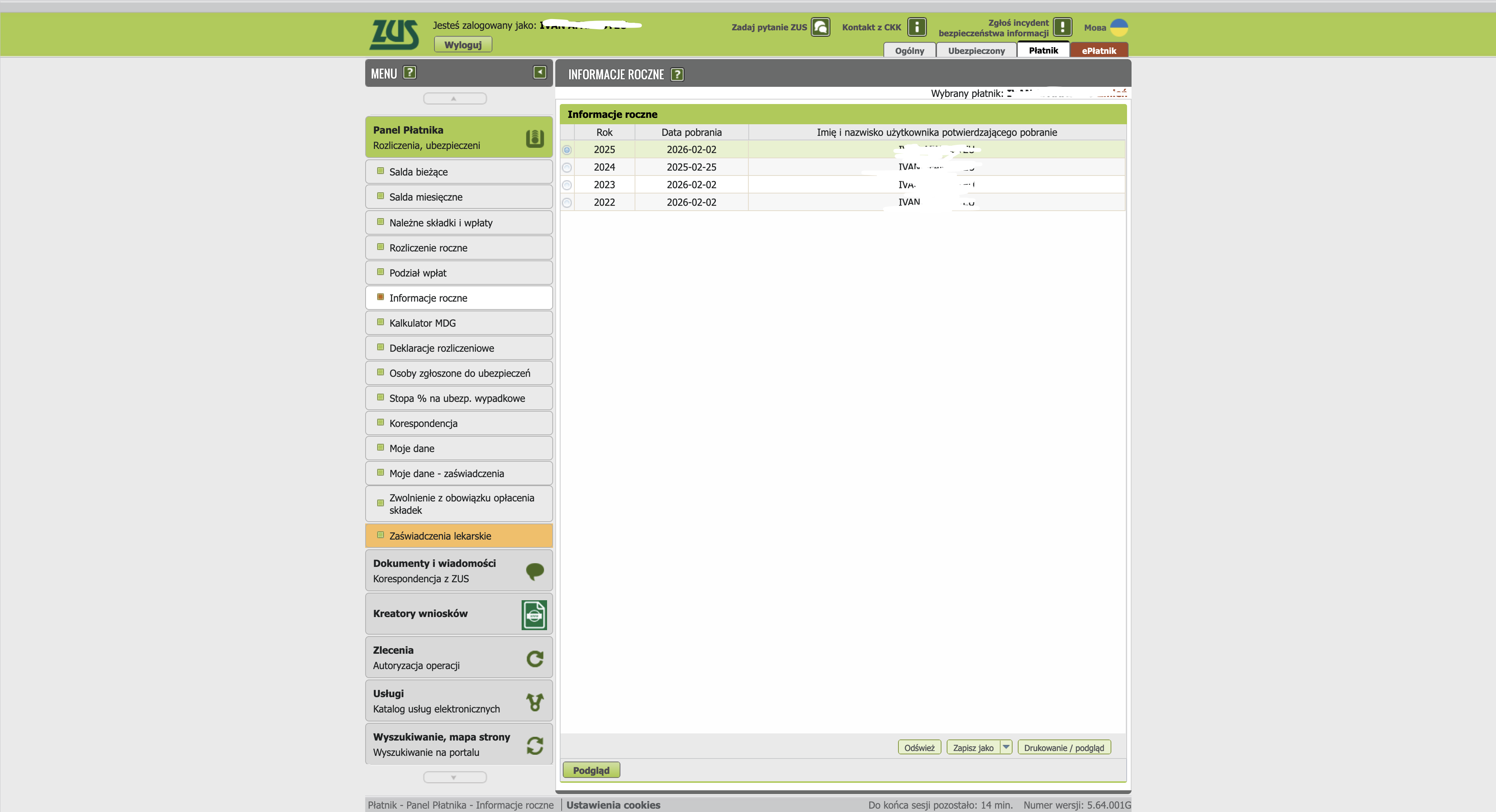
- 5.1 - log into ZUS
- 5.2 - choose informacje roczne
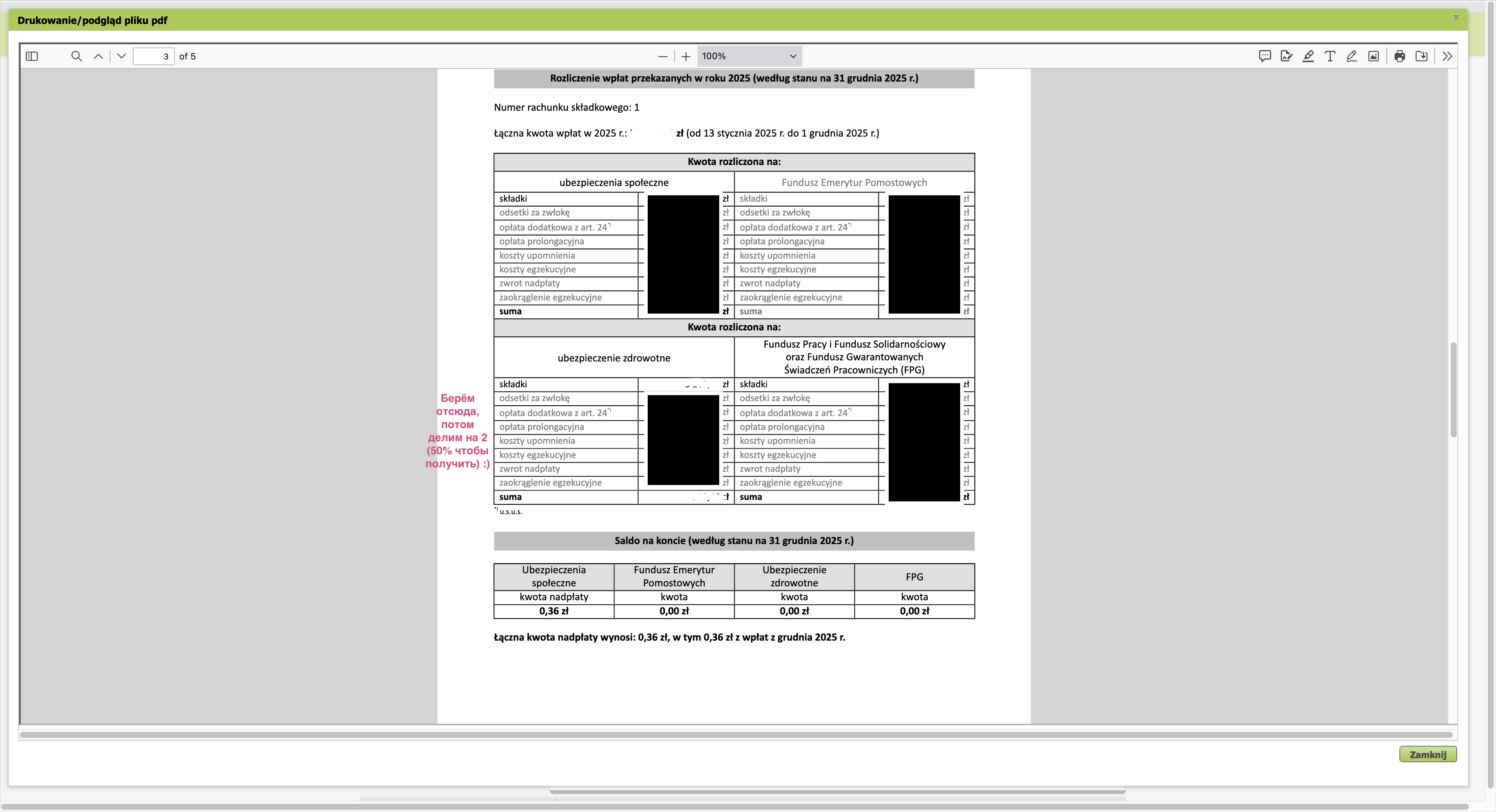
- 5.3 - view the document for the needed year and find the zdrowotna (FUZ) contribution there
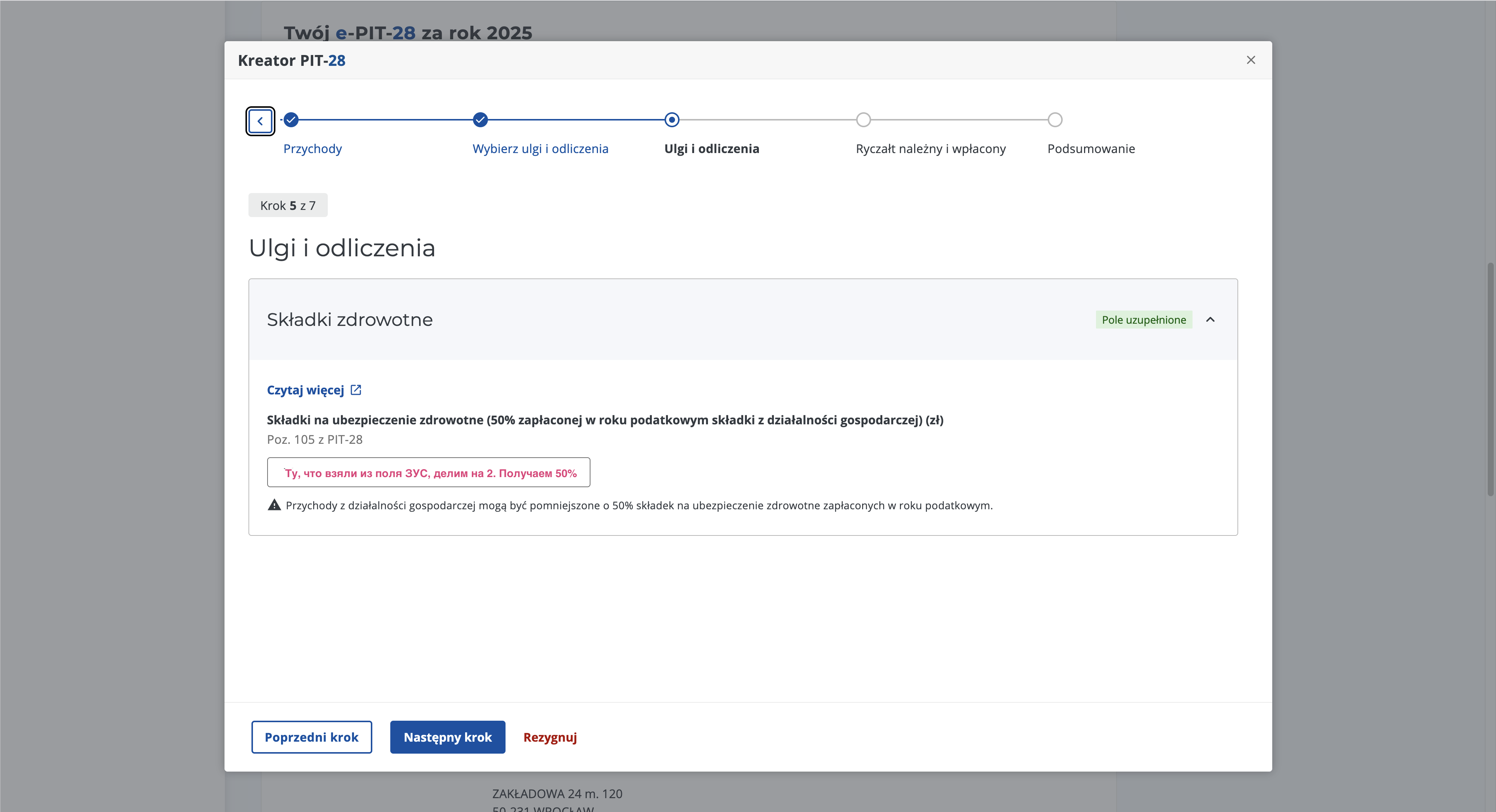
- 5.4 - enter half of that contribution in the form field
- 5.5 - find składki społeczne (FUS)
- 5.6 - enter 100% of that contribution in the form field
6. Verify Required Amounts Against Actual Payments¶
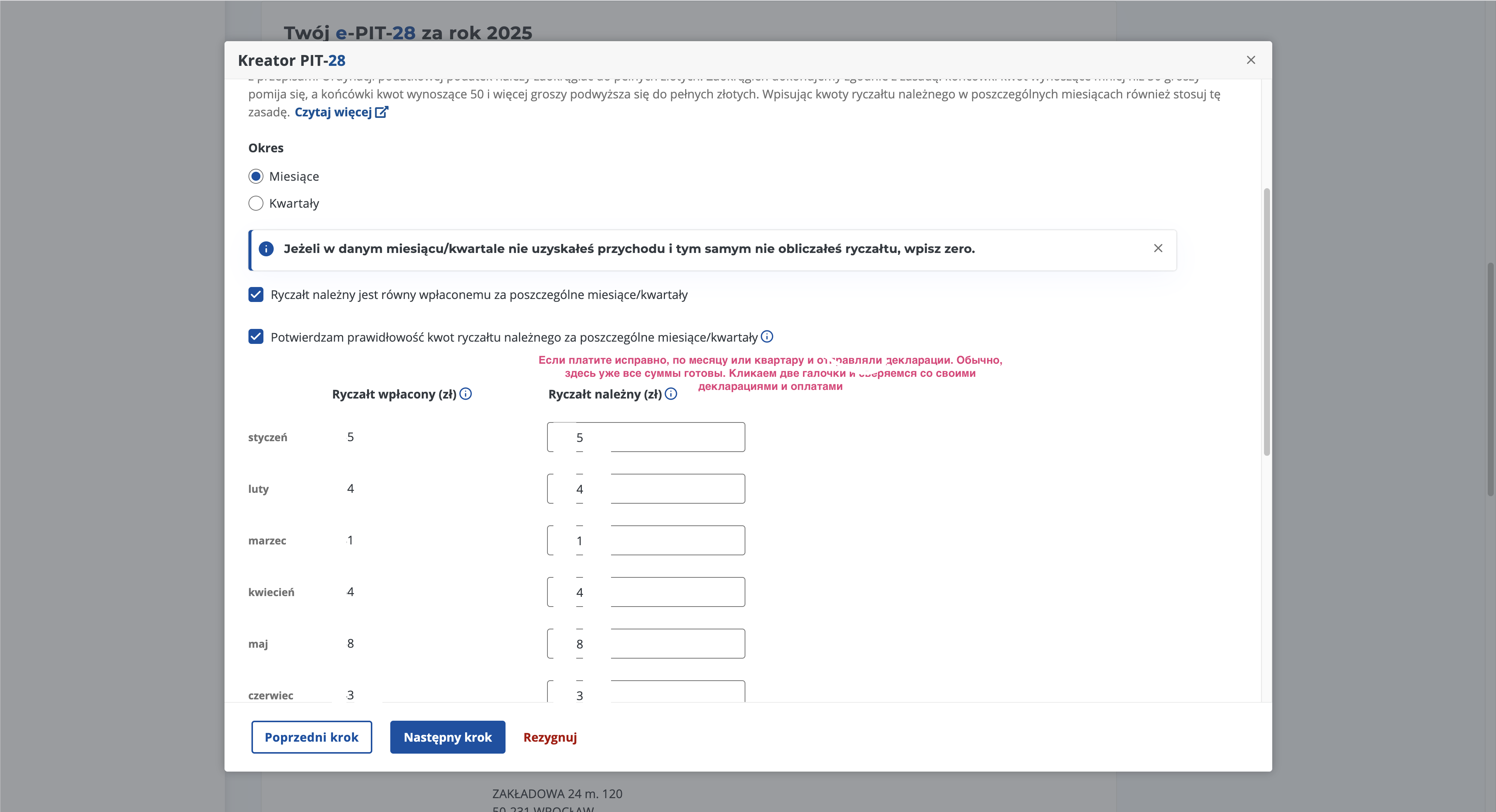
If you paid everything on time, they'll all show up automatically. You just need to click 2 checkboxes and verify.
7. Podsumowanie¶
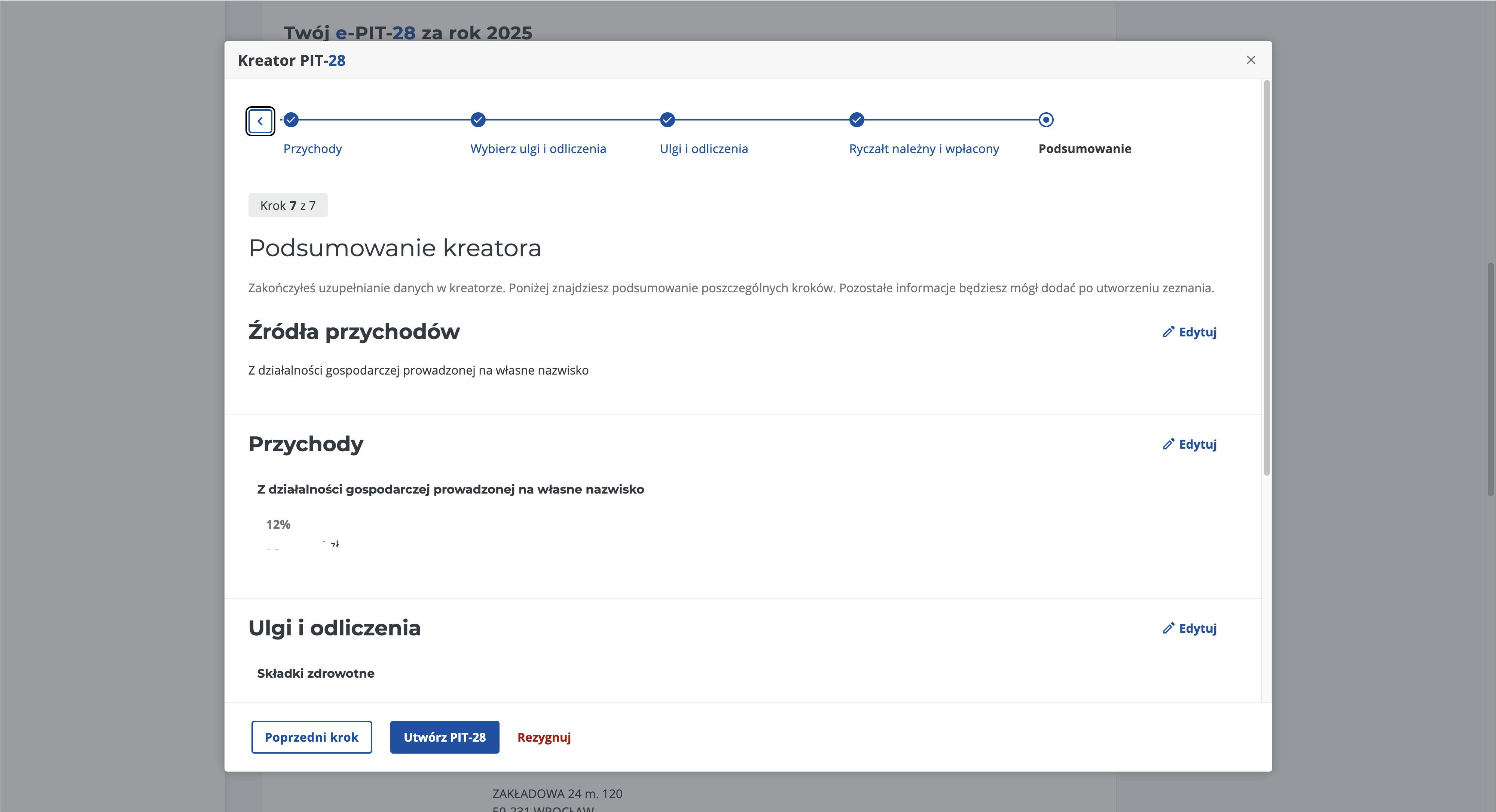
You'll see the entered form results for verification.
8. Final Check Before Submission¶
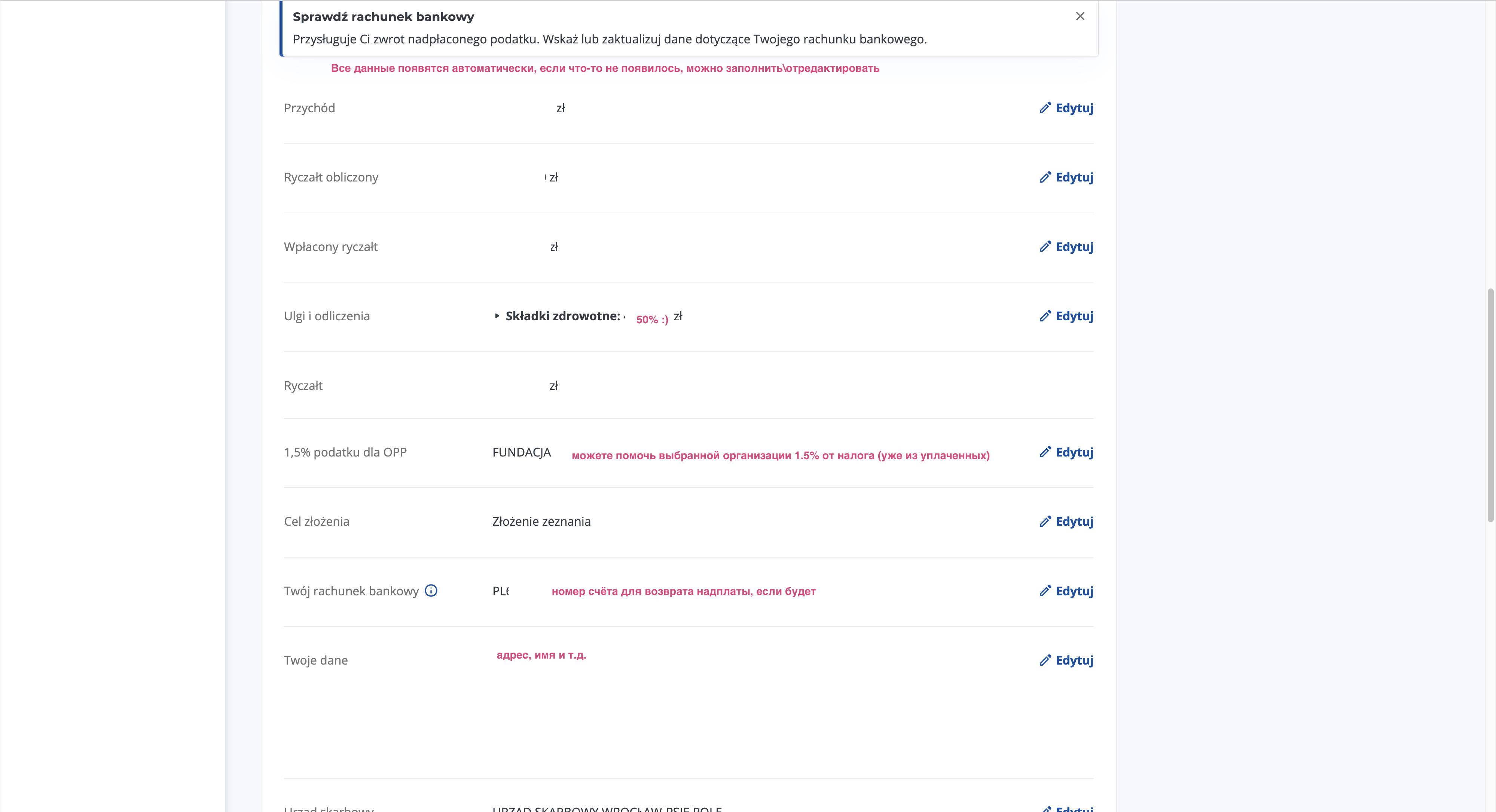
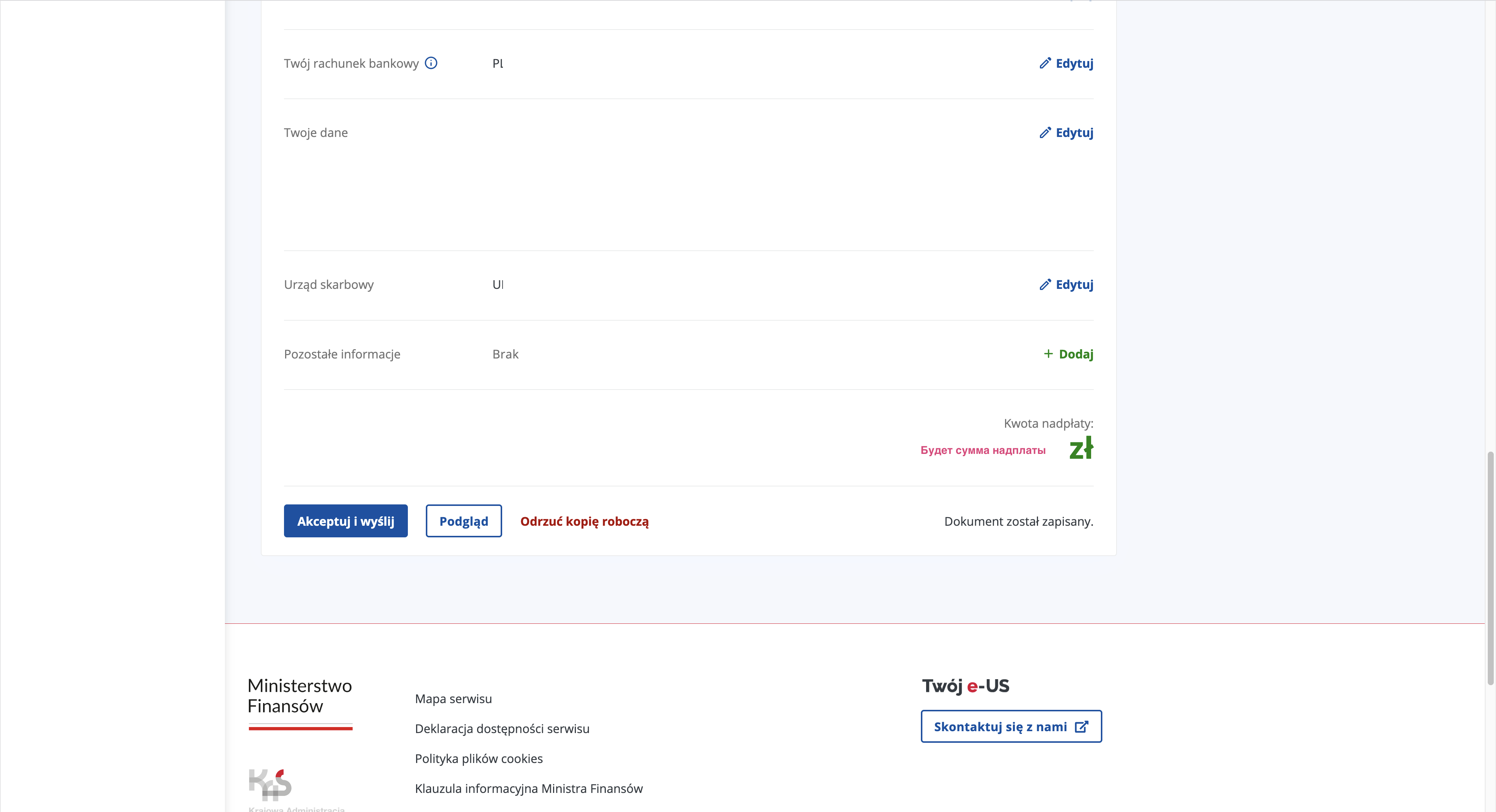
As in the guide above, if you've entered data before, everything will be pre-filled. If not: - you need to enter a bank account number for the overpayment refund - you can choose who gets the 1.5% of your tax — Charity - see the overpayment amount
9. PIT-28 Is Ready¶
You'll be automatically redirected to a page where you can download the PIT-28 for the year and the UPO. You'll also see the refund status there a bit later.
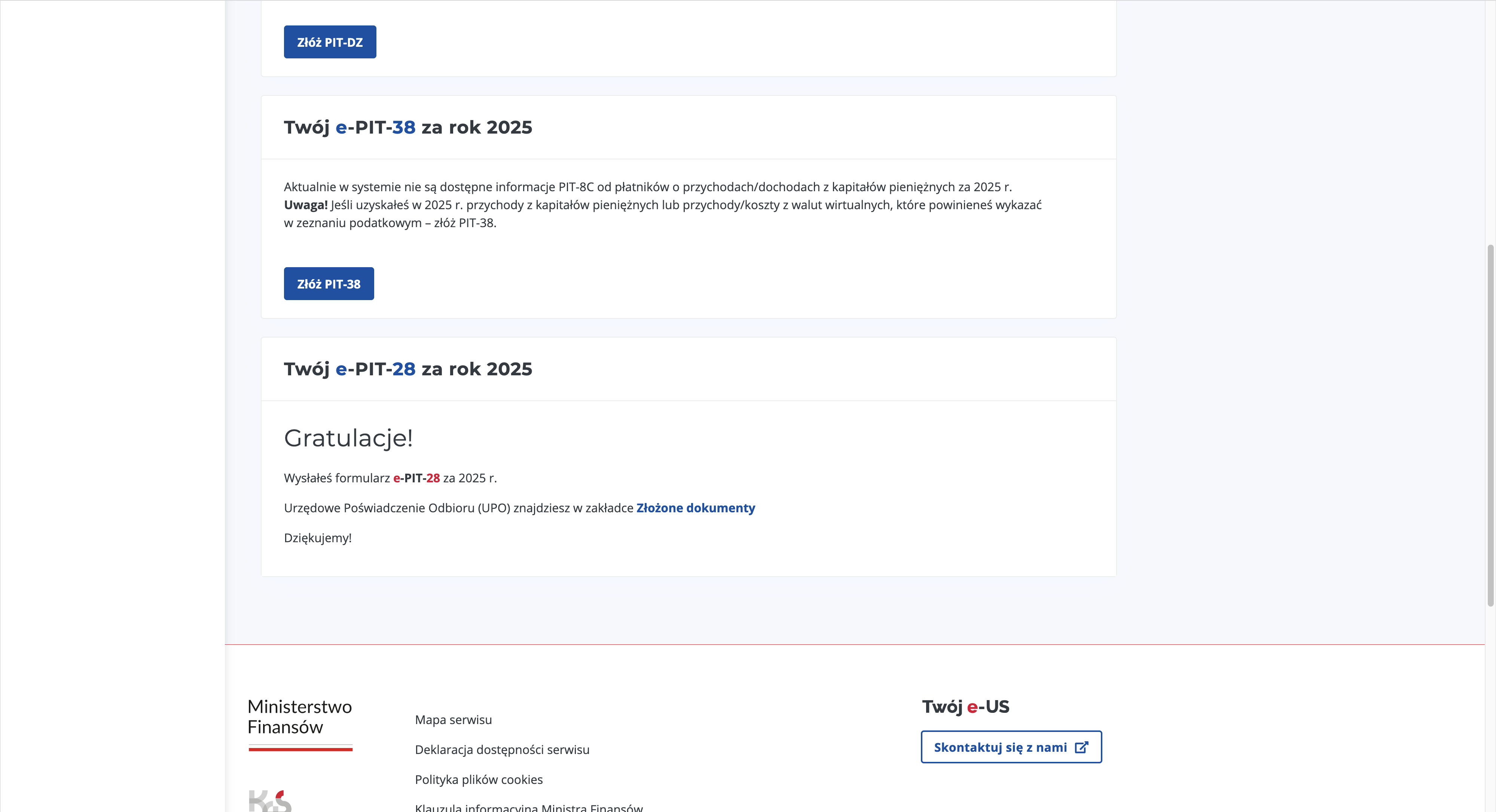
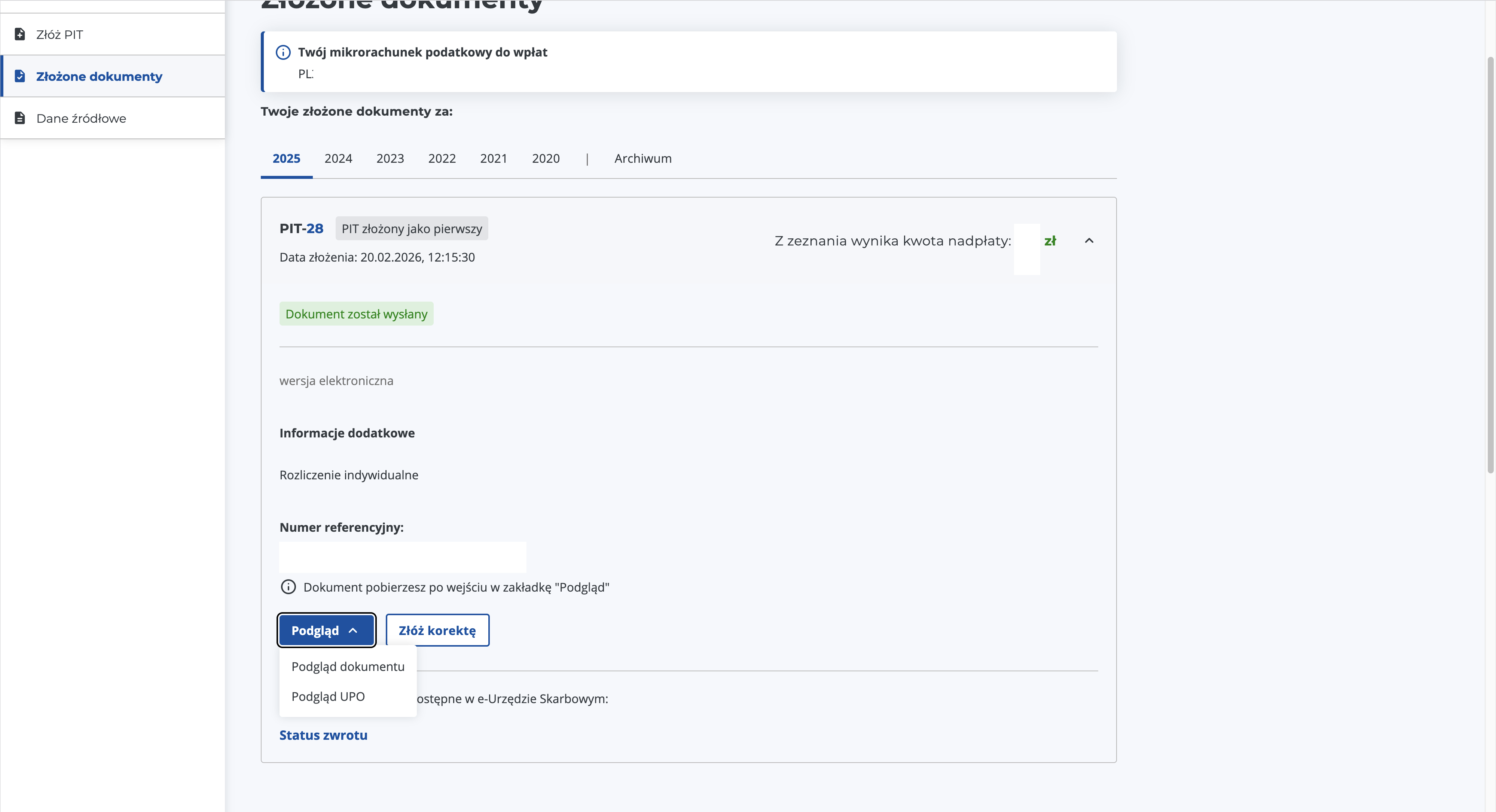
P.S. This is my favorite way to file. In practice, you only need to enter the ZUS contribution and your income. Everything else is already filled in and calculated.
Reliefs¶
PIT Zerowy¶
Also known as "Ulga dla młodych do 26 roku życia". Zero PIT for those under 26 at the time of receiving income DOES NOT APPLY TO JDG INCOME!
Ulga na Internet¶
Getting Help¶
When the annual filing season starts, search in your city for accountants on duty (dyżur podatkowy PIT warszawa). Such events are organized periodically: free help filling out your PIT in exchange for 1.5% going to their OPP. For example, here's the schedule for Ursynów, Warsaw.
Checking Status¶
On the Status e-Deklaracji page you can check the status of your submitted declaration and download the UPO.
Correction¶
After submitting your PIT you have 5 full years to make corrections. That is, declarations for 2025 can be corrected until the end of 2031.
Source: Korekta zeznania.
In the field "6. Cel złożenia formularza (zaznaczyć właściwy kwadrat)":
- 1. złożenie zeznania
- 2. korekta zeznania
In the field "6a. Rodzaj korekty (zaznaczyć właściwy kwadrat)":
- 1. korekta zeznania, o której mowa w art. 81 Ordynacji podatkowej²
- 2. korekta zeznania, o której mowa w art. 81b § 1a Ordynacji podatkowej³
My understanding of 6a:
- if you found the error yourself, check the first box.
- if the auditing authorities found the error, check the second box.
How Long to Wait for an Overpayment Refund¶
The earlier you file, the faster you'll get it back. Official deadlines:
| Filing method | Maximum refund waiting time |
|---|---|
| Paper form | ⏱ 3 months |
| Online (electronic form) | ⏱ 45 days |
Notes:
- the countdown starts from February 15, since the tax office doesn't begin reviewing PITs until then.
- if there are errors in the declaration, they may delay the refund. And if you had a debt to the tax office or an unpaid fine, you might not get a refund at all, since the overpayment goes first toward paying off debts.
How to Pay Additional Tax¶
It's quite expected that due to rounding of monthly advances, the annual calculation may result in an additional payment of 1 to 6 złoty.
Pay to the same mikrorachunek as your tax advances, but choose a different symbol formularza: it should match the name of the PIT declaration (as a reminder, for ryczałt it's PIT-28).
Instructions: How to find your tax payment account?.
You must pay the tax by 30.04 regardless of when you filed the PIT declaration. After that date, late payment interest is charged.
Useful Links¶
Where does it say you can deduct 100% of the social contribution?
⚖ Art. 11. - Odliczenia od przychodów - Zryczałtowany podatek dochodowy od niektórych przychodów, ust. 1
Where does it say you can deduct 50% of the health contribution?
⚖ Art. 11. - Odliczenia od przychodów - Zryczałtowany podatek dochodowy od niektórych przychodów, ust. 1a